Replace Laptop battery in NZ

Author: admin

  • 3948mAh/15.2WH 3.8V Li-ion ASUS tablet battery for ASUS Portege, ASUS MeMO Pad 8 ME581C K01H K015 ME8150C

    This ASUS C11P1330 Battery has a capacity of 3948mAh/15.2WH and a voltage of 3.8V. Suitable for ASUS MeMO Pad 8 ME581C K01H K015 ME8150C. 100% compatible and 100% safe. 1-year warranty, 30-day money back guarantee. 

    ASUS C11P1330 3948mAh/15.2WH 3.8V tablet battery
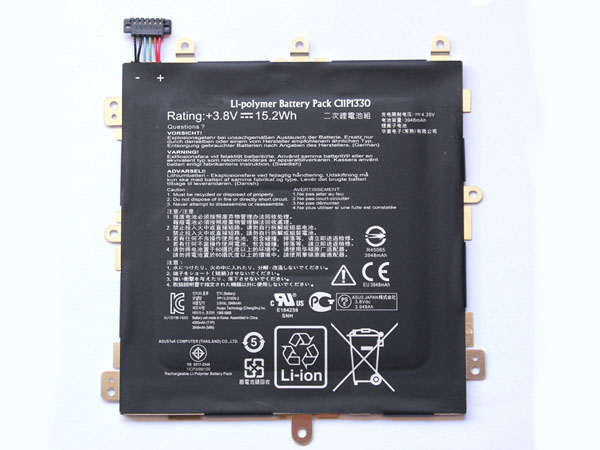
    ASUS C11P1330 battery


    (product code: C11P1330) 

    (Usually ships the same business day!)

      Product details:

    • Brand: ASUS C11P1330 Tablet batteries

    • Type: Li-ion battery

    • Voltage: 3.8V

    • Capacity: 3948mAh/15.2WH

    • SKU: ECN10679_Ta

    Replace the following batteries:

    C11P1330

    Compatible with the following models:

    For ASUS MeMO Pad 8 ME581C K01H K015 ME8150C
    Charge limit voltage:4.35V

    http://www.notebookbattery.co.nz/laptop-batteies-asus/replace-battery-c11p1330-b179980.htm

    Extend tablet battery ASUS C11P1330 Service life 

    1.Charge the battery! Consider keeping it plugged in for 12 hours before you unplug.

    2. Switch on the optimized battery or power feature. You'll find this option — sometimes referred to as max battery mode — in your tablet battery system's built-in power management control panel. You can select the option to reduce the amount of time your inactive tablet battery stays on before powering itself down and going to sleep.

    3. Remove the battery and clean the metal contacts. Wipe them with alcohol, ideally every two months, to ensure that the power transfer between the tablet battery and its battery is as efficient as possible. Allow the battery to dry thoroughly before replacing it! 

    4. Unplug any tablet battery accessories you aren't using. Even if they're not in use, accessories drain power from the battery.

    ABOUT US

    Wholesale and retail Notebook Battery in NZ. Replacement for Acer, Apple, Compaq, Dell, FUJITSU, IBM,Lenovo,Sony and so on.

    These may be you want to look for :

    BL-44JR battery replace for LG Prada 3.0 Prada K2 P940

    45N1752 battery replace for Lenovo ThinkPad E450 E450C E460

    C21N1413 battery replace for ASUS T300FA Series

    L14D2P31 battery replace for Lenovo Tab 2 X30F X30M A10-70F

    AB06XL battery replace for HP ENVY 13-AD023TU HSTNN-DB8C 921438-855 TPN-I128
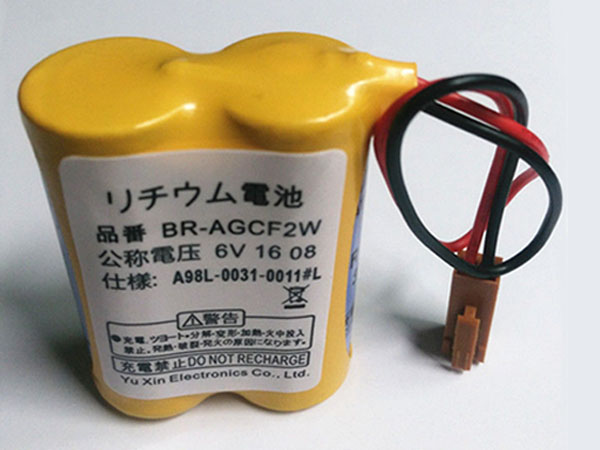
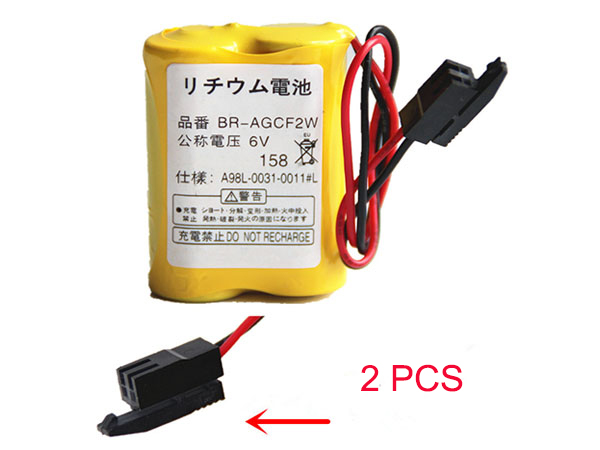
  • Battery Replacement For Panasonic BR-AGCF2W Economic battery

    This Panasonic BR-AGCF2W Battery has a capacity of and a voltage of 6V. Suitable for Panasonic A98L-0031-0011 Brown Plug 5pcs. 100% compatible and 100% safe. 1-year warranty, 30-day money back guarantee. 

    Panasonic BR-AGCF2W 6V Economic battery

    Panasonic BR-AGCF2W battery


    (product code: BR-AGCF2W) 

    (Usually ships the same business day!)

      Product details:

    • Brand: Panasonic BR-AGCF2W Economic batteries

    • Type: Li-ion battery

    • Voltage: 6V

    • Capacity:

    • SKU: ECN10688_PLC_Oth

    Replace the following batteries:

    BR-AGCF2W

    Compatible with the following models:

    Date of manufacture:2018-02
    Brand:For Panasonic
    Model No.:BR-AGCF2W
    Rated Voltage:6V
    Rated Current:BR-AGCF2W 1800mAh 2.5mA 34X17X45.5mm 36g
    Note:Do Not Recharge
    you will get 5pcs battery 

    http://www.notebookbattery.co.nz/laptop-batteies-panasonic/replace-battery-br-agcf2w-b179981.htm

    Extend Economic battery Panasonic BR-AGCF2W Service life 

    1.Charge the battery! Consider keeping it plugged in for 12 hours before you unplug.

    2. Switch on the optimized battery or power feature. You'll find this option — sometimes referred to as max battery mode — in your Economic battery system's built-in power management control panel. You can select the option to reduce the amount of time your inactive Economic battery stays on before powering itself down and going to sleep.

    3. Remove the battery and clean the metal contacts. Wipe them with alcohol, ideally every two months, to ensure that the power transfer between the Economic battery and its battery is as efficient as possible. Allow the battery to dry thoroughly before replacing it! 

    4. Unplug any Economic battery accessories you aren't using. Even if they're not in use, accessories drain power from the battery.

    ABOUT US

    Wholesale and retail Notebook Battery in NZ. Replacement for Acer, Apple, Compaq, Dell, FUJITSU, IBM,Lenovo,Sony and so on.

    These may be you want to look for :

    MR-J3BAT battery replace for Mitsubishi ER6VC119A/B MELSERVO M70 System 2PCS

    DJ1J0 battery replace for DELL Latitude 12 7000 7280 7480 PGFX4 ONFOH 0PGFX4

    6-87-WA5RS-4242 battery replace for Clevo WA50

    BL-L4A battery replace for Lumia 535 RM-1090 RM1089 NOKIA

    D41F1208 battery replace for IDX DUO-150 with USB Output

  • Panasonic Cutler Hammer GE Fanuc A98L-0031-0011/L 2pcs replacement for BR-AGCF2W battery

    This Panasonic BR-AGCF2W Battery has a capacity of and a voltage of 6V. Suitable for Panasonic Cutler Hammer GE Fanuc A98L-0031-0011/L 2pcs. 100% compatible and 100% safe. 1-year warranty, 30-day money back guarantee. 

    Panasonic BR-AGCF2W 6V Economic battery

    Panasonic BR-AGCF2W battery


    (product code: BR-AGCF2W) 

    (Usually ships the same business day!)

      Product details:

    • Brand: Panasonic BR-AGCF2W Economic batteries

    • Type: Li-ion battery

    • Voltage: 6V

    • Capacity:

    • SKU: ECN10689_PLC_Oth

    Replace the following batteries:

    BR-AGCF2W

    Compatible with the following models:

    Date of manufacture:2018-02
    Brand:For Panasonic
    Model No.:BR-AGCF2W
    Rated Voltage:6V
    Rated Current:BR-AGCF2W 1800mAh 2.5mA 34X17X45.5mm 36g
    Note:Do Not Recharge
    you will get 2pcs battery

    http://www.notebookbattery.co.nz/laptop-batteies-panasonic/replace-battery-br-agcf2w-b179982.htm

    Extend Economic battery Panasonic BR-AGCF2W Service life 

    1.Charge the battery! Consider keeping it plugged in for 12 hours before you unplug.

    2. Switch on the optimized battery or power feature. You'll find this option — sometimes referred to as max battery mode — in your Economic battery system's built-in power management control panel. You can select the option to reduce the amount of time your inactive Economic battery stays on before powering itself down and going to sleep.

    3. Remove the battery and clean the metal contacts. Wipe them with alcohol, ideally every two months, to ensure that the power transfer between the Economic battery and its battery is as efficient as possible. Allow the battery to dry thoroughly before replacing it! 

    4. Unplug any Economic battery accessories you aren't using. Even if they're not in use, accessories drain power from the battery.

    ABOUT US

    Wholesale and retail Notebook Battery in NZ. Replacement for Acer, Apple, Compaq, Dell, FUJITSU, IBM,Lenovo,Sony and so on.

    These may be you want to look for :

    HB3X1 battery replace for HUAWEI MediaPad 10 Link S10-201W

    45N1702 battery replace for Lenovo ThinkPad New X1 Carbon 14 Series

    BP-930 battery replace for Canon XLH1 XH-A1 A1S G1

    GNS-260 battery replace for Gigabyte P55G P55K P55W V4 V5 V6 V7 Series

    C11P1510 battery replace for Asus ZenPad S 8.0 Z580CA 1ICP3/99/100

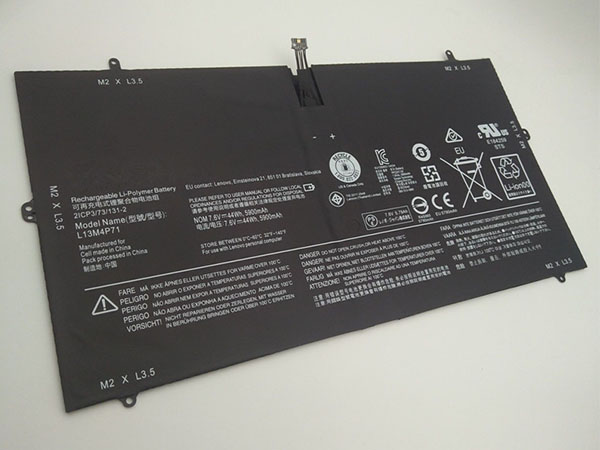
  • Lenovo Yoga 3 Pro 1370 Notebook Battery

    This Lenovo L13M4P71 Battery has a capacity of 44Wh and a voltage of 7.6V. Suitable for Lenovo Yoga 3 Pro 1370. 100% compatible and 100% safe. 1-year warranty, 30-day money back guarantee. 

    Lenovo L13M4P71 44Wh 7.6V Notebook Battery

    Lenovo L13M4P71 battery


    (product code: L13M4P71) 

    (Usually ships the same business day!)

      Product details:

    • Brand: Lenovo L13M4P71 Notebook batteries

    • Type: Li-Polymer battery

    • Voltage: 7.6V

    • Capacity: 44Wh

    • SKU: LEN19J172

    Replace the following batteries:

    L14S4P71 L13M4P71(2ICP3/74/131-2)

    Compatible with the following models:

    For Lenovo YOGA 3 PRO Yoga 3 Pro 1370 Yoga 3 Pro-5Y71 YOGA 3 Pro-I5Y51
    YOGA 3 Pro-I5Y70 YOGA 3 Pro-I5Y70(D) YOGA 3 Pro-I5Y70(F)
    YOGA 3 Pro-I5Y70(L) YOGA 3 Pro-I5Y71

    http://www.notebookbattery.co.nz/laptop-batteies-lenovo/replace-battery-l13m4p71-b179983.htm

    Extend Notebook Battery Lenovo L13M4P71 Service life 

    1.Charge the battery! Consider keeping it plugged in for 12 hours before you unplug.

    2. Switch on the optimized battery or power feature. You'll find this option — sometimes referred to as max battery mode — in your Notebook Battery system's built-in power management control panel. You can select the option to reduce the amount of time your inactive Notebook Battery stays on before powering itself down and going to sleep.

    3. Remove the battery and clean the metal contacts. Wipe them with alcohol, ideally every two months, to ensure that the power transfer between the Notebook Battery and its battery is as efficient as possible. Allow the battery to dry thoroughly before replacing it! 

    4. Unplug any Notebook Battery accessories you aren't using. Even if they're not in use, accessories drain power from the battery.

    ABOUT US

    Wholesale and retail Notebook Battery in NZ. Replacement for Acer, Apple, Compaq, Dell, FUJITSU, IBM,Lenovo,Sony and so on.

    These may be you want to look for :

    BP-232 battery replace for ICOM IC-F14 IC-F3062 IC-F3011

    P63NY battery replace for Dell Latitude 7370 Series

    ER6C battery replace for MAXELL ER6C AA Mitsubishi FX PLC F2-40BL

    ER6C battery replace for Mitsubishi FX2N-128MR FX1N PLC MAXELL F2-40BL 2pcs

    BL265 battery replace for Motorola XT1662

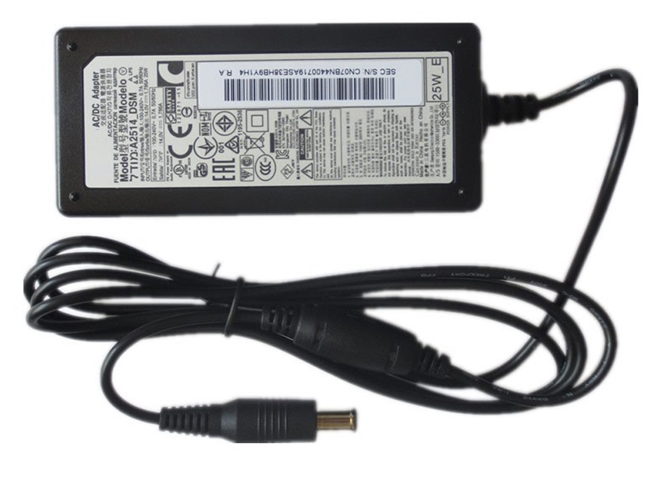
  • Notebook adapter for Samsung BN44-00865A

    Samsung BN44-00865A laptop adapter 100% compatible +100% stable. Meet original or exceed original specifications. High quality material, cheaper than original, low power consumption, strict safety test and performance test to ensure your computer is safely charged. We are committed to a one-year, 30-day unconditional refund for all notebook adapters.

    Samsung BN44-00865A laptop adapter 1.79A/1.786A, 25W (for worldwide use)100-240V 50-60Hz

    Samsung BN44-00865A adapter
    AC Input:100-240V 50-60Hz
    DC Output: 1.79A/1.786A, 25W
    Connection:6.5 mm*4.4 mm, with central pin inside
    Model: BN44-00865A

    Adapter Part Numbers:
    BN44-00865A A2514_KSM
    Adapter Fit Models:
    Samsung LED LS19A LS22A LS19B LS22B LS19C 

    Here,buy it now
    ES:Samsung BN44-00865A AC adapter
    NL:Samsung BN44-00865A Laptop adapter
    IT:Samsung BN44-00865A
    DE:BN44-00865A Notebook-Netzteile

    http://www.notebookbattery.co.nz/samsung-laptop-power-adapter/bn44-00865a-a179139.htm

    What should I pay attention to when using laptop adapter?

    1. You should create a good cooling environment. 
    When using the in a high temperature environment, place the power adapter in a place that is not exposed to direct sunlight and ventilation; do not place the power adapter near the cooling air outlet of the notebook; at the same time, we can put the adapter on the side to make the heat better distributed.
    2. If the voltage is unstable, it needs to be stopped in time.
    Although the adapter is a wide-band operating voltage, it can be marked from 100V to 240V, but if it is used under extremely unstable voltage, it will also cause serious heat or damage to the power adapter. If you need to temporarily borrow power from other brands, try to choose an adapter with the same or larger output current.
    3. If an abnormality occurs, stop using it in time.
    When you are not using the adapter, unplug the power cord. Prolonged power-up will keep the adapter working and will affect the end of life. When the power adapter emits large working noise or even smoke, it is often damaged or has a fault. It should be stopped immediately and can be used again after being repaired by professional engineers.

    Finding the Right Model of Adapter :

    · Get the laptop's model number. This is usually printed on a small sticker affixed to the underside of the laptop.

    · Get the power requirements for the laptop. This is also printed on a small sticker affixed to the underside of the laptop. It may also be printed near the laptop power port. Look for the amperage and the voltage required.

    · Look up the model number online to find if there are compatible adapters available. The voltage and amperage of the adapter need to match the requirements of the laptop.

    · Compare the connector type of the laptop adapter to any available adapters found online. They need to match to ensure that the adapter can plug into the laptop.

    ABOUT US

    NotebookBattery.co.nz is professional selling the highest quality notebook batteries and laptop power adapters for the lowest price with the highest level of service in NewZeland, all in a secure and convenient platform. Our product range includes replacement laptop batteries for most major laptop brands, including Dell, Apple, Compaq/HP, IBM/Lenovo, Fujitsu, Gateway, Sony and Toshiba. We ship to the Laptop adapter around Globe [USA, Canada, UK, NZ and Ireland, Australia]. View more laptop adapter. Contact with us if any problem on selecting power adapter.

    Power Adapter Fast Shipping

    Adapter for A13-090P3A Samsung NP700Z5C-S02US,AD-9019S

    Adapter for BA44-00215A Samsung NP700Z5B-S01UB,BA44-00215A

    Adapter for A13-090P3A Samsung NP700Z5B-W01UB,AA-PA1N90W NP700Z7C-S01US Notebook

    Adapter for LTM1555 SAMSUNG SAD04914F-UV LTN1565 BN44-00129C Monitor

    Adapter for PA1181-96 Samsung 19.5V 9.23A PSCV181101 AD-18019A

  • Laptop Adapter for Samsung A2514_KSM

    Samsung A2514_KSM laptop adapter 100% compatible +100% stable. Meet original or exceed original specifications. High quality material, cheaper than original, low power consumption, strict safety test and performance test to ensure your computer is safely charged. We are committed to a one-year, 30-day unconditional refund for all notebook adapters.

    Samsung A2514_KSM laptop adapter 1.79A/1.786A, 25W (for worldwide use)100-240V 50-60Hz (for worldwi

    Samsung A2514_KSM adapter
    AC Input:100-240V 50-60Hz (for worldwi
    DC Output: 1.79A/1.786A, 25W
    Connection:6.5 mm??4.4 mm, with central pin inside (ref to th
    Model: A2514_KSM

    Adapter Part Numbers:
    BN44-00865A A2514_KSM
    Adapter Fit Models:
    Samsung LED LS22C,LS19D,LS22D,LS19E,LS22D 

    Here,buy it now
    ES:Samsung A2514_KSM AC adapter
    NL:Samsung A2514_KSM Laptop adapter
    IT:Samsung A2514_KSM
    DE:A2514_KSM Notebook-Netzteile

    http://www.notebookbattery.co.nz/samsung-laptop-power-adapter/a2514_ksm-a179140.htm

    What should I pay attention to when using laptop adapter?

    1. You should create a good cooling environment. 
    When using the in a high temperature environment, place the power adapter in a place that is not exposed to direct sunlight and ventilation; do not place the power adapter near the cooling air outlet of the notebook; at the same time, we can put the adapter on the side to make the heat better distributed.
    2. If the voltage is unstable, it needs to be stopped in time.
    Although the adapter is a wide-band operating voltage, it can be marked from 100V to 240V, but if it is used under extremely unstable voltage, it will also cause serious heat or damage to the power adapter. If you need to temporarily borrow power from other brands, try to choose an adapter with the same or larger output current.
    3. If an abnormality occurs, stop using it in time.
    When you are not using the adapter, unplug the power cord. Prolonged power-up will keep the adapter working and will affect the end of life. When the power adapter emits large working noise or even smoke, it is often damaged or has a fault. It should be stopped immediately and can be used again after being repaired by professional engineers.

    Finding the Right Model of Adapter :

    · Get the laptop's model number. This is usually printed on a small sticker affixed to the underside of the laptop.

    · Get the power requirements for the laptop. This is also printed on a small sticker affixed to the underside of the laptop. It may also be printed near the laptop power port. Look for the amperage and the voltage required.

    · Look up the model number online to find if there are compatible adapters available. The voltage and amperage of the adapter need to match the requirements of the laptop.

    · Compare the connector type of the laptop adapter to any available adapters found online. They need to match to ensure that the adapter can plug into the laptop.

    ABOUT US

    NotebookBattery.co.nz is professional selling the highest quality notebook batteries and laptop power adapters for the lowest price with the highest level of service in NewZeland, all in a secure and convenient platform. Our product range includes replacement laptop batteries for most major laptop brands, including Dell, Apple, Compaq/HP, IBM/Lenovo, Fujitsu, Gateway, Sony and Toshiba. We ship to the Laptop adapter around Globe [USA, Canada, UK, NZ and Ireland, Australia]. View more laptop adapter. Contact with us if any problem on selecting power adapter.

    Power Adapter Fast Shipping

    Adapter for A13-090P3A Samsung NP700Z5C-S02US,AD-9019S

    Adapter for BA44-00215A Samsung NP700Z5B-S01UB,BA44-00215A

    Adapter for A13-090P3A Samsung NP700Z5B-W01UB,AA-PA1N90W NP700Z7C-S01US Notebook

    Adapter for LTM1555 SAMSUNG SAD04914F-UV LTN1565 BN44-00129C Monitor

    Adapter for PA1181-96 Samsung 19.5V 9.23A PSCV181101 AD-18019A

  • High quality Samsung BN44-00865A AC adapter

    Samsung BN44-00865A laptop adapter 100% compatible +100% stable. Meet original or exceed original specifications. High quality material, cheaper than original, low power consumption, strict safety test and performance test to ensure your computer is safely charged. We are committed to a one-year, 30-day unconditional refund for all notebook adapters.

    Samsung BN44-00865A laptop adapter 1.79A/1.786A, 25W (for worldwide use)100-240V 50-60Hz (for worldwi

    Samsung BN44-00865A adapter
    AC Input:100-240V 50-60Hz (for worldwi
    DC Output: 1.79A/1.786A, 25W
    Connection:6.5 mm??4.4 mm, with central pin inside (ref to th
    Model: BN44-00865A

    Adapter Part Numbers:
    BN44-00865A A2514_KSM
    Adapter Fit Models:
    Samsung Led Monitor Power Supply Charger 

    Here,buy it now
    ES:Samsung BN44-00865A AC adapter
    NL:Samsung BN44-00865A Laptop adapter
    IT:Samsung BN44-00865A
    DE:BN44-00865A Notebook-Netzteile

    http://www.notebookbattery.co.nz/samsung-laptop-power-adapter/bn44-00865a-a179141.htm

    What should I pay attention to when using laptop adapter?

    1. You should create a good cooling environment. 
    When using the in a high temperature environment, place the power adapter in a place that is not exposed to direct sunlight and ventilation; do not place the power adapter near the cooling air outlet of the notebook; at the same time, we can put the adapter on the side to make the heat better distributed.
    2. If the voltage is unstable, it needs to be stopped in time.
    Although the adapter is a wide-band operating voltage, it can be marked from 100V to 240V, but if it is used under extremely unstable voltage, it will also cause serious heat or damage to the power adapter. If you need to temporarily borrow power from other brands, try to choose an adapter with the same or larger output current.
    3. If an abnormality occurs, stop using it in time.
    When you are not using the adapter, unplug the power cord. Prolonged power-up will keep the adapter working and will affect the end of life. When the power adapter emits large working noise or even smoke, it is often damaged or has a fault. It should be stopped immediately and can be used again after being repaired by professional engineers.

    Finding the Right Model of Adapter :

    · Get the laptop's model number. This is usually printed on a small sticker affixed to the underside of the laptop.

    · Get the power requirements for the laptop. This is also printed on a small sticker affixed to the underside of the laptop. It may also be printed near the laptop power port. Look for the amperage and the voltage required.

    · Look up the model number online to find if there are compatible adapters available. The voltage and amperage of the adapter need to match the requirements of the laptop.

    · Compare the connector type of the laptop adapter to any available adapters found online. They need to match to ensure that the adapter can plug into the laptop.

    ABOUT US

    NotebookBattery.co.nz is professional selling the highest quality notebook batteries and laptop power adapters for the lowest price with the highest level of service in NewZeland, all in a secure and convenient platform. Our product range includes replacement laptop batteries for most major laptop brands, including Dell, Apple, Compaq/HP, IBM/Lenovo, Fujitsu, Gateway, Sony and Toshiba. We ship to the Laptop adapter around Globe [USA, Canada, UK, NZ and Ireland, Australia]. View more laptop adapter. Contact with us if any problem on selecting power adapter.

    Power Adapter Fast Shipping

    Adapter for A13-090P3A Samsung NP700Z5C-S02US,AD-9019S

    Adapter for BA44-00215A Samsung NP700Z5B-S01UB,BA44-00215A

    Adapter for A13-090P3A Samsung NP700Z5B-W01UB,AA-PA1N90W NP700Z7C-S01US Notebook

    Adapter for LTM1555 SAMSUNG SAD04914F-UV LTN1565 BN44-00129C Monitor

    Adapter for PA1181-96 Samsung 19.5V 9.23A PSCV181101 AD-18019A

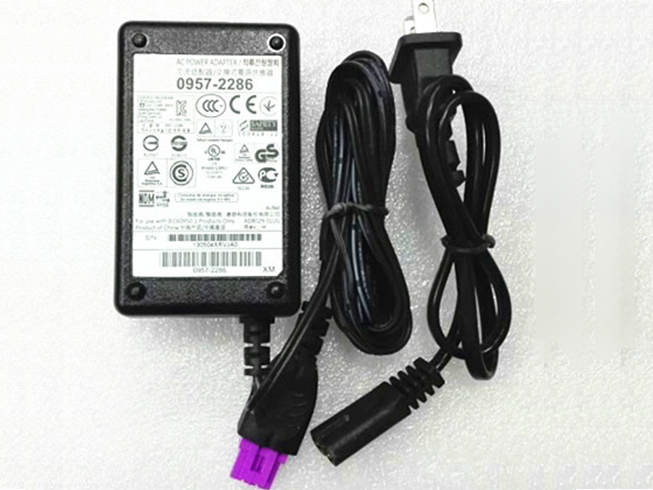
  • Replacement AC Adapter HP LH-03333

    HP LH-03333 laptop adapter 100% compatible +100% stable. Meet original or exceed original specifications. High quality material, cheaper than original, low power consumption, strict safety test and performance test to ensure your computer is safely charged. We are committed to a one-year, 30-day unconditional refund for all notebook adapters.

    HP LH-03333 laptop adapter 30V 333mA (for worldwide use)AC 110–240V 50/60Hz

    HP LH-03333 adapter
    AC Input:AC 110–240V 50/60Hz
    DC Output: 30V 333mA
    Connection:120x70x60mm
    Model: LH-03333

    Adapter Part Numbers:
    LH-03333 0957-2286
    Adapter Fit Models:
    HP Deskjet 0957-2286 1000 2000 

    Here,buy it now
    ES:HP LH-03333 AC adapter
    NL:HP LH-03333 Laptop adapter
    IT:HP LH-03333
    DE:LH-03333 Notebook-Netzteile

    http://www.notebookbattery.co.nz/hp-laptop-power-adapter/lh-03333-a179142.htm

    What should I pay attention to when using laptop adapter?

    1. You should create a good cooling environment. 
    When using the in a high temperature environment, place the power adapter in a place that is not exposed to direct sunlight and ventilation; do not place the power adapter near the cooling air outlet of the notebook; at the same time, we can put the adapter on the side to make the heat better distributed.
    2. If the voltage is unstable, it needs to be stopped in time.
    Although the adapter is a wide-band operating voltage, it can be marked from 100V to 240V, but if it is used under extremely unstable voltage, it will also cause serious heat or damage to the power adapter. If you need to temporarily borrow power from other brands, try to choose an adapter with the same or larger output current.
    3. If an abnormality occurs, stop using it in time.
    When you are not using the adapter, unplug the power cord. Prolonged power-up will keep the adapter working and will affect the end of life. When the power adapter emits large working noise or even smoke, it is often damaged or has a fault. It should be stopped immediately and can be used again after being repaired by professional engineers.

    Finding the Right Model of Adapter :

    · Get the laptop's model number. This is usually printed on a small sticker affixed to the underside of the laptop.

    · Get the power requirements for the laptop. This is also printed on a small sticker affixed to the underside of the laptop. It may also be printed near the laptop power port. Look for the amperage and the voltage required.

    · Look up the model number online to find if there are compatible adapters available. The voltage and amperage of the adapter need to match the requirements of the laptop.

    · Compare the connector type of the laptop adapter to any available adapters found online. They need to match to ensure that the adapter can plug into the laptop.

    ABOUT US

    NotebookBattery.co.nz is professional selling the highest quality notebook batteries and laptop power adapters for the lowest price with the highest level of service in NewZeland, all in a secure and convenient platform. Our product range includes replacement laptop batteries for most major laptop brands, including Dell, Apple, Compaq/HP, IBM/Lenovo, Fujitsu, Gateway, Sony and Toshiba. We ship to the Laptop adapter around Globe [USA, Canada, UK, NZ and Ireland, Australia]. View more laptop adapter. Contact with us if any problem on selecting power adapter.

    Power Adapter Fast Shipping

    Adapter for HSTNN-CA24 HP Zbook 15 17 608431-002 609945-001

    Adapter for 508149-001 WORKSTATION Z800

    Adapter for PA-1900-2P2 Hp Officeconnect SWITCH 1920S 1820 8G 2530-8-POE J9774

    Adapter for TPN-CA06 925740-002 HP spectre X2 X360

    Adapter for HP-D3201E0 HP 503378-001 508154-001 6000 Pro Elite 8000 MT

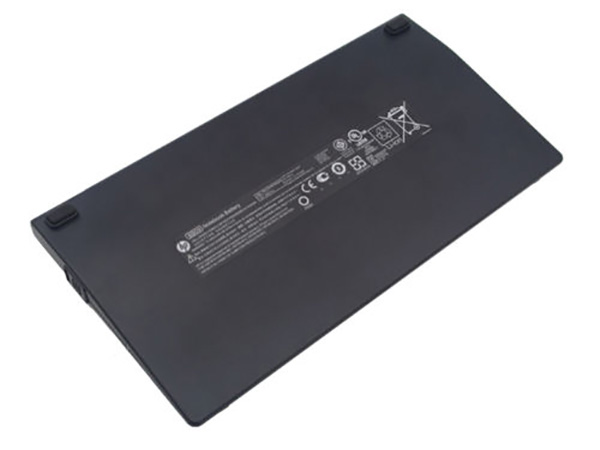
  • HP BB09 100Wh 11.1V Notebook Battery

    This HP BB09 Battery has a capacity of 100Wh and a voltage of 11.1V. Suitable for HP 632115-241 EliteBook 8460P 8460W 8760W Probook. 100% compatible and 100% safe. 1-year warranty, 30-day money back guarantee. 

    HP BB09 100Wh 11.1V Notebook Battery

    HP BB09 battery


    (product code: BB09) 

    (Usually ships the same business day!)

      Product details:

    • Brand: HP BB09 Notebook batteries

    • Type: Li-ion battery

    • Voltage: 11.1V

    • Capacity: 100Wh

    • SKU: HPQ31N14

    Replace the following batteries:

    632115-241 632115-321 634087-001 HSTNN-I90C HSTNN-I91C HSTNN-I93C HSTNN-W81C HSTNN-F08C HSTNN-F10C

    Compatible with the following models:

    HP 6360t Mobile Thin Client
    HP EliteBook 8460p Notebook PC
    HP EliteBook 8460w Mobile Workstation
    HP EliteBook 8560p Notebook PC
    HP EliteBook 8560w Mobile Workstation
    HP EliteBook 8570p Notebook PC
    HP EliteBook 8570w Mobile Workstation
    HP EliteBook 8760w Mobile Workstation
    HP EliteBook 8770w Mobile Workstation
    HP ProBook 6360b Notebook PC
    HP ProBook 6460b Notebook PC
    HP ProBook 6465b Notebook PC
    HP ProBook 6560b Notebook PC
    HP ProBook 6565b Notebook PC

    http://www.notebookbattery.co.nz/laptop-batteies-hp/replace-battery-bb09-b179418.htm

    Extend Notebook Battery HP BB09 Service life 

    1.Charge the battery! Consider keeping it plugged in for 12 hours before you unplug.

    2. Switch on the optimized battery or power feature. You'll find this option — sometimes referred to as max battery mode — in your Notebook Battery system's built-in power management control panel. You can select the option to reduce the amount of time your inactive Notebook Battery stays on before powering itself down and going to sleep.

    3. Remove the battery and clean the metal contacts. Wipe them with alcohol, ideally every two months, to ensure that the power transfer between the Notebook Battery and its battery is as efficient as possible. Allow the battery to dry thoroughly before replacing it! 

    4. Unplug any Notebook Battery accessories you aren't using. Even if they're not in use, accessories drain power from the battery.

    ABOUT US

    Wholesale and retail Notebook Battery in NZ. Replacement for Acer, Apple, Compaq, Dell, FUJITSU, IBM,Lenovo,Sony and so on.

    These may be you want to look for :

    163467-0001 battery replace for LXE MX7 Barcode Scanner

    C21N1634 battery replace for ASUS Vivobook R542UR R542UR-GQ378T FL5900L

    45W5002 battery replace for IBM BladeCenter S SAS RAID Controller Module W/ 17P8979

    C21N1430 battery replace for Asus C21N1430 Chromebook C201PA C201PA-2G C201PA-C-2A 2B

    CF- VZSU66U battery replace for Panasonic Toughbook CF-C1 CF-C1AT01GG Tablet PC

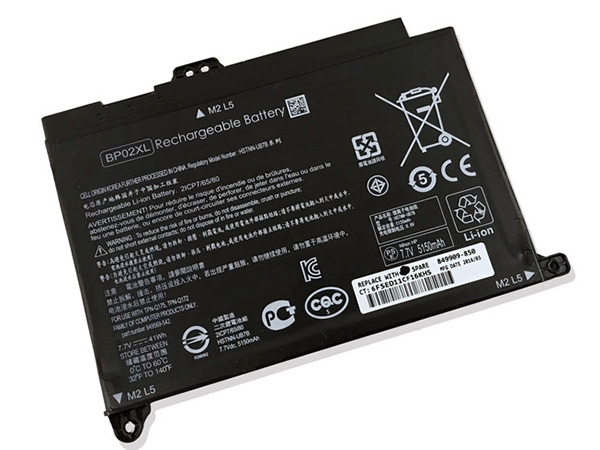
  • 41Wh 7.7v Li-ion HP Notebook Battery for HP Portege, HP Pavilion Notebook PC 15 15-AU010WM 15-AU018WM 7.7v

    This HP BP02XL Battery has a capacity of 41Wh and a voltage of 7.7v. Suitable for HP Pavilion Notebook PC 15 15-AU010WM 15-AU018WM 7.7v. 100% compatible and 100% safe. 1-year warranty, 30-day money back guarantee. 

    HP BP02XL 41Wh 7.7v Notebook Battery

    HP BP02XL battery


    (product code: BP02XL) 

    (Usually ships the same business day!)

      Product details:

    • Brand: HP BP02XL Notebook batteries

    • Type: Li-ion battery

    • Voltage: 7.7v

    • Capacity: 41Wh

    • SKU: HPQ31N17

    Replace the following batteries:

    BP02041XL HSTNN-LB7H HSTNN-UB7B

    Compatible with the following models:

    HP Pavilion Notebook PC 15 15-AU010WM 15-AU018WM

    http://www.notebookbattery.co.nz/laptop-batteies-hp/replace-battery-bp02xl-b179419.htm

    Extend Notebook Battery HP BP02XL Service life 

    1.Charge the battery! Consider keeping it plugged in for 12 hours before you unplug.

    2. Switch on the optimized battery or power feature. You'll find this option — sometimes referred to as max battery mode — in your Notebook Battery system's built-in power management control panel. You can select the option to reduce the amount of time your inactive Notebook Battery stays on before powering itself down and going to sleep.

    3. Remove the battery and clean the metal contacts. Wipe them with alcohol, ideally every two months, to ensure that the power transfer between the Notebook Battery and its battery is as efficient as possible. Allow the battery to dry thoroughly before replacing it! 

    4. Unplug any Notebook Battery accessories you aren't using. Even if they're not in use, accessories drain power from the battery.

    ABOUT US

    Wholesale and retail Notebook Battery in NZ. Replacement for Acer, Apple, Compaq, Dell, FUJITSU, IBM,Lenovo,Sony and so on.

    These may be you want to look for :

    A41N1611 battery replace for ASUS ROG STRIX GL753V GL752VW FX53VD

    SP397281A battery replace for Samsung Tab 7.7 GT-P6800 P6800 SCH-I815

    9TV5X battery replace for Dell XPS 12 9250 Latitude 12 7275

    533-000096 battery replace for Logitech UE Boombox Speaker 984-000304

    OY06XL battery replace for HP OY06XL HSTNN-DB6A 750335-2B1