Replace Laptop battery in NZ

Author: admin

  • How to remove malware from your Windows PC

    Beware the signs of a potentially malware-infested PC: slower-than-usual performance, the recent occurrence of lots of pop-ups, and other weird issues. It’s possible your system has been infected by a virus, spyware, or other nefarious entity—even if you have an antivirus program installed. Yes, out-of-the-ordinary behavior is sometimes the result of hardware issues, but it’s best to first rule out malware if your PC is acting up. Here’s a step-by-step guide for taking action.

    Step 1: Enter Safe Mode

    Before you do anything, you need to disconnect your PC from the internet, and don’t use it until you’re ready to clean your PC. This can help prevent the malware from spreading and/or leaking your private data.

    If you think your PC may have a malware infection, boot your PC into Microsoft’s Safe Mode. In this mode, only the minimum required programs and services are loaded. If any malware is set to load automatically when Windows starts, entering in this mode may prevent it from doing so. This is important because it can make removing the nefarious files easier since they’re not actually running or active.

    You may find that your PC runs noticeably faster in Safe Mode. This could be a sign that your system has a malware infection, or it could mean that you have a lot of legitimate programs that normally start up alongside Windows. If your PC is outfitted with a solid-state drive it’s probably fast either way.

    Step 2: Delete temporary files

    Now that you’re in Safe Mode, you’ll want to run a virus scan. But before you do that, delete your temporary files. Doing this may speed up the virus scanning, free up disk space, and even get rid of some malware. To use the Disk Cleanup utility included with Windows 10 just type Disk Cleanup in the search bar or after pressing the Start button and select the tool that appears named Disk Cleanup.

    Step 3: Download malware scanners

    Now you’re ready to have a malware scanner do its work—and fortunately, running a scanner is enough to remove most standard infections. If you already had an antivirus program active on your computer, you should use a different scanner for this malware check, since your current antivirus software may not have detected the malware. Remember, no antivirus program can detect 100 percent of the millions of malware types and variants.

    There are two types of antivirus programs. You’re probably more familiar with real-time antivirus programs, which run in the background and constantly watch for malware. (Another option is an on-demand scanner, which searches for malware infections when you open the program manually and run a scan. You should have only one real-time antivirus program installed at a time, but you can have many on-demand scanners installed to run scans with multiple programs, thereby ensuring that if one program misses something a different one might find it.

    Step 4: Fix your web browser

    Malware infections can damage Windows system files and other settings. One common malware trait is to modify your web browser’s homepage to reinfect the PC, display advertisements, prevent browsing, and generally annoy you.

    Before launching your web browser, check your homepage and connection settings. For Internet Explorer right-click the Windows 10 Start button and select Control Panel, then Internet Options. Find the Home Page settings in the General tab, and verify that it’s not some site you know nothing about. For Chrome, Firefox, or Edge, simply go to the setttings window of your browser to check your homepage setting.
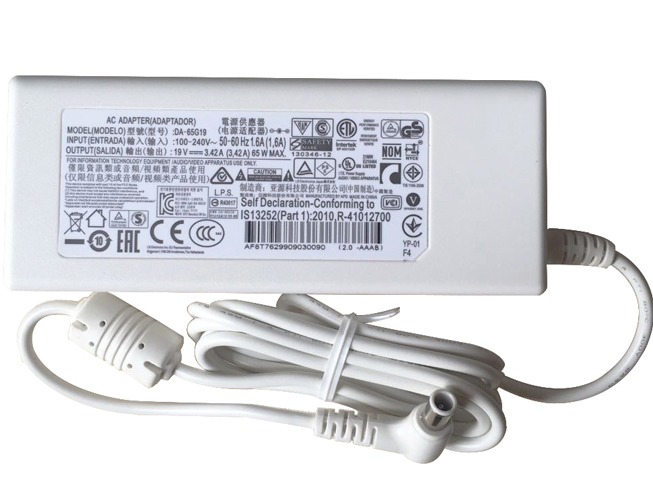
  • Superb Choice LG PA-1650-64 AC Adapter Charger

    • 100-240V 50-60Hz (for worldwid 19V 3.42A 65W , LG PA-1650-64, adapter 1 year warranty, 30 days money back, 100% new. 30% off all products! Warranty: 12 months! Short circuit protection Meets the environment according to RoHS European Standards. All our products are certified to CE Certificate CE Approval Certificate – Approved Safety. 
      LG PA-1650-64 adapter

      LG PA-1650-64 AC Power Adapter Charger

      AC Input:100-240V 50-60Hz (for worldwid
      DC Output: 19V 3.42A 65W 
      PA-1650-64 Power Adapter
      Adapter Part Numbers:
      DA-65G19 PSAB-L101A DA-48F19 DA-48F19 LCAP35 PA-1650-43 PA-1650-64 32MB24
      Adapter Fit Models:
      White LG Innotek PSAB-L101A DA-48F19 32MB24 
      Here,buy it now
      ES:LG PA-1650-64 AC adapter NL:LG PA-1650-64 Laptop adapter IT:LG PA-1650-64
      DE:PA-1650-64 Notebook-Netzteile.Das richtige LG Laptop Netzteil finden. 
      We ship to the Laptop adapter around Globe [USA, Canada, UK, NZ and Ireland, Australia]. View more laptop adapter. Contact with us if any problem on selecting power adapter. Quality: Quality is our number one priority! All LG PA-1650-64 adapters are New! Our own quality assurance ensures a high quality standard. All LG PA-1650-64 laptop power adapters are 100% compatible with the original product, in most cases our batteries have even more powerful performance than the original product thanks to the advanced technologies and cell standards.
      Safety: Safety is a key feature of our products. Our own safety controls guarantee the highest level of safety standards. 
      Guaranty: All LG PA-1650-64 products have a warranty of at least 1 year. For many products, e.g. LG PA-1650-64 adapter, we are so confident of the quality so outstanding, due to excessive loads, can not work. In case of doubt please contact us. The statutory warranty period remains unaffected.We will be happy to answer all your questions about their respective products and all other warranties. 

      Finding the Right Model of Adapter :

      · Get the laptop's model number. This is usually printed on a small sticker affixed to the underside of the laptop.

      · Get the power requirements for the laptop. This is also printed on a small sticker affixed to the underside of the laptop. It may also be printed near the laptop power port. Look for the amperage and the voltage required.

      · Look up the model number online to find if there are compatible adapters available. The voltage and amperage of the adapter need to match the requirements of the laptop.

      · Compare the connector type of the laptop adapter to any available adapters found online. They need to match to ensure that the adapter can plug into the laptop.

      Power Adapter Fast Shipping

      Adapter for FSP180-50PLA FSP NZ

      Adapter for HSTNN-CA27 HP NZ

      Adapter for ADS-40FSG-19 LG NZ

      Adapter for ACDP-100D01 Sony NZ

      Adapter for VGP-AC19V15 Sony NZ

      Wholesale and retail laptop adapter in NZ. Replacement for Acer,Apple, Compaq,Dell, FUJITSU, IBM,Lenovo,Sony and so on.

      These may be you want to look for : G238T for Dell Optiplex AC255AD-00 L255P-01 D255P-00 255W , L240EM-00 for DHVJN for Dell Inspiron 3650 Optiplex 3040 5040 7040 , 9RD1W for New Dell Optiplex 980 255w Power Supply K340R 9RD1W F255E-00 L255EM-01 , FSP180-50PLV for HK280- 86FP/FSP180-50PLV-36001754/36001822 , 290W for DELL OPTIPLEX 7020 MT POWER SUPPLY ,

  • Replacement Notebook Battery Clevo P870BAT-8

    • CLEVO P870BAT-8 Notebook Battery

      Current:89Wh
      Voltage: 15.12V
      P870BAT-8 Notebook Battery
      battery Part Numbers:
      P870BAT-8 6-87P870S-4271
      battery Fit Models:
      clevo P870 SERIES
      Here,buy it now
      ES:Clevo P870BAT-8 Batería NL:Clevo P870BAT-8 ACCU IT:Clevo P870BAT-8 batteria
      DE:P870BAT-8 Akku.Das richtige CLEVO Akku finden. 
      We ship to the Notebook Battery around Globe [USA, Canada, UK, NZ and Ireland, Australia]. View more Notebook Battery. Contact with us if any problem on selecting power Notebook Battery. 
      Clevo P870BAT-8 Features:
      All our high quality Clevo P870BAT-8 replacement Notebook Battery have been tested and proven to match and / or match the performance of the original Clevo Notebook Battery and are 100% compatible with the original manufacturer's specifications. This Clevo P870BAT-8 Notebook Battery comes with a 1-year limited warranty.
      Thank you for purchasing this high quality Clevo P870BAT-8 replacement Notebook Battery. We have a rigorous testing process to ensure that your ordered products (like this Notebook Battery for Clevo P870BAT-8) are functionally correct before being packaged and sent to you. And before placing an order, make sure that your old original part number of the Clevo P870BAT-8 Notebook Battery is listed below and that the shape is identical to the images in our Notebook Battery.

      Extend Notebook Battery Clevo P870BAT-8 Service life

      1. Charge the battery! Consider keeping it plugged in for 12 hours before you unplug.
      2. Switch on the optimized battery or power feature. You'll find this option — sometimes referred to as max battery mode — in your laptop system's built-in power management control panel. You can select the option to reduce the amount of time your inactive laptop stays on before powering itself down and going to sleep.
      3. Remove the battery and clean the metal contacts. Wipe them with alcohol, ideally every two months, to ensure that the power transfer between the laptop and its battery is as efficient as possible. Allow the battery to dry thoroughly before replacing it! 
      4. Unplug any laptop accessories you aren't using. Even if they're not in use, accessories drain power from the battery.

      Wholesale and retail Notebook Battery in NZ. Replacement for Acer,Apple, Compaq,Dell, FUJITSU, IBM,Lenovo,Sony and so on.

      These may be you want to look for : VGP- BPS30 for SONY SVT-11 Series SVT-13 Series Sony VAIO T11 T13 Series , C41-TAICHI31 for ASUS TAICHI 31 , 1001AB01 for Intermec CK70 CK71 , 45N1092 for LENOVO ThinkPad S230u Series , U597Pfor Dell Studio 14 1450 1457 1458 ,

  • Replacement tablet battery Acer AC14B13J

    ACER AC14B13J tablet battery

    Current:36Wh/3220mAh/3090mAh
    Voltage: 11.4v
    AC14B13J tablet battery
    battery Part Numbers:
    AC14B13J
    battery Fit Models:
    Acer Aspire AC14B13J ES1-131 ES1-331 ES1-512 ES1-520 ES1-521
    Here,buy it now
    ES:Acer AC14B13J Batería NL:Acer AC14B13J ACCU IT:Acer AC14B13J batteria
    DE:AC14B13J Akku.Das richtige ACER Akku finden. 
    We ship to the tablet battery around Globe [USA, Canada, UK, NZ and Ireland, Australia]. View more tablet battery. Contact with us if any problem on selecting power tablet battery. 
    Acer AC14B13J Features:
    All our high quality Acer AC14B13J replacement tablet battery have been tested and proven to match and / or match the performance of the original Acer tablet battery and are 100% compatible with the original manufacturer's specifications. This Acer AC14B13J tablet battery comes with a 1-year limited warranty.
    Thank you for purchasing this high quality Acer AC14B13J replacement tablet battery. We have a rigorous testing process to ensure that your ordered products (like this tablet battery for Acer AC14B13J) are functionally correct before being packaged and sent to you. And before placing an order, make sure that your old original part number of the Acer AC14B13J tablet battery is listed below and that the shape is identical to the images in our tablet battery.

    Extend tablet battery Acer AC14B13J Service life

    1. Charge the battery! Consider keeping it plugged in for 12 hours before you unplug.
    2. Switch on the optimized battery or power feature. You'll find this option — sometimes referred to as max battery mode — in your laptop system's built-in power management control panel. You can select the option to reduce the amount of time your inactive laptop stays on before powering itself down and going to sleep.
    3. Remove the battery and clean the metal contacts. Wipe them with alcohol, ideally every two months, to ensure that the power transfer between the laptop and its battery is as efficient as possible. Allow the battery to dry thoroughly before replacing it! 
    4. Unplug any laptop accessories you aren't using. Even if they're not in use, accessories drain power from the battery.

    Wholesale and retail tablet battery in NZ. Replacement for Acer,Apple, Compaq,Dell, FUJITSU, IBM,Lenovo,Sony and so on.

    These may be you want to look for : NM631 for Dell Latitude E6400 E6500 series , BATHGT31L6 for Lenovo F40 F41 Y400 Y410 BATHGT31L6 , PA3442U-1BRS for Toshiba Libretto U100 U100-105 U100-108 U105 Series , AL10D56 for Acer Aspire 1830T AS1830T 1830Z TimelineX NEW , D181T for Dell Inspiron 1320 1320n ,

  • Microsoft issues emergency Windows patch to disable Intel’s buggy Spectre fix

    If you’ve noticed any unexpected reboots or PC instability as a result of the recent Spectre patches, there’s a solution: Microsoft has issued an emergency Windows patch that rolls back the recent Spectre mitigations.

    Confused? It’s a bit complicated. After the intial Spectre and Meltdown vulnerabilites were disclosed, both Intel and Microsoft hustled out patches to mitigate the problem. Unfortunately, Intel’s latest microcode updates—and the BIOS updates from PC makers based upon them—were themselves buggy, causing instability, reboots, and data loss in some PCs.

    Microsoft’s latest patch (KB4078130) allows people with affected systems to download the patch via the Microsoft Update Catalog, which disables the mitigations for the “Spectre variant 2.”

    Note that the patch notes specifically state that you should run this patch “if you are running an impacted device” (emphasis ours). In other words, if your system is working normally, don’t bother downloading this patch. This is what Microsoft calls an “out of band” patch, and it doesn’t appear that it will be made available via Windows Update, either.

    Why should you consider it? Intel has warned previously that the faulty patch can sometimes cause data loss and corruption, and Microsoft is saying the same: “Our own experience is that system instability can in some circumstances cause data loss or corruption,” the patch notes state.

    There’s another wrinkle, though. As part of the patch, Microsoft is allowing users to edit the Windows registry to toggle the mitigations on or off. (Instructions are here.) It’s possible to toggle Microsoft’s patch off, and then, when Intel solves its own patching problem, re-enable it. That scenario is actually what Microsoft recommends—again, only if you’ve noticed system instability and want to take action against it.

    Toggling the mitigations on and off is also a feature of the latest InSpectre utility.

    What should you do? There’s no one-size-fits-all answer to this question. But we can tell you what we’re doing: if a PC is working as expected, we’re leaving it patched and in place. If you’re backing up your data (to the cloud or an external drive) chances are your most crucial data will be saved in case your system goes down unexpectedly. Obviously, install Microsoft’s emergency Windows patch if you’re running into system issues. There’s no perfect solution—if you’re more paranoid than we are, feel free to deploy the patch even if your PC hasn’t hiccuped.

    Good luck, and be sure to check out PCWorld’s guide on how to protect your PC against Meltdown and Spectre. Operating system updates are just one part of it.

    As Bleeping Computer noted, system makers such as Dell and HP also advise rolling back their own BIOS patches to an earlier version, which they’re redeployed. It’s all horrendously confusing for consumers and IT organizations alike. Fortunately, at least, there haven’t been any public cases of these vulnerabilities being exploited, Microsoft says.

  • Superb Choice Microsoft A1800 AC Adapter Charger

    MICROSOFT A1800 AC Power Adapter Charger

    AC Input:100-240V ~ 1.3A 50/60Hz (for w
    DC Output: 15V 2.58A 44W
    A1800 Power Adapter
    Adapter Part Numbers:
    A1800
    Adapter Fit Models:
    Microsoft Surface Pro 5 & Pro 4 Intel Core M3 i5 i7
    Here,buy it now
    ES:Microsoft A1800 AC adapter NL:Microsoft A1800 Laptop adapter IT:Microsoft A1800
    DE:A1800 Notebook-Netzteile.Das richtige MICROSOFT Laptop Netzteil finden. 
    We ship to the Laptop adapter around Globe [USA, Canada, UK, NZ and Ireland, Australia]. View more laptop adapter. Contact with us if any problem on selecting power adapter. Quality: Quality is our number one priority! All Microsoft A1800 adapters are New! Our own quality assurance ensures a high quality standard. All Microsoft A1800 laptop power adapters are 100% compatible with the original product, in most cases our batteries have even more powerful performance than the original product thanks to the advanced technologies and cell standards.
    Safety: Safety is a key feature of our products. Our own safety controls guarantee the highest level of safety standards. 
    Guaranty: All Microsoft A1800 products have a warranty of at least 1 year. For many products, e.g. Microsoft A1800 adapter, we are so confident of the quality so outstanding, due to excessive loads, can not work. In case of doubt please contact us. The statutory warranty period remains unaffected.We will be happy to answer all your questions about their respective products and all other warranties. 

    Finding the Right Model of Adapter :

    · Get the laptop's model number. This is usually printed on a small sticker affixed to the underside of the laptop.

    · Get the power requirements for the laptop. This is also printed on a small sticker affixed to the underside of the laptop. It may also be printed near the laptop power port. Look for the amperage and the voltage required.

    · Look up the model number online to find if there are compatible adapters available. The voltage and amperage of the adapter need to match the requirements of the laptop.

    · Compare the connector type of the laptop adapter to any available adapters found online. They need to match to ensure that the adapter can plug into the laptop.

    Power Adapter Fast Shipping

    Adapter for FSP180-50PLA FSP NZ

    Adapter for HSTNN-CA27 HP NZ

    Adapter for ADS-40FSG-19 LG NZ

    Adapter for ACDP-100D01 Sony NZ

    Adapter for VGP-AC19V15 Sony NZ

    Wholesale and retail laptop adapter in NZ. Replacement for Acer,Apple, Compaq,Dell, FUJITSU, IBM,Lenovo,Sony and so on.

    These may be you want to look for : 611484-001 for HP ATX 320w CFH0320AWWA D10-320P2A , 235W for Dell Optiplex 760 780 SFF Power Supply , HP-P3017F3P for Dell N381F Vostro 220 230 400 HIPRO 300W Power Supply PSU , RM112 for Dell Optiplex 760 960 980 SFF 235W Power Supply , HCWV2 for Dell Optiplex 3020 7020 9020 SFF ,

  • Replacement battery ASUS C11P1517

    ASUS C11P1517 tablet battery

    Current:4545mAh/18Wh
    Voltage: 3.85V
    C11P1517 tablet battery
    battery Part Numbers:
    C11P1517
    battery Fit Models:
    ASUS ZenPad 10 Z300M 10.1 Tab Tablet
    Here,buy it now
    ES:ASUS C11P1517 Batería NL:ASUS C11P1517 ACCU IT:ASUS C11P1517 batteria
    DE:C11P1517 Akku.Das richtige ASUS Akku finden. 
    We ship to the tablet battery around Globe [USA, Canada, UK, NZ and Ireland, Australia]. View more tablet battery. Contact with us if any problem on selecting power tablet battery. 
    ASUS C11P1517 Features:
    All our high quality ASUS C11P1517 replacement tablet battery have been tested and proven to match and / or match the performance of the original ASUS tablet battery and are 100% compatible with the original manufacturer's specifications. This ASUS C11P1517 tablet battery comes with a 1-year limited warranty.
    Thank you for purchasing this high quality ASUS C11P1517 replacement tablet battery. We have a rigorous testing process to ensure that your ordered products (like this tablet battery for ASUS C11P1517) are functionally correct before being packaged and sent to you. And before placing an order, make sure that your old original part number of the ASUS C11P1517 tablet battery is listed below and that the shape is identical to the images in our tablet battery.

    Extend tablet battery ASUS C11P1517 Service life

    1. Charge the battery! Consider keeping it plugged in for 12 hours before you unplug.
    2. Switch on the optimized battery or power feature. You'll find this option — sometimes referred to as max battery mode — in your laptop system's built-in power management control panel. You can select the option to reduce the amount of time your inactive laptop stays on before powering itself down and going to sleep.
    3. Remove the battery and clean the metal contacts. Wipe them with alcohol, ideally every two months, to ensure that the power transfer between the laptop and its battery is as efficient as possible. Allow the battery to dry thoroughly before replacing it! 
    4. Unplug any laptop accessories you aren't using. Even if they're not in use, accessories drain power from the battery.

    Wholesale and retail tablet battery in NZ. Replacement for Acer,Apple, Compaq,Dell, FUJITSU, IBM,Lenovo,Sony and so on.

    These may be you want to look for : PABAS093 for Toshiba Portege R400 Series , HSTNN-DB1B for HP ProBook 4320s 4321s 4325s 4320t 4420s 4421s 4425s 4520s Series , 82-101606-01 for Symbol Motorola MC9060 MC9090 MC9000 BTRY-MC90SAB00-01 , SSBS16 for AVERATEC AVN1140 , PC- AB6300 for Hitachi Medion md9783 Flora 270w Series ,

  • Discount NEC PC-VP-WP88 Notebook Battery [4800mah 14.8V ] Replacement

    NEC PC-VP-WP88 Notebook Battery

    Current:4800mah
    Voltage: 14.8V
    PC-VP-WP88 Notebook Battery
    battery Part Numbers:
    PC-VP-WP88 OP-570-76939
    battery Fit Models:
    NEC LL590LG LL570LG
    Here,buy it now
    ES:NEC PC-VP-WP88 Batería NL:NEC PC-VP-WP88 ACCU IT:NEC PC-VP-WP88 batteria
    DE:PC-VP-WP88 Akku.Das richtige NEC Akku finden. 
    We ship to the Notebook Battery around Globe [USA, Canada, UK, NZ and Ireland, Australia]. View more Notebook Battery. Contact with us if any problem on selecting power Notebook Battery. 
    NEC PC-VP-WP88 Features:
    All our high quality NEC PC-VP-WP88 replacement Notebook Battery have been tested and proven to match and / or match the performance of the original NEC Notebook Battery and are 100% compatible with the original manufacturer's specifications. This NEC PC-VP-WP88 Notebook Battery comes with a 1-year limited warranty.
    Thank you for purchasing this high quality NEC PC-VP-WP88 replacement Notebook Battery. We have a rigorous testing process to ensure that your ordered products (like this Notebook Battery for NEC PC-VP-WP88) are functionally correct before being packaged and sent to you. And before placing an order, make sure that your old original part number of the NEC PC-VP-WP88 Notebook Battery is listed below and that the shape is identical to the images in our Notebook Battery.

    Extend Notebook Battery NEC PC-VP-WP88 Service life

    1. Charge the battery! Consider keeping it plugged in for 12 hours before you unplug.
    2. Switch on the optimized battery or power feature. You'll find this option — sometimes referred to as max battery mode — in your laptop system's built-in power management control panel. You can select the option to reduce the amount of time your inactive laptop stays on before powering itself down and going to sleep.
    3. Remove the battery and clean the metal contacts. Wipe them with alcohol, ideally every two months, to ensure that the power transfer between the laptop and its battery is as efficient as possible. Allow the battery to dry thoroughly before replacing it! 
    4. Unplug any laptop accessories you aren't using. Even if they're not in use, accessories drain power from the battery.

    Wholesale and retail Notebook Battery in NZ. Replacement for Acer,Apple, Compaq,Dell, FUJITSU, IBM,Lenovo,Sony and so on.

    These may be you want to look for : SQU-914 for LG FOUNDER HASEE laptop , HV02XL for HP HSTNN-LB6P TPN-Q164 TPN-W112 796219-421 , T54FJ for Dell Latitude E6520 E6520n , VGP-BPSE38 for SONY VAIO Pro13 Series , 21-65587-03for Symbol MOTOROLA MC9000 MC9090 MC9090-G ,

  • Long Lasting Samsung ADP-120ZB Replacement AC adapter

    SAMSUNG ADP-120ZB AC Power Adapter Charger

    AC Input:100-240V 50-60Hz (for worldwid
    DC Output: 19V 6.32A, 120W
    ADP-120ZB Power Adapter
    Adapter Part Numbers:
    ADP-120ZB BB AD-12019G BA44-00269A AA-PA2N120 BA44-00152A PA-1121-08 API2AD58 7018470000
    Adapter Fit Models:
    Samsung NP800G5M-X01US
    Here,buy it now
    ES:Samsung ADP-120ZB AC adapter NL:Samsung ADP-120ZB Laptop adapter IT:Samsung ADP-120ZB
    DE:ADP-120ZB Notebook-Netzteile.Das richtige SAMSUNG Laptop Netzteil finden. 
    We ship to the Laptop adapter around Globe [USA, Canada, UK, NZ and Ireland, Australia]. View more laptop adapter. Contact with us if any problem on selecting power adapter. Quality: Quality is our number one priority! All Samsung ADP-120ZB adapters are New! Our own quality assurance ensures a high quality standard. All Samsung ADP-120ZB laptop power adapters are 100% compatible with the original product, in most cases our batteries have even more powerful performance than the original product thanks to the advanced technologies and cell standards.
    Safety: Safety is a key feature of our products. Our own safety controls guarantee the highest level of safety standards. 
    Guaranty: All Samsung ADP-120ZB products have a warranty of at least 1 year. For many products, e.g. Samsung ADP-120ZB adapter, we are so confident of the quality so outstanding, due to excessive loads, can not work. In case of doubt please contact us. The statutory warranty period remains unaffected.We will be happy to answer all your questions about their respective products and all other warranties. 

    Finding the Right Model of Adapter :

    · Get the laptop's model number. This is usually printed on a small sticker affixed to the underside of the laptop.

    · Get the power requirements for the laptop. This is also printed on a small sticker affixed to the underside of the laptop. It may also be printed near the laptop power port. Look for the amperage and the voltage required.

    · Look up the model number online to find if there are compatible adapters available. The voltage and amperage of the adapter need to match the requirements of the laptop.

    · Compare the connector type of the laptop adapter to any available adapters found online. They need to match to ensure that the adapter can plug into the laptop.

    Power Adapter Fast Shipping

    Adapter for FSP180-50PLA FSP NZ

    Adapter for HSTNN-CA27 HP NZ

    Adapter for ADS-40FSG-19 LG NZ

    Adapter for ACDP-100D01 Sony NZ

    Adapter for VGP-AC19V15 Sony NZ

    Wholesale and retail laptop adapter in NZ. Replacement for Acer,Apple, Compaq,Dell, FUJITSU, IBM,Lenovo,Sony and so on.

    These may be you want to look for : FR610 for New Dell 235W SFF Power Supply Unit Fits F235E-00 L235P-01 H235P-00 H235E-00 , FSP180-50PLV for HK280- 86FP/FSP180-50PLV-36001754/36001822 , P2721 for DELL OPTIPLEX GX240 GX260 GX270 2400C 4600c 160W POWER SUPPLY PS-5161-7D , 54Y8923 for Lenovo Q77/B75/A75/Q75 /H81/Q85/Q87 , 39Y7201for IBM X3550 M3 M2/X3650 M2/RD210 Series 675W ,

  • Replacement battery NEC PC-VP-BP38

    • NEC PC-VP-BP38 Notebook Battery

      Current:4800mah
      Voltage: 11.1V
      PC-VP-BP38 Notebook Battery
      battery Part Numbers:
      PC-VP-BP38 OP-570-76920
      battery Fit Models:
      NEC PC-VP-BP38/OP-570-76920 Laptop
      Here,buy it now
      ES:NEC PC-VP-BP38 Batería NL:NEC PC-VP-BP38 ACCU IT:NEC PC-VP-BP38 batteria
      DE:PC-VP-BP38 Akku.Das richtige NEC Akku finden. 
      We ship to the Notebook Battery around Globe [USA, Canada, UK, NZ and Ireland, Australia]. View more Notebook Battery. Contact with us if any problem on selecting power Notebook Battery. 
      NEC PC-VP-BP38 Features:
      All our high quality NEC PC-VP-BP38 replacement Notebook Battery have been tested and proven to match and / or match the performance of the original NEC Notebook Battery and are 100% compatible with the original manufacturer's specifications. This NEC PC-VP-BP38 Notebook Battery comes with a 1-year limited warranty.
      Thank you for purchasing this high quality NEC PC-VP-BP38 replacement Notebook Battery. We have a rigorous testing process to ensure that your ordered products (like this Notebook Battery for NEC PC-VP-BP38) are functionally correct before being packaged and sent to you. And before placing an order, make sure that your old original part number of the NEC PC-VP-BP38 Notebook Battery is listed below and that the shape is identical to the images in our Notebook Battery.

      Extend Notebook Battery NEC PC-VP-BP38 Service life

      1. Charge the battery! Consider keeping it plugged in for 12 hours before you unplug.
      2. Switch on the optimized battery or power feature. You'll find this option — sometimes referred to as max battery mode — in your laptop system's built-in power management control panel. You can select the option to reduce the amount of time your inactive laptop stays on before powering itself down and going to sleep.
      3. Remove the battery and clean the metal contacts. Wipe them with alcohol, ideally every two months, to ensure that the power transfer between the laptop and its battery is as efficient as possible. Allow the battery to dry thoroughly before replacing it! 
      4. Unplug any laptop accessories you aren't using. Even if they're not in use, accessories drain power from the battery.

      Wholesale and retail Notebook Battery in NZ. Replacement for Acer,Apple, Compaq,Dell, FUJITSU, IBM,Lenovo,Sony and so on.

      These may be you want to look for : 3UR18650-2-T0188 for HASEE HP550 HP560 HP650 HP640 HP660 HP430 , 43R9254for Lenovo ThinkPad X200 Series , 088796 for Bose Soundlink Mini 2 Pack , SMP-LMXXFS2 for Everex StepNote NM3500W NC1501 VA2001T VA4103 VA4300 , LT-BA-GN732 for IPC Web@Note C (Green733) IPC Web@Note C (Green733e), IPC Web@Note T (Green732e) IPC Web@Note T+ (Green732e), IPC Web@Note TT (Green736) IPC Web@Note TT+ (Green736) ,