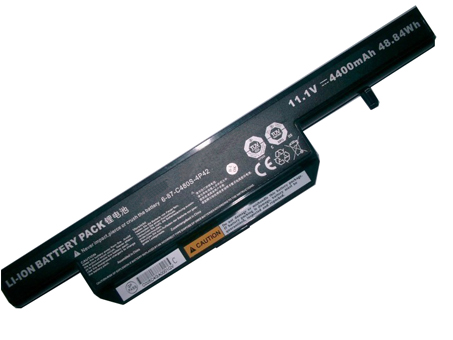
Replace Laptop battery in NZ

Blog

  • SAMSUNG Galaxy Gear 1 SM-V700 battery

    This SAMSUNG LSSP482230AB Battery has a capacity of 315mah and a voltage of 3.7V. Suitable for SAMSUNG Galaxy Gear 1 SM-V700. 100% compatible and 100% safe. 1-year warranty, 30-day money back guarantee. 

    SAMSUNG LSSP482230AB 315mah 3.7V battery

    SAMSUNG LSSP482230AB battery


    (product code: LSSP482230AB) 

    (Usually ships the same business day!)

      Product details:

    • Brand: SAMSUNG LSSP482230AB batteries

    • Type: Li-ion battery

    • Voltage: 3.7V

    • Capacity: 315mah

    • SKU: ECN10369_Oth

    Replace the following batteries:

    LSSP482230AB

    Compatible with the following models:

    SAMSUNG Galaxy Gear 1 SM-V700

    http://www.notebookbattery.co.nz/laptop-batteies-samsung/replace-battery-lssp482230ab-b179437.htm

    ABOUT US

    Wholesale and retail Notebook Battery in NZ. Replacement for Acer, Apple, Compaq, Dell, FUJITSU, IBM,Lenovo,Sony and so on.

    These may be you want to look for :

    3G2A9-BAT08 battery replacement for Omron C500-BAT08 3G2A9-BAT08 10pcs

    TA03XL battery replacement for HP EliteBook 755 G4 840 G4 HSTNN-IB7L 854047-1C1

    0JV6J battery replacement for Dell Inspiron 11 3162 3164 3168 8NWF3 PGYK5 0PGYK5

    BP3S1P2100-S battery replacement for Getac V110 Rugged Notebook BP3S1P2100 441129000001

    99EX-BTEC battery replacement for Dolphin 99EX Honeywell 99GX

  • MSI ADP-180NB Laptop AC Adapter on sale

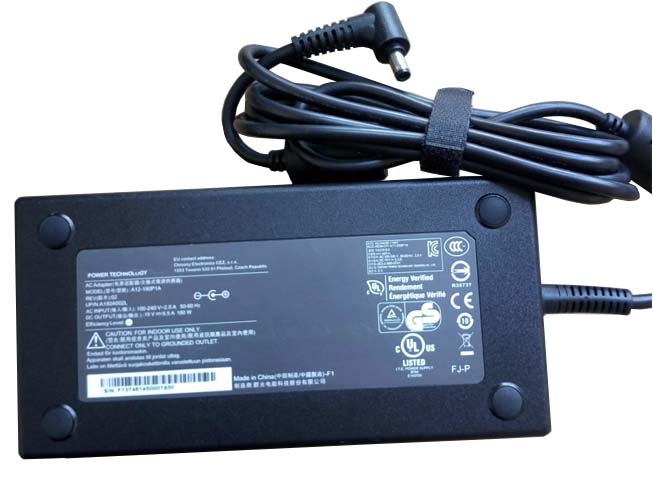
    MSI ADP-180NB laptop adapter 100% compatible +100% stable. Meet original or exceed original specifications. High quality material, cheaper than original, low power consumption, strict safety test and performance test to ensure your computer is safely charged. We are committed to a one-year, 30-day unconditional refund for all notebook adapters.

    MSI ADP-180NB laptop adapter 19.5V 9.2A 180W (for worldwide use)100-240V

    MSI ADP-180NB adapter
    AC Input:100-240V
    DC Output: 19.5V 9.2A 180W
    Connection:5.5mm *2.5mm, Barrel tip (ref to the picture)
    Model: ADP-180NB

    Adapter Part Numbers:
    ADP-180NB BC,S93-0404190-D04
    Adapter Fit Models:
    MSI GT60 2OKWS-674US 

    Here,buy it now
    ES:MSI ADP-180NB Adaptador
    IT:MSI ADP-180NB Adattatore prodotto nuovo
    JP:MSI ADP-180NB
    DE:ADP-180NB Notebook-Netzteile.
    http://www.notebookbattery.co.nz/msi-laptop-power-adapter/adp-180nb-a178935.htm,

    What should I pay attention to when using MSI ADP-180NB laptop adapter?

    1. You should create a good cooling environment. 
    When using the in a high temperature environment, place the MSI ADP-180NB power adapter in a place that is not exposed to direct sunlight and ventilation; do not place the power adapter near the cooling air outlet of the notebook; at the same time, we can put the adapter on the side to make the heat better distributed.
    2. If the voltage is unstable, it needs to be stopped in time.
    Although the MSI ADP-180NB adapter is a wide-band operating voltage, it can be marked from 100V to 240V, but if it is used under extremely unstable voltage, it will also cause serious heat or damage to the power adapter. If you need to temporarily borrow power from other brands, try to choose an adapter with the same or larger output current.
    3. If an abnormality occurs, stop using it in time.
    When you are not using the MSI ADP-180NB adapter, unplug the power cord. Prolonged power-up will keep the adapter working and will affect the end of life. When the power adapter emits large working noise or even smoke, it is often damaged or has a fault. It should be stopped immediately and can be used again after being repaired by professional engineers.

    Finding the Right Model of Adapter :

    · Get the laptop's model number. This is usually printed on a small sticker affixed to the underside of the laptop.

    · Get the power requirements for the laptop. This is also printed on a small sticker affixed to the underside of the laptop. It may also be printed near the laptop power port. Look for the amperage and the voltage required.

    · Look up the model number online to find if there are compatible adapters available. The voltage and amperage of the adapter need to match the requirements of the laptop.

    · Compare the connector type of the laptop adapter to any available adapters found online. They need to match to ensure that the adapter can plug into the laptop.

    ABOUT US

    NotebookBattery.co.nz is professional selling the highest quality notebook batteries and laptop power adapters for the lowest price with the highest level of service in NewZeland, all in a secure and convenient platform. Our product range includes replacement laptop batteries for most major laptop brands, including Dell, Apple, Compaq/HP, IBM/Lenovo, Fujitsu, Gateway, Sony and Toshiba. We ship to the Laptop adapter around Globe [USA, Canada, UK, NZ and Ireland, Australia]. View more laptop adapter. Contact with us if any problem on selecting power adapter.

    Power Adapter Fast Shipping

    Adapter for A120A010L MSI GE72 APACHE-235 A12-120P1A

    Adapter for ADP-120MH MSI Gateway Series

    Adapter for ADP-120MH MSI GE62 6QD MS-16J5

    Adapter for ADP-150VB MSI GS70 2QE-083CN

    Adapter for S93-0404250-D04 MSI GS70 GS72 GS72S 6QD-041XCN

  • Acer 135W compatible with Acer Aspire ADP-135KB T power adapter

    Acer 135W laptop adapter 100% compatible +100% stable. Meet original or exceed original specifications. High quality material, cheaper than original, low power consumption, strict safety test and performance test to ensure your computer is safely charged. We are committed to a one-year, 30-day unconditional refund for all notebook adapters.

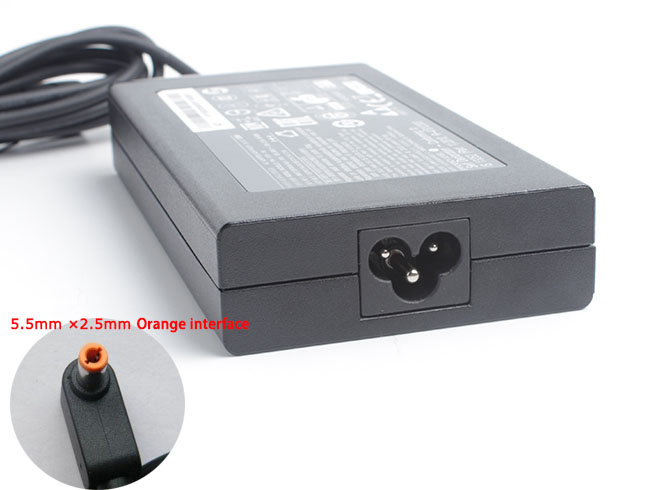
    Acer 135W laptop adapter 19V 7.1A, 135W (for worldwide use)100-240V 50-60Hz

    Acer 135W adapter
    AC Input:100-240V 50-60Hz
    DC Output: 19V 7.1A, 135W
    Connection:5.5mm*2.5mm(Orange connector is not compatible wit
    Model: 135W

    Adapter Part Numbers:
    Please Note: Incompatible interface 5.5*1.7MM
    Outlet: 3-prong
    Cord Cable: US/ UK/ EU/ AU plug
    Warranty: 12 months
    Package includes:
    1 X AC Adapter
    1 X Free Power cord
    Adapter Fit Models:
    Acer Aspire ADP-135KB T 

    Here,buy it now
    ES:Acer 135W Adaptador
    IT:Acer 135W Adattatore prodotto nuovo
    JP:Acer 135W
    DE:135W Notebook-Netzteile.
    http://www.notebookbattery.co.nz/acer-laptop-power-adapter/135w-a178937.htm,

    What should I pay attention to when using Acer 135W laptop adapter?

    1. You should create a good cooling environment. 
    When using the in a high temperature environment, place the Acer 135W power adapter in a place that is not exposed to direct sunlight and ventilation; do not place the power adapter near the cooling air outlet of the notebook; at the same time, we can put the adapter on the side to make the heat better distributed.
    2. If the voltage is unstable, it needs to be stopped in time.
    Although the Acer 135W adapter is a wide-band operating voltage, it can be marked from 100V to 240V, but if it is used under extremely unstable voltage, it will also cause serious heat or damage to the power adapter. If you need to temporarily borrow power from other brands, try to choose an adapter with the same or larger output current.
    3. If an abnormality occurs, stop using it in time.
    When you are not using the Acer 135W adapter, unplug the power cord. Prolonged power-up will keep the adapter working and will affect the end of life. When the power adapter emits large working noise or even smoke, it is often damaged or has a fault. It should be stopped immediately and can be used again after being repaired by professional engineers.

    Finding the Right Model of Adapter :

    · Get the laptop's model number. This is usually printed on a small sticker affixed to the underside of the laptop.

    · Get the power requirements for the laptop. This is also printed on a small sticker affixed to the underside of the laptop. It may also be printed near the laptop power port. Look for the amperage and the voltage required.

    · Look up the model number online to find if there are compatible adapters available. The voltage and amperage of the adapter need to match the requirements of the laptop.

    · Compare the connector type of the laptop adapter to any available adapters found online. They need to match to ensure that the adapter can plug into the laptop.

    ABOUT US

    NotebookBattery.co.nz is professional selling the highest quality notebook batteries and laptop power adapters for the lowest price with the highest level of service in NewZeland, all in a secure and convenient platform. Our product range includes replacement laptop batteries for most major laptop brands, including Dell, Apple, Compaq/HP, IBM/Lenovo, Fujitsu, Gateway, Sony and Toshiba. We ship to the Laptop adapter around Globe [USA, Canada, UK, NZ and Ireland, Australia]. View more laptop adapter. Contact with us if any problem on selecting power adapter.

    Power Adapter Fast Shipping

    Adapter for ADP-180MB Acer Predator 17 G9-791 G9-791G,ADP-180MB K

    Adapter for ADP-180MB Acer PREDATOR 15 G9-591-71DQ

    Adapter for ADP-180MB Acer Predator G9-791-735A

    Adapter for H0OW59H0085 Acer Predator 15 G9-591-74KN

    Adapter for R33030 Acer Predator 17 G9-791-79W7

  • Long Lasting Acer KP.13501.004 Replacement AC adapter

    Acer KP.13501.004 laptop adapter 100% compatible +100% stable. Meet original or exceed original specifications. High quality material, cheaper than original, low power consumption, strict safety test and performance test to ensure your computer is safely charged. We are committed to a one-year, 30-day unconditional refund for all notebook adapters.

    Acer KP.13501.004 laptop adapter 19V 7.1A, 135W (for worldwide use)100-240V 50-60Hz

    Acer KP.13501.004 adapter
    AC Input:100-240V 50-60Hz
    DC Output: 19V 7.1A, 135W
    Connection:5.5mm*2.5mm(Orange connector is not compatible wit
    Model: KP.13501.004

    Adapter Part Numbers:
    Please Note: Incompatible interface 5.5*1.7MM
    Outlet: 3-prong
    Cord Cable: US/ UK/ EU/ AU plug
    Warranty: 12 months
    Package includes:
    1 X AC Adapter
    1 X Free Power cord
    Adapter Fit Models:
    Acer Aspire L100 L310 L320 L3600 L460G 

    Here,buy it now
    ES:Acer KP.13501.004 Adaptador
    IT:Acer KP.13501.004 Adattatore prodotto nuovo
    JP:Acer KP.13501.004
    DE:KP.13501.004 Notebook-Netzteile.
    http://www.notebookbattery.co.nz/acer-laptop-power-adapter/kp.13501.004-a178938.htm,

    What should I pay attention to when using Acer KP.13501.004 laptop adapter?

    1. You should create a good cooling environment. 
    When using the in a high temperature environment, place the Acer KP.13501.004 power adapter in a place that is not exposed to direct sunlight and ventilation; do not place the power adapter near the cooling air outlet of the notebook; at the same time, we can put the adapter on the side to make the heat better distributed.
    2. If the voltage is unstable, it needs to be stopped in time.
    Although the Acer KP.13501.004 adapter is a wide-band operating voltage, it can be marked from 100V to 240V, but if it is used under extremely unstable voltage, it will also cause serious heat or damage to the power adapter. If you need to temporarily borrow power from other brands, try to choose an adapter with the same or larger output current.
    3. If an abnormality occurs, stop using it in time.
    When you are not using the Acer KP.13501.004 adapter, unplug the power cord. Prolonged power-up will keep the adapter working and will affect the end of life. When the power adapter emits large working noise or even smoke, it is often damaged or has a fault. It should be stopped immediately and can be used again after being repaired by professional engineers.

    Finding the Right Model of Adapter :

    · Get the laptop's model number. This is usually printed on a small sticker affixed to the underside of the laptop.

    · Get the power requirements for the laptop. This is also printed on a small sticker affixed to the underside of the laptop. It may also be printed near the laptop power port. Look for the amperage and the voltage required.

    · Look up the model number online to find if there are compatible adapters available. The voltage and amperage of the adapter need to match the requirements of the laptop.

    · Compare the connector type of the laptop adapter to any available adapters found online. They need to match to ensure that the adapter can plug into the laptop.

    ABOUT US

    NotebookBattery.co.nz is professional selling the highest quality notebook batteries and laptop power adapters for the lowest price with the highest level of service in NewZeland, all in a secure and convenient platform. Our product range includes replacement laptop batteries for most major laptop brands, including Dell, Apple, Compaq/HP, IBM/Lenovo, Fujitsu, Gateway, Sony and Toshiba. We ship to the Laptop adapter around Globe [USA, Canada, UK, NZ and Ireland, Australia]. View more laptop adapter. Contact with us if any problem on selecting power adapter.

    Power Adapter Fast Shipping

    Adapter for ADP-180MB Acer Predator 17 G9-791 G9-791G,ADP-180MB K

    Adapter for ADP-180MB Acer PREDATOR 15 G9-591-71DQ

    Adapter for ADP-180MB Acer Predator G9-791-735A

    Adapter for H0OW59H0085 Acer Predator 15 G9-591-74KN

    Adapter for R33030 Acer Predator 17 G9-791-79W7

  • High quality Acer KP.13501.006 AC adapter

    • Acer KP.13501.006 laptop adapter 100% compatible +100% stable. Meet original or exceed original specifications. High quality material, cheaper than original, low power consumption, strict safety test and performance test to ensure your computer is safely charged. We are committed to a one-year, 30-day unconditional refund for all notebook adapters.

      Acer KP.13501.006 laptop adapter 19V 7.1A, 135W (for worldwide use)100-240V 50-60Hz

      Acer KP.13501.006 adapter
      AC Input:100-240V 50-60Hz
      DC Output: 19V 7.1A, 135W
      Connection:5.5mm*2.5mm(Orange connector is not compatible wit
      Model: KP.13501.006

      Adapter Part Numbers:
      Please Note: Incompatible interface 5.5*1.7MM
      Outlet: 3-prong
      Cord Cable: US/ UK/ EU/ AU plug
      Warranty: 12 months
      Package includes:
      1 X AC Adapter
      1 X Free Power cord
      Adapter Fit Models:
      Acer Aspire VN7-591G-74SK,VN7-591G-70JY,VN7-591G-792U 

      Here,buy it now
      ES:Acer KP.13501.006 Adaptador
      IT:Acer KP.13501.006 Adattatore prodotto nuovo
      JP:Acer KP.13501.006
      DE:KP.13501.006 Notebook-Netzteile.
      http://www.notebookbattery.co.nz/acer-laptop-power-adapter/kp.13501.006-a178939.htm,

      What should I pay attention to when using Acer KP.13501.006 laptop adapter?

      1. You should create a good cooling environment. 
      When using the in a high temperature environment, place the Acer KP.13501.006 power adapter in a place that is not exposed to direct sunlight and ventilation; do not place the power adapter near the cooling air outlet of the notebook; at the same time, we can put the adapter on the side to make the heat better distributed.
      2. If the voltage is unstable, it needs to be stopped in time.
      Although the Acer KP.13501.006 adapter is a wide-band operating voltage, it can be marked from 100V to 240V, but if it is used under extremely unstable voltage, it will also cause serious heat or damage to the power adapter. If you need to temporarily borrow power from other brands, try to choose an adapter with the same or larger output current.
      3. If an abnormality occurs, stop using it in time.
      When you are not using the Acer KP.13501.006 adapter, unplug the power cord. Prolonged power-up will keep the adapter working and will affect the end of life. When the power adapter emits large working noise or even smoke, it is often damaged or has a fault. It should be stopped immediately and can be used again after being repaired by professional engineers.

      Finding the Right Model of Adapter :

      · Get the laptop's model number. This is usually printed on a small sticker affixed to the underside of the laptop.

      · Get the power requirements for the laptop. This is also printed on a small sticker affixed to the underside of the laptop. It may also be printed near the laptop power port. Look for the amperage and the voltage required.

      · Look up the model number online to find if there are compatible adapters available. The voltage and amperage of the adapter need to match the requirements of the laptop.

      · Compare the connector type of the laptop adapter to any available adapters found online. They need to match to ensure that the adapter can plug into the laptop.

      ABOUT US

      NotebookBattery.co.nz is professional selling the highest quality notebook batteries and laptop power adapters for the lowest price with the highest level of service in NewZeland, all in a secure and convenient platform. Our product range includes replacement laptop batteries for most major laptop brands, including Dell, Apple, Compaq/HP, IBM/Lenovo, Fujitsu, Gateway, Sony and Toshiba. We ship to the Laptop adapter around Globe [USA, Canada, UK, NZ and Ireland, Australia]. View more laptop adapter. Contact with us if any problem on selecting power adapter.

      Power Adapter Fast Shipping

      Adapter for ADP-180MB Acer Predator 17 G9-791 G9-791G,ADP-180MB K

      Adapter for ADP-180MB Acer PREDATOR 15 G9-591-71DQ

      Adapter for ADP-180MB Acer Predator G9-791-735A

      Adapter for H0OW59H0085 Acer Predator 15 G9-591-74KN

      Adapter for R33030 Acer Predator 17 G9-791-79W7

  • Replacement AC Adapter Acer PA-1131-08

    Acer PA-1131-08 laptop adapter 100% compatible +100% stable. Meet original or exceed original specifications. High quality material, cheaper than original, low power consumption, strict safety test and performance test to ensure your computer is safely charged. We are committed to a one-year, 30-day unconditional refund for all notebook adapters.

    Acer PA-1131-08 laptop adapter 19V 7.1A, 135W (for worldwide use)100-240V 50-60Hz

    Acer PA-1131-08 adapter
    AC Input:100-240V 50-60Hz
    DC Output: 19V 7.1A, 135W
    Connection:5.5mm*2.5mm(Orange connector is not compatible wit
    Model: PA-1131-08

    Adapter Part Numbers:
    Please Note: Incompatible interface 5.5*1.7MM
    Outlet: 3-prong
    Cord Cable: US/ UK/ EU/ AU plug
    Warranty: 12 months
    Package includes:
    1 X AC Adapter
    1 X Free Power cord
    Adapter Fit Models:
    ACER L100 L320 L3600 L460G 3000 PA-1131-08 

    Here,buy it now
    ES:Acer PA-1131-08 Adaptador
    IT:Acer PA-1131-08 Adattatore prodotto nuovo
    JP:Acer PA-1131-08
    DE:PA-1131-08 Notebook-Netzteile.
    http://www.notebookbattery.co.nz/acer-laptop-power-adapter/pa-1131-08-a178940.htm,

    What should I pay attention to when using Acer PA-1131-08 laptop adapter?

    1. You should create a good cooling environment. 
    When using the in a high temperature environment, place the Acer PA-1131-08 power adapter in a place that is not exposed to direct sunlight and ventilation; do not place the power adapter near the cooling air outlet of the notebook; at the same time, we can put the adapter on the side to make the heat better distributed.
    2. If the voltage is unstable, it needs to be stopped in time.
    Although the Acer PA-1131-08 adapter is a wide-band operating voltage, it can be marked from 100V to 240V, but if it is used under extremely unstable voltage, it will also cause serious heat or damage to the power adapter. If you need to temporarily borrow power from other brands, try to choose an adapter with the same or larger output current.
    3. If an abnormality occurs, stop using it in time.
    When you are not using the Acer PA-1131-08 adapter, unplug the power cord. Prolonged power-up will keep the adapter working and will affect the end of life. When the power adapter emits large working noise or even smoke, it is often damaged or has a fault. It should be stopped immediately and can be used again after being repaired by professional engineers.

    Finding the Right Model of Adapter :

    · Get the laptop's model number. This is usually printed on a small sticker affixed to the underside of the laptop.

    · Get the power requirements for the laptop. This is also printed on a small sticker affixed to the underside of the laptop. It may also be printed near the laptop power port. Look for the amperage and the voltage required.

    · Look up the model number online to find if there are compatible adapters available. The voltage and amperage of the adapter need to match the requirements of the laptop.

    · Compare the connector type of the laptop adapter to any available adapters found online. They need to match to ensure that the adapter can plug into the laptop.

    ABOUT US

    NotebookBattery.co.nz is professional selling the highest quality notebook batteries and laptop power adapters for the lowest price with the highest level of service in NewZeland, all in a secure and convenient platform. Our product range includes replacement laptop batteries for most major laptop brands, including Dell, Apple, Compaq/HP, IBM/Lenovo, Fujitsu, Gateway, Sony and Toshiba. We ship to the Laptop adapter around Globe [USA, Canada, UK, NZ and Ireland, Australia]. View more laptop adapter. Contact with us if any problem on selecting power adapter.

    Power Adapter Fast Shipping

    Adapter for ADP-180MB Acer Predator 17 G9-791 G9-791G,ADP-180MB K

    Adapter for ADP-180MB Acer PREDATOR 15 G9-591-71DQ

    Adapter for ADP-180MB Acer Predator G9-791-735A

    Adapter for H0OW59H0085 Acer Predator 15 G9-591-74KN

    Adapter for R33030 Acer Predator 17 G9-791-79W7

  • SONY SVP13 Pro13 Pro11 Notebook Battery-VGP-BPS38 battery

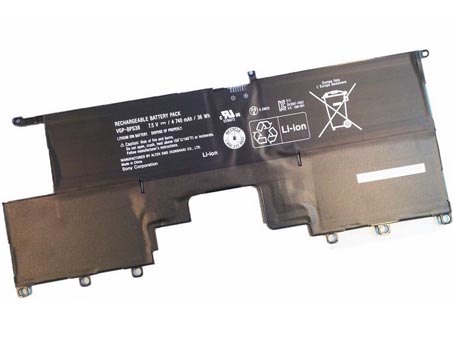
    This sony VGP-BPS38 Battery has a capacity of 4740mAh/36Wh and a voltage of 7.5V. Suitable for SONY SVP13 Pro13 Pro11. 100% compatible and 100% safe. 1-year warranty, 30-day money back guarantee. 

    sony VGP-BPS38 4740mAh/36Wh 7.5V Notebook Battery

    sony VGP-BPS38 battery


    (product code: VGP-BPS38) 

    (Usually ships the same business day!)

      Product details:

    • Brand: sony VGP-BPS38 Notebook batteries

    • Type: li-ion battery

    • Voltage: 7.5V

    • Capacity: 4740mAh/36Wh

    • SKU: SON2881

    Replace the following batteries:

    VGP-BPS38

    Compatible with the following models:

    Sony PRO11 PRO13
    P132200C P11226SCBI P13227SC P13226SC P132200C SVP13218SC SVP13217SC SV P112100C

    http://www.notebookbattery.co.nz/laptop-batteies-sony/replace-battery-vgp-bps38-b2881.htm

    Laptop battery tips

    Newly bought notebooks, the first three charges do not need to reach 12 hours, because the current laptop batteries have a management chip that can control the charging limit, when the battery is full, it will automatically cut off the charging function, thus protecting the battery life and avoiding overcharging.

    It is not necessary to discharge completely before each charge, because this deep discharge will shorten the battery life. It is recommended to charge when the remaining 10% is left. In addition, when there is still more than 30% of the battery power, it is best not to charge, because the memory effect does exist. The power management software allows you to check the battery level at any time, and the HP EliteBook P-series notebooks come with a battery indicator that allows you to check the remaining battery even without turning it on.

    When plugging in AC power (connecting the power adapter), you don't need to remove the battery

    , because most laptop batteries need to be charged below 90%, and the battery naturally discharges to this capacity takes two weeks to a month, so use it every day. Notebooks don't have to worry about repeated charging and unloading, not to mention the fact that emergency power outages are more damaging to data.

    If you want to store unused batteries for a long time, you need to put them in a dry, low temperature environment while maintaining 40% of the remaining power in the battery. In addition, it is best to take out the battery once a month to ensure a good storage state and service life of the battery.

    Reducing the brightness of your notebook screen can extend the life of your notebook and reduce the number of times it is charged.

    Use some power management tools, such as the Power Assistant on the HP EliteBook P Series, which can even monitor the energy consumption of each component in real time through the PMC circuit, and accurately summarize the company's status to the HPclient Configuration Manager software, and optionally Turn off the specified parts to extend battery life.

    ABOUT US

    Wholesale and retail Notebook Battery in NZ. Replacement for Acer, Apple, Compaq, Dell, FUJITSU, IBM,Lenovo,Sony and so on.

    These may be you want to look for :

    SB10J79004 battery replacement for Lenovo T460S

    L15D1P32 battery replacement for Lenovo Tab 3 8 Plus TB-8703F 8703N 8703 PB1-750N

    PA5185U-1BRS battery replacement for TOSHIBA Satellite L40D-B

    TLi014A1 battery replacement for Alcatel One Touch OT4010/D OT 4030/D/A OT 5020

    BV-4BW battery replacement for NOKIA BV4BW Lumia 1520 /1320

  • SAMSUNG AA-PB6NC6W 57WH 11.1V Notebook Battery

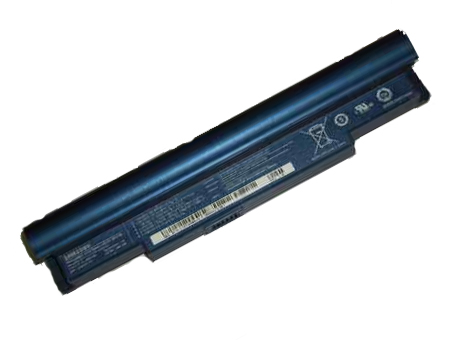
    This SAMSUNG AA-PB6NC6W Battery has a capacity of 57WH and a voltage of 11.1V. Suitable for Samsung NC10 NC10- 14GB Series. 100% compatible and 100% safe. 1-year warranty, 30-day money back guarantee. 

    SAMSUNG AA-PB6NC6W 57WH 11.1V Notebook Battery

    SAMSUNG AA-PB6NC6W battery


    (product code: AA-PB6NC6W) 

    (Usually ships the same business day!)

      Product details:

    • Brand: SAMSUNG AA-PB6NC6W Notebook batteries

    • Type: Li-ion battery

    • Voltage: 11.1V

    • Capacity: 57WH

    • SKU: SAM2882

    Replace the following batteries:

    AA-PB6NC6W,AA-PB8NC6B,AA-PB8NC6M

    Compatible with the following models:

    Samsung NC10 Series
    Samsung NC10-14GB Samsung NC10-14GW Samsung NC10-14GBK
    Samsung NC10-11GP Samsung NC10-11PBK Samsung NC10-KA01US
    Samsung NC10-KA03 Samsung NC10-KA04 Samsung NC10-KA05
    Samsung NC10-KA06 Samsung NC10 KA06DE Samsung NC10-KA07
    Samsung NC10-KA08DE Samsung ND10-DA05

    http://www.notebookbattery.co.nz/laptop-batteies-samsung/replace-battery-aa-pb6nc6w-b2882.htm

    Laptop battery tips

    Newly bought notebooks, the first three charges do not need to reach 12 hours, because the current laptop batteries have a management chip that can control the charging limit, when the battery is full, it will automatically cut off the charging function, thus protecting the battery life and avoiding overcharging.

    It is not necessary to discharge completely before each charge, because this deep discharge will shorten the battery life. It is recommended to charge when the remaining 10% is left. In addition, when there is still more than 30% of the battery power, it is best not to charge, because the memory effect does exist. The power management software allows you to check the battery level at any time, and the HP EliteBook P-series notebooks come with a battery indicator that allows you to check the remaining battery even without turning it on.

    When plugging in AC power (connecting the power adapter), you don't need to remove the battery

    , because most laptop batteries need to be charged below 90%, and the battery naturally discharges to this capacity takes two weeks to a month, so use it every day. Notebooks don't have to worry about repeated charging and unloading, not to mention the fact that emergency power outages are more damaging to data.

    If you want to store unused batteries for a long time, you need to put them in a dry, low temperature environment while maintaining 40% of the remaining power in the battery. In addition, it is best to take out the battery once a month to ensure a good storage state and service life of the battery.

    Reducing the brightness of your notebook screen can extend the life of your notebook and reduce the number of times it is charged.

    Use some power management tools, such as the Power Assistant on the HP EliteBook P Series, which can even monitor the energy consumption of each component in real time through the PMC circuit, and accurately summarize the company's status to the HPclient Configuration Manager software, and optionally Turn off the specified parts to extend battery life.

    ABOUT US

    Wholesale and retail Notebook Battery in NZ. Replacement for Acer, Apple, Compaq, Dell, FUJITSU, IBM,Lenovo,Sony and so on.

    These may be you want to look for :

    VGP-BPS40 battery replacement for Sony Vaio Flip SVF 15A SVF15N17CXB SVF15N18PXB SVF15N28PXB

    PA04-A701-C battery replacement for Luggie PA04-A701-C PA04-A702-B PA04-A700 series

    44184400099 battery replacement for Getac B300 B300X BP3S3P2900(P)

    BNTV600 battery replacement for Barnes & Noble Nook HD+ Plus, NOOK HD+ 9inch

    HE349 battery replacement for Sharp Aquos S3 FS8032

  • Battery Replacement For Acer AS10D51 Notebook Battery

    This Acer AS10D51 Battery has a capacity of 4400MAh and a voltage of 11.1V. Suitable for Acer eMachines D440 D442 D443 E443 D528 D530 D642 MS2305. 100% compatible and 100% safe. 1-year warranty, 30-day money back guarantee. 

    Acer AS10D51 4400MAh 11.1V Notebook Battery
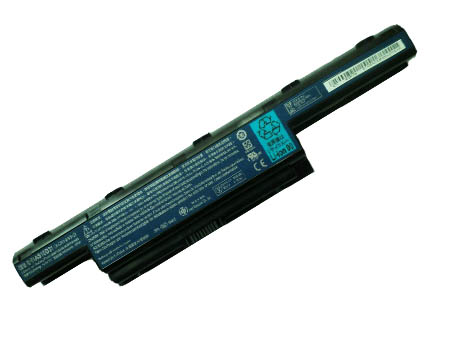
    Acer AS10D51 battery


    (product code: AS10D51) 

    (Usually ships the same business day!)

      Product details:

    • Brand: Acer AS10D51 Notebook batteries

    • Type: Li-ion battery

    • Voltage: 11.1V

    • Capacity: 4400MAh

    • SKU: ACE2886

    Replace the following batteries:

    BT.00607.125,BT.00603.111,BT.00606.008,BT.00607.127,BT.00604.049,LC.BTP00.123,BT.00605.062,BT.00607.126,BT.00607.127,LC.BTP00.127,BT.00605.065,31CR19/652,31CR19/65-2,3ICR19/66-2,934T2078F,AS10D3E,AS10D5E,AS10D7E,ZQ3,AS10G3E,AS10D51,AS10D56,AS10D61,AS10D71,AS10D73,AS10D75,AS10D41,AS10D31,AS10D81

    Compatible with the following models:

    E-Machines eMachines D440 ( MS2305 )
    D440-1202G25Mn D440-1202G16Mn D440-1202G32Mn D440-1202G16Mi

    E-Machines eMachines D442
    D442-V264 D442-V081 D442-V234

    E-Machines eMachines D528
    D528-2062

    E-Machines eMachines D640 D640G ( MS2305 )

    E-Machines eMachines D728

    E-Machines eMachines D730 D730G ( MS2304 )

    E-Machines eMachines D732
    D732-7000 D732-7025

    E-Machines eMachines D732G

    E-Machines eMachines D732Z
    D732Z-4717

    E-Machines eMachines D732ZG

    E-Machines eMachines E440 ( NEW85 )
    E440-1616 E440-1394 E440-1680 E440-1653 E440-1317 E440-1036
    E440-1203G32Mn E440-1434 E440-1202G16Mi E440-1201G16Mn

    E-Machines eMachines E640
    E640-N833G32Mn E640-P324G50Mn E640-N833G25Mn E640-P324G32Mn E640-P324G25Mn E640-P1202G25Mn
    E640-N833G25Mi E640-P322G16Mi

    E-Machines eMachines E640G
    E640G-P324G50Mn E640G-P324G32Mn E640G-P322G16Mi E640G-P323G32Mn E640G-1202G25Mn

    E-Machines eMachines E642

    E-Machines eMachines E642G

    E-Machines eMachines E730G

    E-Machines eMachines E732
    E732-7096

    E-Machines eMachines E732Z

    E-Machines eMachines E732ZG

    E-Machines eMachines G640
    G640-P322G25MNKS G640-P324G25Mn G640-N833G32Mn G640-P322G25Mn G640-P324G32Mn G640-P323G25Mn
    G640-P324G50Mn G640-P322G32MNKS

    E-Machines eMachines G640G
    G640G-N833G32Mn G640G-P324G50Mn G640G-P523G25Mi G640G-P323G25Mi G640G-P322G50MNKS G640G-P324G32Mn
    G640G-P323G32Mn G640G-P324G32MNKS G640G-P322G25Mi

    E-Machines eMachines G730G

    E-Machines eMachines G730Z

    E-Machines eMachines G730ZG
    Acer eMachines D440 D442 D443 E443 D528 D530 D640 D640G D642

    http://www.notebookbattery.co.nz/laptop-batteies-acer/replace-battery-as10d51-b2886.htm

    Laptop battery tips

    Newly bought notebooks, the first three charges do not need to reach 12 hours, because the current laptop batteries have a management chip that can control the charging limit, when the battery is full, it will automatically cut off the charging function, thus protecting the battery life and avoiding overcharging.

    It is not necessary to discharge completely before each charge, because this deep discharge will shorten the battery life. It is recommended to charge when the remaining 10% is left. In addition, when there is still more than 30% of the battery power, it is best not to charge, because the memory effect does exist. The power management software allows you to check the battery level at any time, and the HP EliteBook P-series notebooks come with a battery indicator that allows you to check the remaining battery even without turning it on.

    When plugging in AC power (connecting the power adapter), you don't need to remove the battery

    , because most laptop batteries need to be charged below 90%, and the battery naturally discharges to this capacity takes two weeks to a month, so use it every day. Notebooks don't have to worry about repeated charging and unloading, not to mention the fact that emergency power outages are more damaging to data.

    If you want to store unused batteries for a long time, you need to put them in a dry, low temperature environment while maintaining 40% of the remaining power in the battery. In addition, it is best to take out the battery once a month to ensure a good storage state and service life of the battery.

    Reducing the brightness of your notebook screen can extend the life of your notebook and reduce the number of times it is charged.

    Use some power management tools, such as the Power Assistant on the HP EliteBook P Series, which can even monitor the energy consumption of each component in real time through the PMC circuit, and accurately summarize the company's status to the HPclient Configuration Manager software, and optionally Turn off the specified parts to extend battery life.

    ABOUT US

    Wholesale and retail Notebook Battery in NZ. Replacement for Acer, Apple, Compaq, Dell, FUJITSU, IBM,Lenovo,Sony and so on.

    These may be you want to look for :

    L15D3K32 battery replacement for Lenovo Yoga Tab 3 YT3-X50F YT3-X50M L15C3K32

    633-27 battery replacement for Anritsu S331B S331C S331D S332B S332D S332A

    LR08XL battery replacement for Hp Envy 15-3000 Envy 15-3012TX

    C11P1404 battery replacement for ASUS ZenFone 4.5 A450

    45N1016 battery replacement for Lenovo ThinkPad T410 T420 T430 T510 28++
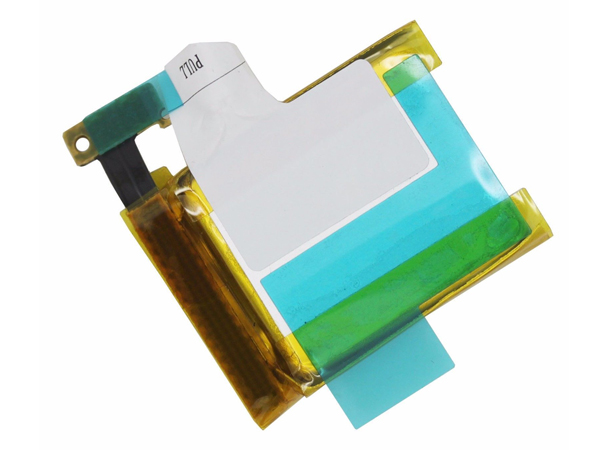
  • CLEVO W240BUBAT-3 replacement for W240BUBAT-3 battery

    This CLEVO W240BUBAT-3 Battery has a capacity of 4400mAh and a voltage of 11.1V. Suitable for CLEVO W240BUBAT-3. 100% compatible and 100% safe. 1-year warranty, 30-day money back guarantee. 

    CLEVO W240BUBAT-3 4400mAh 11.1V Notebook Battery

    CLEVO W240BUBAT-3 battery


    (product code: W240BUBAT-3) 

    (Usually ships the same business day!)

      Product details:

    • Brand: CLEVO W240BUBAT-3 Notebook batteries

    • Type: Li-ion battery

    • Voltage: 11.1V

    • Capacity: 4400mAh

    • SKU: CLE2887

    Replace the following batteries:

    W240BUBAT-3,W240BUBAT-6

    Compatible with the following models:

    CLEVO W240BUBAT-3 W240BUBAT-6

    http://www.notebookbattery.co.nz/laptop-batteies-clevo/replace-battery-w240bubat-3-b2887.htm

    Laptop battery tips

    Newly bought notebooks, the first three charges do not need to reach 12 hours, because the current laptop batteries have a management chip that can control the charging limit, when the battery is full, it will automatically cut off the charging function, thus protecting the battery life and avoiding overcharging.

    It is not necessary to discharge completely before each charge, because this deep discharge will shorten the battery life. It is recommended to charge when the remaining 10% is left. In addition, when there is still more than 30% of the battery power, it is best not to charge, because the memory effect does exist. The power management software allows you to check the battery level at any time, and the HP EliteBook P-series notebooks come with a battery indicator that allows you to check the remaining battery even without turning it on.

    When plugging in AC power (connecting the power adapter), you don't need to remove the battery

    , because most laptop batteries need to be charged below 90%, and the battery naturally discharges to this capacity takes two weeks to a month, so use it every day. Notebooks don't have to worry about repeated charging and unloading, not to mention the fact that emergency power outages are more damaging to data.

    If you want to store unused batteries for a long time, you need to put them in a dry, low temperature environment while maintaining 40% of the remaining power in the battery. In addition, it is best to take out the battery once a month to ensure a good storage state and service life of the battery.

    Reducing the brightness of your notebook screen can extend the life of your notebook and reduce the number of times it is charged.

    Use some power management tools, such as the Power Assistant on the HP EliteBook P Series, which can even monitor the energy consumption of each component in real time through the PMC circuit, and accurately summarize the company's status to the HPclient Configuration Manager software, and optionally Turn off the specified parts to extend battery life.

    ABOUT US

    Wholesale and retail Notebook Battery in NZ. Replacement for Acer, Apple, Compaq, Dell, FUJITSU, IBM,Lenovo,Sony and so on.

    These may be you want to look for :

    HB3G1 battery replacement for HUAWEI MediaPad7 Lite s7-301u 302 303 701

    TE04XL battery replacement for HP Omen 15-AX200 Pavilion 15-BC Series HSTNN-DB7T

    GEB121 battery replacement for LEICA TPS400 TPS700 TPS800 TPS1000 Total stations battery

    681951-001 battery replacement for HP ENVY Sleekbook 6-1000 8-Cell 60Wh

    BL220 battery replacement for Lenovo S850 S850T +Tools