Replace Laptop battery in NZ

Blog

  • Replacement battery Motorola GA40

    MOTOROLA GA40 battery

    Current:3000mAh / 11.4 Wh
    Voltage: 3.8V
    GA40 battery
    battery Part Numbers:
    GA40 SNN5970A 1ICP4/46/104 XT1625
    battery Fit Models:
    Motorola Moto G4 Plus
    Here,buy it now
    ES:Motorola GA40 Batería NL:Motorola GA40 ACCU IT:Motorola GA40 batteria
    DE:GA40 Akku.Das richtige MOTOROLA Akku finden. 
    We ship to the battery around Globe [USA, Canada, UK, NZ and Ireland, Australia]. View more battery. Contact with us if any problem on selecting power battery. 
    Motorola GA40 Features:
    All our high quality Motorola GA40 replacement battery have been tested and proven to match and / or match the performance of the original Motorola battery and are 100% compatible with the original manufacturer's specifications. This Motorola GA40 battery comes with a 1-year limited warranty.
    Thank you for purchasing this high quality Motorola GA40 replacement battery. We have a rigorous testing process to ensure that your ordered products (like this battery for Motorola GA40) are functionally correct before being packaged and sent to you. And before placing an order, make sure that your old original part number of the Motorola GA40 battery is listed below and that the shape is identical to the images in our battery.

    Extend battery Motorola GA40 Service life

    1. Charge the battery! Consider keeping it plugged in for 12 hours before you unplug.
    2. Switch on the optimized battery or power feature. You'll find this option — sometimes referred to as max battery mode — in your laptop system's built-in power management control panel. You can select the option to reduce the amount of time your inactive laptop stays on before powering itself down and going to sleep.
    3. Remove the battery and clean the metal contacts. Wipe them with alcohol, ideally every two months, to ensure that the power transfer between the laptop and its battery is as efficient as possible. Allow the battery to dry thoroughly before replacing it! 
    4. Unplug any laptop accessories you aren't using. Even if they're not in use, accessories drain power from the battery.

    Wholesale and retail battery in NZ. Replacement for Acer,Apple, Compaq,Dell, FUJITSU, IBM,Lenovo,Sony and so on.

    These may be you want to look for : AL12B32 for Acer Aspire One 725 756 Series , L51-3S4000-C1L1 for GQ Great Quality 536S NX-L51 NX-L510 NX-L513 NX-L515 NX-L517 L513 , BATN222 for Averatec 3000 AV3220H1 AV3320-EH1 Series ,L13M4P61 for LENOVO EDGE 15 80H1 15.6inch , P650BAT-4 for Clevo P650SA P650SE P650SG Sager NP8650 NP8651 NP8652 ,
  • Everything We Know About the Samsung Galaxy S9 So Far, From Rumors to Release Date

    Samsung is just a few weeks away from releasing the long-awaited Galaxy S9, the latest in its long line of Android-based Apple iPhone competitors.

    Companies like Samsung are notoriously tight-lipped about what their upcoming smartphones might look like, or what features they might include. So far we know for sure when Samsung’s Galaxy S9 will be officially unveiled, and that Samsung is pitching the S9’s camera as a main selling point.

    But there’s an entire cottage industry built up around smartphone rumors and leaks that we can use to glean some more information about the Samsung Galaxy S9’s potential features, specs, price and more.

    Here’s what we know about the Samsung Galaxy S9 so far.

    Samsung Galaxy S9 Release Date and Price

    Samsung will unveil the Galaxy S9 (and likely a larger Galaxy S9 Plus version) on Sunday, Feb. 25 during Mobile World Congress (MWC) in Barcelona, Spain. Samsung typically begins shipping new smartphones within a few weeks of announcing them. So it’s a safe bet you’ll start seeing the Galaxy S9 on store shelves and available online by mid-March or so.

    The Galaxy S9 price isn’t clear yet. But it’s likely to be comparable to Apple’s most expensive phones — that is, in the $699-$999 range.

    Samsung Galaxy S9 Specs

    The U.S. version of the Samsung Galaxy S9 could use Qualcomm’s Snapdragon 845 processor, which will help it take better pictures and video, enable new artificial intelligence improvements, and result in overall better and more efficient performance. The Snapdragon could help improve the battery life on Samsung’s Galaxy S9 without physically larger batteries, too.

    The Samsung Galaxy S9 that will be sold in other parts of the world might use Samsung’s own Exynos processor instead of the Snapdragon, CNBC reports.

    Samsung Galaxy S9 Camera

    The camera will be a chief selling point for the Galaxy S9, if Samsung’s promotional teaser is any indication. The aforementioned Snapdragon 845 processor would certainly help in that regard. The Galaxy S9 could get some improvements in the camera system itself, too, with a 12-megapixel rear-facing camera featuring an f/1.5 lens, Forbes reports. A lens with that wide an aperture would certainly help with low-light photography.

    It’s unclear whether Samsung will give both the standard issue Galaxy S9 and the Galaxy S9 plus a dual rear-facing camera system, or only put such a setup on the Plus model. Details about the front-facing camera system are also shaky at this point.

    Samsung Galaxy S9 Features

    Samsung’s Galaxy S9 is rumored to have some bonus features that might excite some Android fans out there. Samsung is reportedly working on big improvements to its eye-scanning tech, for example, making it more secure and function better than it does on previous Galaxy models. There’s also a chance the Galaxy S9 could have some kind of face-scanning unlocking feature similar to Apple’s Face ID system.

    There have been rumors that the Samsung Galaxy S9 would include a fingerprint scanner built directly into the touchscreen, but recent reports say that might not be the case after all.

    Also worth noting: The Galaxy S9 could feature an FM radio option, Tom’s Guide reports, allowing users to tune in to local radio broadcasts. That may seem a little retro on such a high-tech device, but it’s an option that some people have long wanted.

  • Superb Choice ASUS 180W AC Adapter Charger

    • ASUS 180W AC Power Adapter Charger

      AC Input:100-240V  50-60Hz (worldwide u
      DC Output: 19V 9.5A, 180W
      180W Power Adapter
      Adapter Part Numbers:
      Power LED indicator
      Outlet: 3-prong 
      Cord Cable: US/ UK/ EU/ AU plug
      Warranty:12 months

      Package includes:
      1 X AC Adapter
      1 X Free Power cord
      Adapter Fit Models:
      ASUS G55 G70 G71 G72 G73 G74 G75
      Here,buy it now
      ES:ASUS 180W AC adapter NL:ASUS 180W Laptop adapter IT:ASUS 180W
      DE:180W Notebook-Netzteile.Das richtige ASUS Laptop Netzteil finden. 
      We ship to the Laptop adapter around Globe [USA, Canada, UK, NZ and Ireland, Australia]. View more laptop adapter. Contact with us if any problem on selecting power adapter. Quality: Quality is our number one priority! All ASUS 180W adapters are New! Our own quality assurance ensures a high quality standard. All ASUS 180W laptop power adapters are 100% compatible with the original product, in most cases our batteries have even more powerful performance than the original product thanks to the advanced technologies and cell standards.
      Safety: Safety is a key feature of our products. Our own safety controls guarantee the highest level of safety standards. 
      Guaranty: All ASUS 180W products have a warranty of at least 1 year. For many products, e.g. ASUS 180W adapter, we are so confident of the quality so outstanding, due to excessive loads, can not work. In case of doubt please contact us. The statutory warranty period remains unaffected.We will be happy to answer all your questions about their respective products and all other warranties. 

      Finding the Right Model of Adapter :

      · Get the laptop's model number. This is usually printed on a small sticker affixed to the underside of the laptop.

      · Get the power requirements for the laptop. This is also printed on a small sticker affixed to the underside of the laptop. It may also be printed near the laptop power port. Look for the amperage and the voltage required.

      · Look up the model number online to find if there are compatible adapters available. The voltage and amperage of the adapter need to match the requirements of the laptop.

      · Compare the connector type of the laptop adapter to any available adapters found online. They need to match to ensure that the adapter can plug into the laptop.

      Power Adapter Fast Shipping

      Adapter for FSP180-50PLA FSP NZ

      Adapter for HSTNN-CA27 HP NZ

      Adapter for ADS-40FSG-19 LG NZ

      Adapter for ACDP-100D01 Sony NZ

      Adapter for VGP-AC19V15 Sony NZ

      Wholesale and retail laptop adapter in NZ. Replacement for Acer,Apple, Compaq,Dell, FUJITSU, IBM,Lenovo,Sony and so on.

      These may be you want to look for : P3JW1 for PSU SFF For Dell Inspiron 660s Vostro 270s 220Watt Computer Power Supply , 6W6M1 for Dell Precision T5500 , 611484-001 for HP Compaq CFH0320AWWA Power Supply P/N 611484-001 613765-001 , HP-D3201E0 for HP 503378-001 508154-001 6000 Pro Elite 8000 MT , T128K for Dell Precision 380 390 PSU L375E-S0 NPS-375CB ,

  • Selling hot APPLE A1664 tablet battery

    APPLE A1664 tablet battery

    Current:7306mAh
    Voltage: 3.82VDC
    A1664 tablet battery
    battery Part Numbers:
    A1664
    battery Fit Models:
    Apple iPad Pro 9.7
    Here,buy it now
    ES:APPLE A1664 Batería NL:APPLE A1664 ACCU IT:APPLE A1664 batteria
    DE:A1664 Akku.Das richtige APPLE Akku finden. 
    We ship to the tablet battery around Globe [USA, Canada, UK, NZ and Ireland, Australia]. View more tablet battery. Contact with us if any problem on selecting power tablet battery. 
    APPLE A1664 Features:
    All our high quality APPLE A1664 replacement tablet battery have been tested and proven to match and / or match the performance of the original APPLE tablet battery and are 100% compatible with the original manufacturer's specifications. This APPLE A1664 tablet battery comes with a 1-year limited warranty.
    Thank you for purchasing this high quality APPLE A1664 replacement tablet battery. We have a rigorous testing process to ensure that your ordered products (like this tablet battery for APPLE A1664) are functionally correct before being packaged and sent to you. And before placing an order, make sure that your old original part number of the APPLE A1664 tablet battery is listed below and that the shape is identical to the images in our tablet battery.

    Extend tablet battery APPLE A1664 Service life

    1. Charge the battery! Consider keeping it plugged in for 12 hours before you unplug.
    2. Switch on the optimized battery or power feature. You'll find this option — sometimes referred to as max battery mode — in your laptop system's built-in power management control panel. You can select the option to reduce the amount of time your inactive laptop stays on before powering itself down and going to sleep.
    3. Remove the battery and clean the metal contacts. Wipe them with alcohol, ideally every two months, to ensure that the power transfer between the laptop and its battery is as efficient as possible. Allow the battery to dry thoroughly before replacing it! 
    4. Unplug any laptop accessories you aren't using. Even if they're not in use, accessories drain power from the battery.

    Wholesale and retail tablet battery in NZ. Replacement for Acer,Apple, Compaq,Dell, FUJITSU, IBM,Lenovo,Sony and so on.

    These may be you want to look for : A14-S5-3S2P4400-0 for Advent Modena M100 M101 M200 M201 M202 series , SQU-702 for Packard Bell EasyNote MZ35 MZ36 , L13M6P71 for Lenovo IdeaPad Yoga 2 13 Series , SQU-816 for FRONTIER R/FRNU503 Series , A32N1331 for ASUS 450 E451 E551 PU450 PU451 PU550 PU551 PRO450 ,

  • Everything We Know About the Samsung Galaxy S9 So Far, From Rumors to Release Date

    Samsung is just a few weeks away from releasing the long-awaited Galaxy S9, the latest in its long line of Android-based Apple iPhone competitors.

    Companies like Samsung are notoriously tight-lipped about what their upcoming smartphones might look like, or what features they might include. So far we know for sure when Samsung’s Galaxy S9 will be officially unveiled, and that Samsung is pitching the S9’s camera as a main selling point.

    But there’s an entire cottage industry built up around smartphone rumors and leaks that we can use to glean some more information about the Samsung Galaxy S9’s potential features, specs, price and more.

    Here’s what we know about the Samsung Galaxy S9 so far.

    Samsung Galaxy S9 Release Date and Price

    Samsung will unveil the Galaxy S9 (and likely a larger Galaxy S9 Plus version) on Sunday, Feb. 25 during Mobile World Congress (MWC) in Barcelona, Spain. Samsung typically begins shipping new smartphones within a few weeks of announcing them. So it’s a safe bet you’ll start seeing the Galaxy S9 on store shelves and available online by mid-March or so.

    The Galaxy S9 price isn’t clear yet. But it’s likely to be comparable to Apple’s most expensive phones — that is, in the $699-$999 range.

    Samsung Galaxy S9 Specs

    The U.S. version of the Samsung Galaxy S9 could use Qualcomm’s Snapdragon 845 processor, which will help it take better pictures and video, enable new artificial intelligence improvements, and result in overall better and more efficient performance. The Snapdragon could help improve the battery life on Samsung’s Galaxy S9 without physically larger batteries, too.

    The Samsung Galaxy S9 that will be sold in other parts of the world might use Samsung’s own Exynos processor instead of the Snapdragon, CNBC reports.

    Samsung Galaxy S9 Camera

    The camera will be a chief selling point for the Galaxy S9, if Samsung’s promotional teaser is any indication. The aforementioned Snapdragon 845 processor would certainly help in that regard. The Galaxy S9 could get some improvements in the camera system itself, too, with a 12-megapixel rear-facing camera featuring an f/1.5 lens, Forbes reports. A lens with that wide an aperture would certainly help with low-light photography.

    It’s unclear whether Samsung will give both the standard issue Galaxy S9 and the Galaxy S9 plus a dual rear-facing camera system, or only put such a setup on the Plus model. Details about the front-facing camera system are also shaky at this point.

    Samsung Galaxy S9 Features

    Samsung’s Galaxy S9 is rumored to have some bonus features that might excite some Android fans out there. Samsung is reportedly working on big improvements to its eye-scanning tech, for example, making it more secure and function better than it does on previous Galaxy models. There’s also a chance the Galaxy S9 could have some kind of face-scanning unlocking feature similar to Apple’s Face ID system.

    There have been rumors that the Samsung Galaxy S9 would include a fingerprint scanner built directly into the touchscreen, but recent reports say that might not be the case after all.

    Also worth noting: The Galaxy S9 could feature an FM radio option, Tom’s Guide reports, allowing users to tune in to local radio broadcasts. That may seem a little retro on such a high-tech device, but it’s an option that some people have long wanted.

  • Long Lasting Dell DA24NM130 Replacement AC adapter

    DELL DA24NM130 AC Power Adapter Charger

    AC Input:100V-240V 1A 50-60Hz
    DC Output: 19.5V 1.2A 24W or 5.0V 2.0A
    DA24NM130 Power Adapter
    Adapter Part Numbers:
    492-BBNH
    Adapter Fit Models:
    Dell Venue 7 8 10 11 Pro Tablet
    Here,buy it now
    ES:Dell DA24NM130 AC adapter NL:Dell DA24NM130 Laptop adapter IT:Dell DA24NM130
    DE:DA24NM130 Notebook-Netzteile.Das richtige DELL Laptop Netzteil finden. 
    We ship to the Laptop adapter around Globe [USA, Canada, UK, NZ and Ireland, Australia]. View more laptop adapter. Contact with us if any problem on selecting power adapter. Quality: Quality is our number one priority! All Dell DA24NM130 adapters are New! Our own quality assurance ensures a high quality standard. All Dell DA24NM130 laptop power adapters are 100% compatible with the original product, in most cases our batteries have even more powerful performance than the original product thanks to the advanced technologies and cell standards.
    Safety: Safety is a key feature of our products. Our own safety controls guarantee the highest level of safety standards. 
    Guaranty: All Dell DA24NM130 products have a warranty of at least 1 year. For many products, e.g. Dell DA24NM130 adapter, we are so confident of the quality so outstanding, due to excessive loads, can not work. In case of doubt please contact us. The statutory warranty period remains unaffected.We will be happy to answer all your questions about their respective products and all other warranties. 

    Finding the Right Model of Adapter :

    · Get the laptop's model number. This is usually printed on a small sticker affixed to the underside of the laptop.

    · Get the power requirements for the laptop. This is also printed on a small sticker affixed to the underside of the laptop. It may also be printed near the laptop power port. Look for the amperage and the voltage required.

    · Look up the model number online to find if there are compatible adapters available. The voltage and amperage of the adapter need to match the requirements of the laptop.

    · Compare the connector type of the laptop adapter to any available adapters found online. They need to match to ensure that the adapter can plug into the laptop.

  • FUJITSU FMVNBP192 Notebook Battery Replacement

    FUJITSU FMVNBP192 Notebook Battery

    Current:2900mah
    Voltage: 10.8V
    FMVNBP192 Notebook Battery
    battery Part Numbers:
    FPCBP272 FPB0245
    battery Fit Models:
    FUJITSU series
    Here,buy it now
    ES:FUJITSU FMVNBP192 Batería NL:FUJITSU FMVNBP192 ACCU IT:FUJITSU FMVNBP192 batteria
    DE:FMVNBP192 Akku.Das richtige FUJITSU Akku finden. 
    We ship to the Notebook Battery around Globe [USA, Canada, UK, NZ and Ireland, Australia]. View more Notebook Battery. Contact with us if any problem on selecting power Notebook Battery. 
    FUJITSU FMVNBP192 Features:
    All our high quality FUJITSU FMVNBP192 replacement Notebook Battery have been tested and proven to match and / or match the performance of the original FUJITSU Notebook Battery and are 100% compatible with the original manufacturer's specifications. This FUJITSU FMVNBP192 Notebook Battery comes with a 1-year limited warranty.
    Thank you for purchasing this high quality FUJITSU FMVNBP192 replacement Notebook Battery. We have a rigorous testing process to ensure that your ordered products (like this Notebook Battery for FUJITSU FMVNBP192) are functionally correct before being packaged and sent to you. And before placing an order, make sure that your old original part number of the FUJITSU FMVNBP192 Notebook Battery is listed below and that the shape is identical to the images in our Notebook Battery.

    Extend Notebook Battery FUJITSU FMVNBP192 Service life

    1. Charge the battery! Consider keeping it plugged in for 12 hours before you unplug.
    2. Switch on the optimized battery or power feature. You'll find this option — sometimes referred to as max battery mode — in your laptop system's built-in power management control panel. You can select the option to reduce the amount of time your inactive laptop stays on before powering itself down and going to sleep.
    3. Remove the battery and clean the metal contacts. Wipe them with alcohol, ideally every two months, to ensure that the power transfer between the laptop and its battery is as efficient as possible. Allow the battery to dry thoroughly before replacing it! 
    4. Unplug any laptop accessories you aren't using. Even if they're not in use, accessories drain power from the battery.

    Wholesale and retail Notebook Battery in NZ. Replacement for Acer,Apple, Compaq,Dell, FUJITSU, IBM,Lenovo,Sony and so on.

    These may be you want to look for : HSTNN-IB5T for HP Pavilion 10 TouchSmart MR03 , B41N1327 for ASUS PRO B Advanced B551LG, B551LG-XB51, VQ2102, , 441677350001 for Medion MD41017 MAM2010 8381 series , PA3536U-1BRSfor Toshiba Satellite P200 P200D P205 P205D X200 X205 Series , HSTNN-Q78C-3 for HP Compaq 320 321 420 421 620 621 Series ,

  • IBM 24P8062 Notebook Battery Replacement

    IBM 24P8062 Notebook Battery

    Current:3.2Ah
    Voltage: 4V
    24P8062 Notebook Battery
    battery Part Numbers:
    24P8062 24P8063 006-1086769 59Y5491
    battery Fit Models:
    IBM CONTRLR CACHE DS4100/DS4300
    Here,buy it now
    ES:IBM 24P8062 Batería NL:IBM 24P8062 ACCU IT:IBM 24P8062 batteria
    DE:24P8062 Akku.Das richtige IBM Akku finden. 
    We ship to the Notebook Battery around Globe [USA, Canada, UK, NZ and Ireland, Australia]. View more Notebook Battery. Contact with us if any problem on selecting power Notebook Battery. 
    IBM 24P8062 Features:
    All our high quality IBM 24P8062 replacement Notebook Battery have been tested and proven to match and / or match the performance of the original IBM Notebook Battery and are 100% compatible with the original manufacturer's specifications. This IBM 24P8062 Notebook Battery comes with a 1-year limited warranty.
    Thank you for purchasing this high quality IBM 24P8062 replacement Notebook Battery. We have a rigorous testing process to ensure that your ordered products (like this Notebook Battery for IBM 24P8062) are functionally correct before being packaged and sent to you. And before placing an order, make sure that your old original part number of the IBM 24P8062 Notebook Battery is listed below and that the shape is identical to the images in our Notebook Battery.

    Extend Notebook Battery IBM 24P8062 Service life

    1. Charge the battery! Consider keeping it plugged in for 12 hours before you unplug.
    2. Switch on the optimized battery or power feature. You'll find this option — sometimes referred to as max battery mode — in your laptop system's built-in power management control panel. You can select the option to reduce the amount of time your inactive laptop stays on before powering itself down and going to sleep.
    3. Remove the battery and clean the metal contacts. Wipe them with alcohol, ideally every two months, to ensure that the power transfer between the laptop and its battery is as efficient as possible. Allow the battery to dry thoroughly before replacing it! 
    4. Unplug any laptop accessories you aren't using. Even if they're not in use, accessories drain power from the battery.

    Wholesale and retail Notebook Battery in NZ. Replacement for Acer,Apple, Compaq,Dell, FUJITSU, IBM,Lenovo,Sony and so on.

    These may be you want to look for : 45N1183 for Lenovo L12L4E55 L12S4E55 L12M4E55 M4400 M4500 G550S L13M4A01 , UM09A71 for Acer Aspire One ZA3 ZG8 , F707H for Dell Inspiron mini 12 ,Inspiron 1210 , L50-3S4000-S1P3 for L50-3S4000-S1P3 , C41-UX52 for ASUS ZenBook UX52VS UX52A UX52V Series ,

  • How to remove malware from your Windows PC

    Beware the signs of a potentially malware-infested PC: slower-than-usual performance, the recent occurrence of lots of pop-ups, and other weird issues. It’s possible your system has been infected by a virus, spyware, or other nefarious entity—even if you have an antivirus program installed. Yes, out-of-the-ordinary behavior is sometimes the result of hardware issues, but it’s best to first rule out malware if your PC is acting up. Here’s a step-by-step guide for taking action.

    Step 1: Enter Safe Mode

    Before you do anything, you need to disconnect your PC from the internet, and don’t use it until you’re ready to clean your PC. This can help prevent the malware from spreading and/or leaking your private data.

    If you think your PC may have a malware infection, boot your PC into Microsoft’s Safe Mode. In this mode, only the minimum required programs and services are loaded. If any malware is set to load automatically when Windows starts, entering in this mode may prevent it from doing so. This is important because it can make removing the nefarious files easier since they’re not actually running or active.

    You may find that your PC runs noticeably faster in Safe Mode. This could be a sign that your system has a malware infection, or it could mean that you have a lot of legitimate programs that normally start up alongside Windows. If your PC is outfitted with a solid-state drive it’s probably fast either way.

    Step 2: Delete temporary files

    Now that you’re in Safe Mode, you’ll want to run a virus scan. But before you do that, delete your temporary files. Doing this may speed up the virus scanning, free up disk space, and even get rid of some malware. To use the Disk Cleanup utility included with Windows 10 just type Disk Cleanup in the search bar or after pressing the Start button and select the tool that appears named Disk Cleanup.

    Step 3: Download malware scanners

    Now you’re ready to have a malware scanner do its work—and fortunately, running a scanner is enough to remove most standard infections. If you already had an antivirus program active on your computer, you should use a different scanner for this malware check, since your current antivirus software may not have detected the malware. Remember, no antivirus program can detect 100 percent of the millions of malware types and variants.

    There are two types of antivirus programs. You’re probably more familiar with real-time antivirus programs, which run in the background and constantly watch for malware. (Another option is an on-demand scanner, which searches for malware infections when you open the program manually and run a scan. You should have only one real-time antivirus program installed at a time, but you can have many on-demand scanners installed to run scans with multiple programs, thereby ensuring that if one program misses something a different one might find it.

    Step 4: Fix your web browser

    Malware infections can damage Windows system files and other settings. One common malware trait is to modify your web browser’s homepage to reinfect the PC, display advertisements, prevent browsing, and generally annoy you.

    Before launching your web browser, check your homepage and connection settings. For Internet Explorer right-click the Windows 10 Start button and select Control Panel, then Internet Options. Find the Home Page settings in the General tab, and verify that it’s not some site you know nothing about. For Chrome, Firefox, or Edge, simply go to the setttings window of your browser to check your homepage setting.

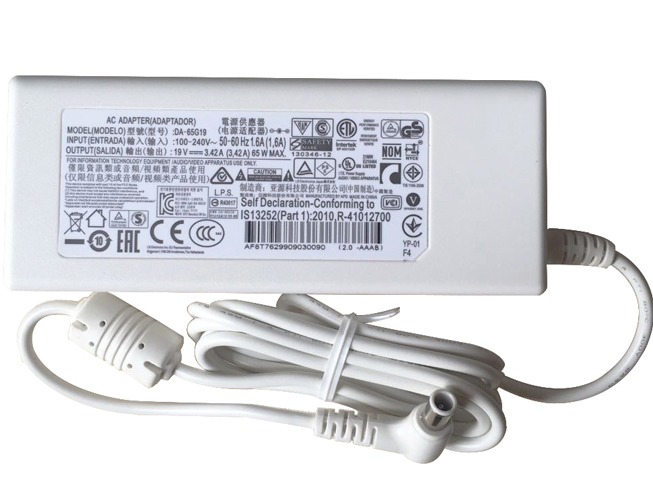
  • Superb Choice LG PA-1650-64 AC Adapter Charger

    • 100-240V 50-60Hz (for worldwid 19V 3.42A 65W , LG PA-1650-64, adapter 1 year warranty, 30 days money back, 100% new. 30% off all products! Warranty: 12 months! Short circuit protection Meets the environment according to RoHS European Standards. All our products are certified to CE Certificate CE Approval Certificate – Approved Safety. 
      LG PA-1650-64 adapter

      LG PA-1650-64 AC Power Adapter Charger

      AC Input:100-240V 50-60Hz (for worldwid
      DC Output: 19V 3.42A 65W 
      PA-1650-64 Power Adapter
      Adapter Part Numbers:
      DA-65G19 PSAB-L101A DA-48F19 DA-48F19 LCAP35 PA-1650-43 PA-1650-64 32MB24
      Adapter Fit Models:
      White LG Innotek PSAB-L101A DA-48F19 32MB24 
      Here,buy it now
      ES:LG PA-1650-64 AC adapter NL:LG PA-1650-64 Laptop adapter IT:LG PA-1650-64
      DE:PA-1650-64 Notebook-Netzteile.Das richtige LG Laptop Netzteil finden. 
      We ship to the Laptop adapter around Globe [USA, Canada, UK, NZ and Ireland, Australia]. View more laptop adapter. Contact with us if any problem on selecting power adapter. Quality: Quality is our number one priority! All LG PA-1650-64 adapters are New! Our own quality assurance ensures a high quality standard. All LG PA-1650-64 laptop power adapters are 100% compatible with the original product, in most cases our batteries have even more powerful performance than the original product thanks to the advanced technologies and cell standards.
      Safety: Safety is a key feature of our products. Our own safety controls guarantee the highest level of safety standards. 
      Guaranty: All LG PA-1650-64 products have a warranty of at least 1 year. For many products, e.g. LG PA-1650-64 adapter, we are so confident of the quality so outstanding, due to excessive loads, can not work. In case of doubt please contact us. The statutory warranty period remains unaffected.We will be happy to answer all your questions about their respective products and all other warranties. 

      Finding the Right Model of Adapter :

      · Get the laptop's model number. This is usually printed on a small sticker affixed to the underside of the laptop.

      · Get the power requirements for the laptop. This is also printed on a small sticker affixed to the underside of the laptop. It may also be printed near the laptop power port. Look for the amperage and the voltage required.

      · Look up the model number online to find if there are compatible adapters available. The voltage and amperage of the adapter need to match the requirements of the laptop.

      · Compare the connector type of the laptop adapter to any available adapters found online. They need to match to ensure that the adapter can plug into the laptop.

      Power Adapter Fast Shipping

      Adapter for FSP180-50PLA FSP NZ

      Adapter for HSTNN-CA27 HP NZ

      Adapter for ADS-40FSG-19 LG NZ

      Adapter for ACDP-100D01 Sony NZ

      Adapter for VGP-AC19V15 Sony NZ

      Wholesale and retail laptop adapter in NZ. Replacement for Acer,Apple, Compaq,Dell, FUJITSU, IBM,Lenovo,Sony and so on.

      These may be you want to look for : G238T for Dell Optiplex AC255AD-00 L255P-01 D255P-00 255W , L240EM-00 for DHVJN for Dell Inspiron 3650 Optiplex 3040 5040 7040 , 9RD1W for New Dell Optiplex 980 255w Power Supply K340R 9RD1W F255E-00 L255EM-01 , FSP180-50PLV for HK280- 86FP/FSP180-50PLV-36001754/36001822 , 290W for DELL OPTIPLEX 7020 MT POWER SUPPLY ,