-
SONY VGN-CR510E AC Power Adapter Charger
AC Input:100-240V 50-60Hz (for worldwi
DC Output: 19.5V 4.7A, 90W
VGN-CR510E Power Adapter
Adapter Part Numbers:Connecter size: 6.5 mm×4.4 mm, with central pin inside (ref to the picture).
Outlet: 3-prongVGP-AC19V31,VGP-AC19V32,VGP-AC19V35,VGP-AC19V36,VGP-AC19V41,VGP-AC19V42,VGP-AC19V59,VGP-AC19V60
VGP-AC19V33,VGP-AC19V34,VGP-AC19V37,VGP-AC19V38,VGP-AC19V43,VGP-AC19V44,VGP-AC19V49,VGP-AC19V48Adapter Fit Models:
Sony Vaio PCG-3J1L PCG-7Z2L NSW24063 N50
Here,buy it now
ES:Sony VGN-CR510E AC adapter NL:Sony VGN-CR510E Laptop adapter IT:Sony VGN-CR510E
DE:VGN-CR510E Notebook-Netzteile.Das richtige SONY Laptop Netzteil finden.
We ship to the Laptop adapter around Globe [USA, Canada, UK, NZ and Ireland, Australia]. View more laptop adapter. Contact with us if any problem on selecting power adapter. Quality: Quality is our number one priority! All Sony VGN-CR510E adapters are New! Our own quality assurance ensures a high quality standard. All Sony VGN-CR510E laptop power adapters are 100% compatible with the original product, in most cases our batteries have even more powerful performance than the original product thanks to the advanced technologies and cell standards.
Safety: Safety is a key feature of our products. Our own safety controls guarantee the highest level of safety standards.
Guaranty: All Sony VGN-CR510E products have a warranty of at least 1 year. For many products, e.g. Sony VGN-CR510E adapter, we are so confident of the quality so outstanding, due to excessive loads, can not work. In case of doubt please contact us. The statutory warranty period remains unaffected.We will be happy to answer all your questions about their respective products and all other warranties.Finding the Right Model of Adapter :
· Get the laptop's model number. This is usually printed on a small sticker affixed to the underside of the laptop.
· Get the power requirements for the laptop. This is also printed on a small sticker affixed to the underside of the laptop. It may also be printed near the laptop power port. Look for the amperage and the voltage required.
· Look up the model number online to find if there are compatible adapters available. The voltage and amperage of the adapter need to match the requirements of the laptop.
· Compare the connector type of the laptop adapter to any available adapters found online. They need to match to ensure that the adapter can plug into the laptop.
Power Adapter Fast Shipping
Adapter for FSP180-50PLA FSP NZ
Adapter for ADS-40FSG-19 LG NZ
Adapter for ACDP-100D01 Sony NZ
Adapter for VGP-AC19V15 Sony NZ
Wholesale and retail laptop adapter in NZ. Replacement for Acer,Apple, Compaq,Dell, FUJITSU, IBM,Lenovo,Sony and so on.
These may be you want to look for : L220NS-00 for Dell Inspiron 660s Slim SFF 220W Power Supply , API3FSO1 for Power Supply Unit 300 Watt , PS-5261-3DF-LF for Dell Optiplex 960 980 DT L255P-01 WU123 255W Power Supply , 39Y7201 for IBM X3550 M3 M2/X3650 M2/RD210 Series 675W , PC9051 for LENOVO M90Z POWER SUPPLY ,
Blog
-
Superb Choice Sony VGN-CR510E AC Adapter Charger
-
Replacement battery SONY VGP-BPL24
SONY VGP-BPL24 BPS24 BPSC24 Notebook Battery
Current:49WH
Voltage: 11.1V
VGP-BPL24 BPS24 BPSC24 Notebook Battery
battery Part Numbers:
VGP-BPL24 VGP-BPS24 VGP-BPSC24
battery Fit Models:
SONY VAIO SC VAIO SD
Here,buy it now
ES:SONY VGP-BPL24 Batería NL:SONY VGP-BPL24 ACCU IT:SONY VGP-BPL24 batteria
DE:VGP-BPL24 Akku.Das richtige SONY Akku finden.
We ship to the Notebook Battery around Globe [USA, Canada, UK, NZ and Ireland, Australia]. View more Notebook Battery. Contact with us if any problem on selecting power Notebook Battery.
SONY VGP-BPL24 Features:
All our high quality SONY VGP-BPL24 replacement Notebook Battery have been tested and proven to match and / or match the performance of the original SONY Notebook Battery and are 100% compatible with the original manufacturer's specifications. This SONY VGP-BPL24 Notebook Battery comes with a 1-year limited warranty.
Thank you for purchasing this high quality SONY VGP-BPL24 replacement Notebook Battery. We have a rigorous testing process to ensure that your ordered products (like this Notebook Battery for SONY VGP-BPL24) are functionally correct before being packaged and sent to you. And before placing an order, make sure that your old original part number of the SONY VGP-BPL24 Notebook Battery is listed below and that the shape is identical to the images in our Notebook Battery.Extend Notebook Battery SONY VGP-BPL24 Service life
1. Charge the battery! Consider keeping it plugged in for 12 hours before you unplug.
2. Switch on the optimized battery or power feature. You'll find this option — sometimes referred to as max battery mode — in your laptop system's built-in power management control panel. You can select the option to reduce the amount of time your inactive laptop stays on before powering itself down and going to sleep.
3. Remove the battery and clean the metal contacts. Wipe them with alcohol, ideally every two months, to ensure that the power transfer between the laptop and its battery is as efficient as possible. Allow the battery to dry thoroughly before replacing it!
4. Unplug any laptop accessories you aren't using. Even if they're not in use, accessories drain power from the battery.Wholesale and retail Notebook Battery in NZ. Replacement for Acer,Apple, Compaq,Dell, FUJITSU, IBM,Lenovo,Sony and so on.
These may be you want to look for : 182281-001 for COMPAQ EVO N100 N160 N800 N800C N800V N800W SERIES ,M3N-BAT402 for mitsubishi m3n-bat402 al330 series , L10P6F01 for Lenovo IdeaPad V560 Y560P , BTY-M6F for MSI GS60 ,BTP-39SN for AOPEN 1545 series ,
-
Long Lasting Dell 74VT4 Replacement AC adapter
DELL 74VT4 LA65NS2-01 AC Power Adapter Charger
AC Input:100 ~ 240V, 50~ 60Hz
DC Output: 19.5V~3.34A , 65 Watt
74VT4 LA65NS2-01 Power Adapter
Adapter Part Numbers:
Connector: 7.4mm*5.0mm
PA-12, PA12, 9T215, NADP- 90KB, 00001, 310-2860, 310-3149, 310-4408, 310-7251, 310-7696, 310-7697, 310-7866, 310-8363, 310-8941, 310-9048, 310-9050, 310-9249, 310-9438, 310-9439, 5U092, DF263, F7970, HF991, MK911, N2765, N2768, NF642, PA-1650-05D, PC531, XD733, XD802, YR733
Adapter Fit Models:
Dell XPS M140 XPS M1530 M1020
Here,buy it now
ES:Dell 74VT4 AC adapter NL:Dell 74VT4 Laptop adapter IT:Dell 74VT4
DE:74VT4 Notebook-Netzteile.Das richtige DELL Laptop Netzteil finden.
We ship to the Laptop adapter around Globe [USA, Canada, UK, NZ and Ireland, Australia]. View more laptop adapter. Contact with us if any problem on selecting power adapter. Quality: Quality is our number one priority! All Dell 74VT4 adapters are New! Our own quality assurance ensures a high quality standard. All Dell 74VT4 laptop power adapters are 100% compatible with the original product, in most cases our batteries have even more powerful performance than the original product thanks to the advanced technologies and cell standards.
Safety: Safety is a key feature of our products. Our own safety controls guarantee the highest level of safety standards.
Guaranty: All Dell 74VT4 products have a warranty of at least 1 year. For many products, e.g. Dell 74VT4 adapter, we are so confident of the quality so outstanding, due to excessive loads, can not work. In case of doubt please contact us. The statutory warranty period remains unaffected.We will be happy to answer all your questions about their respective products and all other warranties.Finding the Right Model of Adapter :
· Get the laptop's model number. This is usually printed on a small sticker affixed to the underside of the laptop.
· Get the power requirements for the laptop. This is also printed on a small sticker affixed to the underside of the laptop. It may also be printed near the laptop power port. Look for the amperage and the voltage required.
· Look up the model number online to find if there are compatible adapters available. The voltage and amperage of the adapter need to match the requirements of the laptop.
· Compare the connector type of the laptop adapter to any available adapters found online. They need to match to ensure that the adapter can plug into the laptop.
Power Adapter Fast Shipping
Adapter for FSP180-50PLA FSP NZ
Adapter for ADS-40FSG-19 LG NZ
Adapter for ACDP-100D01 Sony NZ
Adapter for VGP-AC19V15 Sony NZ
Wholesale and retail laptop adapter in NZ. Replacement for Acer,Apple, Compaq,Dell, FUJITSU, IBM,Lenovo,Sony and so on.
These may be you want to look for : R782R for New FSP Group FSP350- 701UH 350w 1U Server Power Supply , DPS-280JB_A for Lenovo PS-5281-01VF PC7001 A58 M58 M57 M8000S M6180 , 9RD1W for New Dell Optiplex 980 255w Power Supply K340R 9RD1W F255E-00 L255EM-01 , 54Y8861 for LENOVO THINKCENTER M90z POWER SUPPLY , DPS-800GB_Afor HP Proliant ML350 ML370 G5 Redundant Power Supply ,
-
Dell 0HTR7 Notebook Battery Replacement
-
DELL 0HTR7 0NMV5C NMV5C 075WY2 Notebook Battery
Current:64WH-8Cell
Voltage: 14.8V
0HTR7 0NMV5C NMV5C 075WY2 Notebook Battery
battery Part Numbers:
0HTR7 0NMV5C 075WY2
battery Fit Models:
Dell XPS 15z L511Z
Here,buy it now
ES:Dell 0HTR7 Batería NL:Dell 0HTR7 ACCU IT:Dell 0HTR7 batteria
DE:0HTR7 Akku.Das richtige DELL Akku finden.
We ship to the Notebook Battery around Globe [USA, Canada, UK, NZ and Ireland, Australia]. View more Notebook Battery. Contact with us if any problem on selecting power Notebook Battery.
Dell 0HTR7 Features:
All our high quality Dell 0HTR7 replacement Notebook Battery have been tested and proven to match and / or match the performance of the original Dell Notebook Battery and are 100% compatible with the original manufacturer's specifications. This Dell 0HTR7 Notebook Battery comes with a 1-year limited warranty.
Thank you for purchasing this high quality Dell 0HTR7 replacement Notebook Battery. We have a rigorous testing process to ensure that your ordered products (like this Notebook Battery for Dell 0HTR7) are functionally correct before being packaged and sent to you. And before placing an order, make sure that your old original part number of the Dell 0HTR7 Notebook Battery is listed below and that the shape is identical to the images in our Notebook Battery.Extend Notebook Battery Dell 0HTR7 Service life
1. Charge the battery! Consider keeping it plugged in for 12 hours before you unplug.
2. Switch on the optimized battery or power feature. You'll find this option — sometimes referred to as max battery mode — in your laptop system's built-in power management control panel. You can select the option to reduce the amount of time your inactive laptop stays on before powering itself down and going to sleep.
3. Remove the battery and clean the metal contacts. Wipe them with alcohol, ideally every two months, to ensure that the power transfer between the laptop and its battery is as efficient as possible. Allow the battery to dry thoroughly before replacing it!
4. Unplug any laptop accessories you aren't using. Even if they're not in use, accessories drain power from the battery.Wholesale and retail Notebook Battery in NZ. Replacement for Acer,Apple, Compaq,Dell, FUJITSU, IBM,Lenovo,Sony and so on.
These may be you want to look for : PA3421U-1BRS for Toshiba Satellite M30X M35x , MC55 for Motorola Symbol MC55/MC5590/MC55A0 , PA3641U for Toshiba Qosmio X300 X305 Series , 725606-001 for HP SPLIT 13 , D700TBAT-12 for Clevo PortaNote Promedion D700T, D750W series ,
-
-
Selling hot Lenovo L12S4Z51 Notebook Battery
LENOVO L12S4Z51 L12S4Y51 Notebook Battery
Current:2200mAh/32Wh
Voltage:
L12S4Z51 L12S4Y51 Notebook Battery
battery Part Numbers:
L12S4Y51 L12S4Z51 4ICR17/65
battery Fit Models:
Lenovo M490S M490SA K4350 K2450 K4250 B490S M4400S
Here,buy it now
ES:Lenovo L12S4Z51 Batería NL:Lenovo L12S4Z51 ACCU IT:Lenovo L12S4Z51 batteria
DE:L12S4Z51 Akku.Das richtige LENOVO Akku finden.
We ship to the Notebook Battery around Globe [USA, Canada, UK, NZ and Ireland, Australia]. View more Notebook Battery. Contact with us if any problem on selecting power Notebook Battery.
Lenovo L12S4Z51 Features:
All our high quality Lenovo L12S4Z51 replacement Notebook Battery have been tested and proven to match and / or match the performance of the original Lenovo Notebook Battery and are 100% compatible with the original manufacturer's specifications. This Lenovo L12S4Z51 Notebook Battery comes with a 1-year limited warranty.
Thank you for purchasing this high quality Lenovo L12S4Z51 replacement Notebook Battery. We have a rigorous testing process to ensure that your ordered products (like this Notebook Battery for Lenovo L12S4Z51) are functionally correct before being packaged and sent to you. And before placing an order, make sure that your old original part number of the Lenovo L12S4Z51 Notebook Battery is listed below and that the shape is identical to the images in our Notebook Battery.Extend Notebook Battery Lenovo L12S4Z51 Service life
1. Charge the battery! Consider keeping it plugged in for 12 hours before you unplug.
2. Switch on the optimized battery or power feature. You'll find this option — sometimes referred to as max battery mode — in your laptop system's built-in power management control panel. You can select the option to reduce the amount of time your inactive laptop stays on before powering itself down and going to sleep.
3. Remove the battery and clean the metal contacts. Wipe them with alcohol, ideally every two months, to ensure that the power transfer between the laptop and its battery is as efficient as possible. Allow the battery to dry thoroughly before replacing it!
4. Unplug any laptop accessories you aren't using. Even if they're not in use, accessories drain power from the battery.Wholesale and retail Notebook Battery in NZ. Replacement for Acer,Apple, Compaq,Dell, FUJITSU, IBM,Lenovo,Sony and so on.
These may be you want to look for : FPCBP217 for Fujitsu FMV-BIBLO LOOX M/D10 M/D15 M/E10 , SQU-816 for FRONTIER R/FRNU503 Series , 3800-8162 for Averatec 3700 3715 3800 series , SMP-LMXXFS2 for Everex StepNote NM3500W NC1501 VA2001T VA4103 VA4300 , AA-PL1VC6B for Samsung X420 X520 series ,
-
Fix Sticky Keyboard Keys
Step 1:Cleaning the Keys
Before you begin, unplug the keyboard or remove the batteries. If using a laptop, shut it down and unplug it. Pick a can up from an office supply store and spray around the base of each stuck key to dislodge dust and debris. If you don’t have compressed air, turn the keyboard upside down and tap the back while shaking gently. Dampen a cotton swab or clean cloth with isopropyl alcohol. Run it around the edge of each key to remove grease and dried liquid. Some people have reported success with baby oil, but it can remain in your keyboard, so use at your own risk. If you can see the debris underneath the key, use the toothpick or straightened paper clip to dislodge it.
Step 2:Cleaning Under the Keys
If you need to remove more than a few keys, take a photograph first so you remember which key goes where. Before you continue, unplug the keyboard, Most laptops have keys that are difficult or impossible to remove. In these cases, you’ll need a guide or advice specific to your laptop model, or you’ll need to have your laptop professionally repaired. On desktop keyboards, the outer key covering can usually be pried up easily with a flat-head screwdriver. Most debris is found in the letters and numbers. Other keys tend to be less dirty and more difficult to replace after removal, especially the space bar. Use compressed air to remove exposed dust and debris, and a cloth dampened with isopropyl alcohol to remove stickiness and stains. For laptop keyboards and other keyboards with delicate internal parts, use gentle swabbing only. If the underside of your keys are discolored or dirty, put them in a colander and run water over them, or rub them in a bucket of soapy water. Let them air dry completely on a paper towel.Try this technique if your laptop key raises or lowers extra slowly. After removing the key, look for a square plastic object around the button. Remove this gently by pushing the corners sideways with a toothpick. Rinse this in water to clean the hinge, then let air dry. On a Macbook, the catch that holds these hinges in place are on the lower left and right.Let all the keys dry, then push them down over the buttons to reattach them. Let the keyboard dry overnight before you use it.
Step 3:Fixing Hardware and Software Issues
If you only have keyboard problems when using a single application, you’ll need to look for help fixing that software issue.Inconsistent results from keystrokes can be caused by low battery power. USB keyboards work best when plugged directly into the computer, not into a hub, keylogger, or other device.Keyboards with a circular, six-pin PS/2 plug sometimes encounter errors if they are connected while the computer is on. Shut down the computer, disconnect the keyboard, and reconnect it again.If some of your laptop keys don’t register when pressed, there could be a loose internal connection. Unless you have a guide for your model and are comfortable disassembling your laptop yourself, you should take it to a professional.
-
Lenovo 45N1151 Notebook Battery Replacement
-
LENOVO 45N1151 Notebook Battery
Current:92wh
Voltage: 10.8V
45N1151 Notebook Battery
battery Part Numbers:
45N1148 45N1144 45N1150 45N1149 45N1145 45N1151
battery Fit Models:
Lenovo ThinkPad T440p T540p L440 L540 W540
Here,buy it now
ES:Lenovo 45N1151 Batería NL:Lenovo 45N1151 ACCU IT:Lenovo 45N1151 batteria
DE:45N1151 Akku.Das richtige LENOVO Akku finden.
We ship to the Notebook Battery around Globe [USA, Canada, UK, NZ and Ireland, Australia]. View more Notebook Battery. Contact with us if any problem on selecting power Notebook Battery.
Lenovo 45N1151 Features:
All our high quality Lenovo 45N1151 replacement Notebook Battery have been tested and proven to match and / or match the performance of the original Lenovo Notebook Battery and are 100% compatible with the original manufacturer's specifications. This Lenovo 45N1151 Notebook Battery comes with a 1-year limited warranty.
Thank you for purchasing this high quality Lenovo 45N1151 replacement Notebook Battery. We have a rigorous testing process to ensure that your ordered products (like this Notebook Battery for Lenovo 45N1151) are functionally correct before being packaged and sent to you. And before placing an order, make sure that your old original part number of the Lenovo 45N1151 Notebook Battery is listed below and that the shape is identical to the images in our Notebook Battery.Extend Notebook Battery Lenovo 45N1151 Service life
1. Charge the battery! Consider keeping it plugged in for 12 hours before you unplug.
2. Switch on the optimized battery or power feature. You'll find this option — sometimes referred to as max battery mode — in your laptop system's built-in power management control panel. You can select the option to reduce the amount of time your inactive laptop stays on before powering itself down and going to sleep.
3. Remove the battery and clean the metal contacts. Wipe them with alcohol, ideally every two months, to ensure that the power transfer between the laptop and its battery is as efficient as possible. Allow the battery to dry thoroughly before replacing it!
4. Unplug any laptop accessories you aren't using. Even if they're not in use, accessories drain power from the battery.Wholesale and retail Notebook Battery in NZ. Replacement for Acer,Apple, Compaq,Dell, FUJITSU, IBM,Lenovo,Sony and so on.
These may be you want to look for : 989803167281 for Philips HEARTSTART XL+ , A32-F80 for Asus F80 F80A F80H X85 X85C X85L X85S X85SE Series , L51-3S4000-C1L1 for E-SYSTEMS 3089 3090 3115 L51-3S4000-G1L1 BATTERY , A31-B34 for haier s500 series medion series/Drive battery , A1281 for Apple MacBook Pro 15" MB470CH/A MB470J/A ,
-
-
Superb Choice Lenovo 45N0374 AC Adapter Charger
LENOVO 45N0374 45N0370 45N0372 AC Power Adapter Charger
AC Input:100-240V,50-60Hz(for worldwide
DC Output: 20V 8.5A,170W
45N0374 45N0370 45N0372 Power Adapter
Adapter Part Numbers:
45N0370,45N0372,45N0374,45N0487,45N0514,ADL170NLC3A,ADL170NDC3A,ADL170NCC3A
Connecter size: Square (ref to the picture).
Outlet: 3-prong
Adapter Fit Models:
20V 8.5A 170W Lenovo ThinkPad W540 T540P
Here,buy it now
ES:Lenovo 45N0374 AC adapter NL:Lenovo 45N0374 Laptop adapter IT:Lenovo 45N0374
DE:45N0374 Notebook-Netzteile.Das richtige LENOVO Laptop Netzteil finden.
We ship to the Laptop adapter around Globe [USA, Canada, UK, NZ and Ireland, Australia]. View more laptop adapter. Contact with us if any problem on selecting power adapter. Quality: Quality is our number one priority! All Lenovo 45N0374 adapters are New! Our own quality assurance ensures a high quality standard. All Lenovo 45N0374 laptop power adapters are 100% compatible with the original product, in most cases our batteries have even more powerful performance than the original product thanks to the advanced technologies and cell standards.
Safety: Safety is a key feature of our products. Our own safety controls guarantee the highest level of safety standards.
Guaranty: All Lenovo 45N0374 products have a warranty of at least 1 year. For many products, e.g. Lenovo 45N0374 adapter, we are so confident of the quality so outstanding, due to excessive loads, can not work. In case of doubt please contact us. The statutory warranty period remains unaffected.We will be happy to answer all your questions about their respective products and all other warranties.Finding the Right Model of Adapter :
· Get the laptop's model number. This is usually printed on a small sticker affixed to the underside of the laptop.
· Get the power requirements for the laptop. This is also printed on a small sticker affixed to the underside of the laptop. It may also be printed near the laptop power port. Look for the amperage and the voltage required.
· Look up the model number online to find if there are compatible adapters available. The voltage and amperage of the adapter need to match the requirements of the laptop.
· Compare the connector type of the laptop adapter to any available adapters found online. They need to match to ensure that the adapter can plug into the laptop.
Power Adapter Fast Shipping
Adapter for FSP180-50PLA FSP NZ
Adapter for ADS-40FSG-19 LG NZ
Adapter for ACDP-100D01 Sony NZ
Adapter for VGP-AC19V15 Sony NZ
Wholesale and retail laptop adapter in NZ. Replacement for Acer,Apple, Compaq,Dell, FUJITSU, IBM,Lenovo,Sony and so on.
These may be you want to look for : 54Y8921 for AcBel SP50A36145 PCB020 , R782R for New FSP Group FSP350- 701UH 350w 1U Server Power Supply , H240AM-02 for Dell Optiplex 3040 5040 7040 3650 3656 SFF 2P1RD , HP-P3017F3P for Dell N381F Vostro 220 230 400 HIPRO 300W Power Supply PSU , W207D for TFX0250D5W Power Supply Dell Inspiron 530s 531s Slimline SFF NEW ,
-
Selling hot HP 681951-001 Notebook Battery
- The HP 681951-001 Notebook Battery equivalent is guaranteed to meet or exceed original specifications. All HP 681951-001 Notebook Battery are brand new,1 year Warranty, 100% Guarantee Quality and Fully Test!
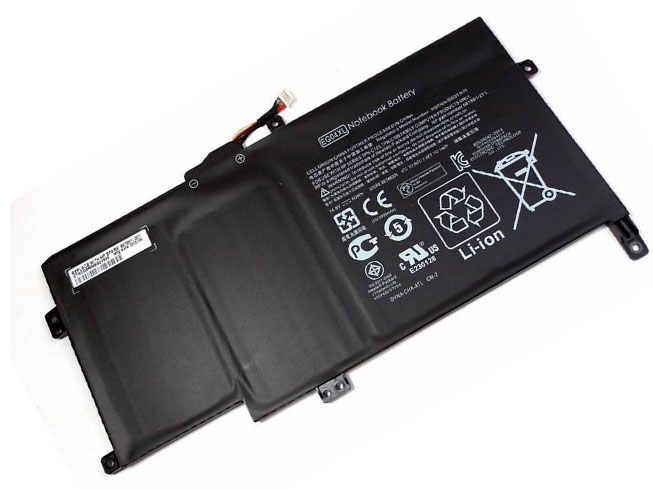
HP 681951-001 EG04XL Notebook Battery
Current:60wh/8cell
Voltage: 14.8V
681951-001 EG04XL Notebook Battery
battery Part Numbers:
681881-171 681951-001
battery Fit Models:
HP ENVY Sleekbook 6-1000 8-Cell 60Wh
Here,buy it now
ES:HP 681951-001 Batería NL:HP 681951-001 ACCU IT:HP 681951-001 batteria
DE:681951-001 Akku.Das richtige HP Akku finden.
We ship to the Notebook Battery around Globe [USA, Canada, UK, NZ and Ireland, Australia]. View more Notebook Battery. Contact with us if any problem on selecting power Notebook Battery.
HP 681951-001 Features:
All our high quality HP 681951-001 replacement Notebook Battery have been tested and proven to match and / or match the performance of the original HP Notebook Battery and are 100% compatible with the original manufacturer's specifications. This HP 681951-001 Notebook Battery comes with a 1-year limited warranty.
Thank you for purchasing this high quality HP 681951-001 replacement Notebook Battery. We have a rigorous testing process to ensure that your ordered products (like this Notebook Battery for HP 681951-001) are functionally correct before being packaged and sent to you. And before placing an order, make sure that your old original part number of the HP 681951-001 Notebook Battery is listed below and that the shape is identical to the images in our Notebook Battery.Extend Notebook Battery HP 681951-001 Service life
1. Charge the battery! Consider keeping it plugged in for 12 hours before you unplug.
2. Switch on the optimized battery or power feature. You'll find this option — sometimes referred to as max battery mode — in your laptop system's built-in power management control panel. You can select the option to reduce the amount of time your inactive laptop stays on before powering itself down and going to sleep.
3. Remove the battery and clean the metal contacts. Wipe them with alcohol, ideally every two months, to ensure that the power transfer between the laptop and its battery is as efficient as possible. Allow the battery to dry thoroughly before replacing it!
4. Unplug any laptop accessories you aren't using. Even if they're not in use, accessories drain power from the battery.Wholesale and retail Notebook Battery in NZ. Replacement for Acer,Apple, Compaq,Dell, FUJITSU, IBM,Lenovo,Sony and so on.
These may be you want to look for : VGP-BPS37 for Sony Vaio Pro11 Ultrabook 11.6 (Svp11216cw/s) , MR90Y for Inspiron 15 (3521) 14R (5421) Series , 312-0416 for Dell Inspiron 1300 B120 B130 series , SQU-804 for LG R410 R510 , 061384 for BOSE SOUNDLINK Mini Series ,
- The HP 681951-001 Notebook Battery equivalent is guaranteed to meet or exceed original specifications. All HP 681951-001 Notebook Battery are brand new,1 year Warranty, 100% Guarantee Quality and Fully Test!
-
Fix Sticky Keyboard Keys
Step 1:Cleaning the Keys
Before you begin, unplug the keyboard or remove the batteries. If using a laptop, shut it down and unplug it. Pick a can up from an office supply store and spray around the base of each stuck key to dislodge dust and debris. If you don’t have compressed air, turn the keyboard upside down and tap the back while shaking gently. Dampen a cotton swab or clean cloth with isopropyl alcohol. Run it around the edge of each key to remove grease and dried liquid. Some people have reported success with baby oil, but it can remain in your keyboard, so use at your own risk. If you can see the debris underneath the key, use the toothpick or straightened paper clip to dislodge it.
Step 2:Cleaning Under the Keys
If you need to remove more than a few keys, take a photograph first so you remember which key goes where. Before you continue, unplug the keyboard, Most laptops have keys that are difficult or impossible to remove. In these cases, you’ll need a guide or advice specific to your laptop model, or you’ll need to have your laptop professionally repaired. On desktop keyboards, the outer key covering can usually be pried up easily with a flat-head screwdriver. Most debris is found in the letters and numbers. Other keys tend to be less dirty and more difficult to replace after removal, especially the space bar. Use compressed air to remove exposed dust and debris, and a cloth dampened with isopropyl alcohol to remove stickiness and stains. For laptop keyboards and other keyboards with delicate internal parts, use gentle swabbing only. If the underside of your keys are discolored or dirty, put them in a colander and run water over them, or rub them in a bucket of soapy water. Let them air dry completely on a paper towel.Try this technique if your laptop key raises or lowers extra slowly. After removing the key, look for a square plastic object around the button. Remove this gently by pushing the corners sideways with a toothpick. Rinse this in water to clean the hinge, then let air dry. On a Macbook, the catch that holds these hinges in place are on the lower left and right.Let all the keys dry, then push them down over the buttons to reattach them. Let the keyboard dry overnight before you use it.
Step 3:Fixing Hardware and Software Issues
If you only have keyboard problems when using a single application, you’ll need to look for help fixing that software issue.Inconsistent results from keystrokes can be caused by low battery power. USB keyboards work best when plugged directly into the computer, not into a hub, keylogger, or other device.Keyboards with a circular, six-pin PS/2 plug sometimes encounter errors if they are connected while the computer is on. Shut down the computer, disconnect the keyboard, and reconnect it again.If some of your laptop keys don’t register when pressed, there could be a loose internal connection. Unless you have a guide for your model and are comfortable disassembling your laptop yourself, you should take it to a professional.