MSI ADP-180NB laptop adapter 100% compatible +100% stable. Meet original or exceed original specifications. High quality material, cheaper than original, low power consumption, strict safety test and performance test to ensure your computer is safely charged. We are committed to a one-year, 30-day unconditional refund for all notebook adapters.
MSI ADP-180NB laptop adapter 19.5V 9.2A 180W (for worldwide use)100-240V
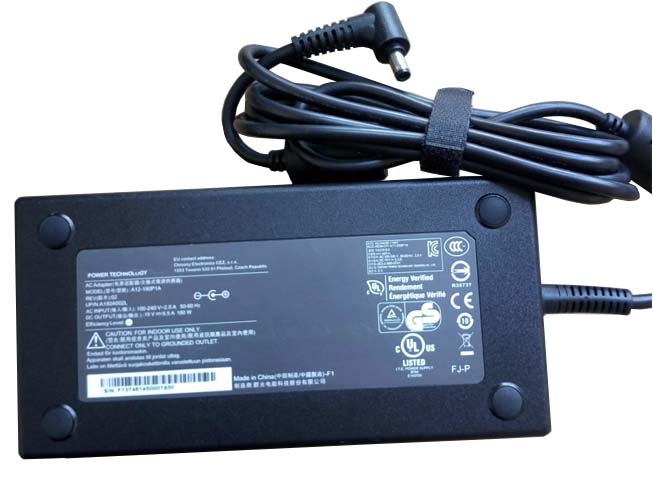
AC Input:100-240V
DC Output: 19.5V 9.2A 180W
Connection:5.5mm *2.5mm, Barrel tip (ref to the picture)
Model: ADP-180NB
Adapter Part Numbers:
ADP-180NB BC,S93-0404190-D04
Adapter Fit Models:
MSI GT60 2OKWS-674US
Here,buy it now
ES:MSI ADP-180NB Adaptador
IT:MSI ADP-180NB Adattatore prodotto nuovo
JP:MSI ADP-180NB
DE:ADP-180NB Notebook-Netzteile.
http://www.notebookbattery.co.nz/msi-laptop-power-adapter/adp-180nb-a178935.htm,
What should I pay attention to when using MSI ADP-180NB laptop adapter?
1. You should create a good cooling environment.
When using the in a high temperature environment, place the MSI ADP-180NB power adapter in a place that is not exposed to direct sunlight and ventilation; do not place the power adapter near the cooling air outlet of the notebook; at the same time, we can put the adapter on the side to make the heat better distributed.
2. If the voltage is unstable, it needs to be stopped in time.
Although the MSI ADP-180NB adapter is a wide-band operating voltage, it can be marked from 100V to 240V, but if it is used under extremely unstable voltage, it will also cause serious heat or damage to the power adapter. If you need to temporarily borrow power from other brands, try to choose an adapter with the same or larger output current.
3. If an abnormality occurs, stop using it in time.
When you are not using the MSI ADP-180NB adapter, unplug the power cord. Prolonged power-up will keep the adapter working and will affect the end of life. When the power adapter emits large working noise or even smoke, it is often damaged or has a fault. It should be stopped immediately and can be used again after being repaired by professional engineers.
Finding the Right Model of Adapter :
· Get the laptop's model number. This is usually printed on a small sticker affixed to the underside of the laptop.
· Get the power requirements for the laptop. This is also printed on a small sticker affixed to the underside of the laptop. It may also be printed near the laptop power port. Look for the amperage and the voltage required.
· Look up the model number online to find if there are compatible adapters available. The voltage and amperage of the adapter need to match the requirements of the laptop.
· Compare the connector type of the laptop adapter to any available adapters found online. They need to match to ensure that the adapter can plug into the laptop.
ABOUT US
NotebookBattery.co.nz is professional selling the highest quality notebook batteries and laptop power adapters for the lowest price with the highest level of service in NewZeland, all in a secure and convenient platform. Our product range includes replacement laptop batteries for most major laptop brands, including Dell, Apple, Compaq/HP, IBM/Lenovo, Fujitsu, Gateway, Sony and Toshiba. We ship to the Laptop adapter around Globe [USA, Canada, UK, NZ and Ireland, Australia]. View more laptop adapter. Contact with us if any problem on selecting power adapter.
Power Adapter Fast Shipping
Adapter for A120A010L MSI GE72 APACHE-235 A12-120P1A
Adapter for ADP-120MH MSI Gateway Series
Adapter for ADP-120MH MSI GE62 6QD MS-16J5
Adapter for ADP-150VB MSI GS70 2QE-083CN
Adapter for S93-0404250-D04 MSI GS70 GS72 GS72S 6QD-041XCN