High Quality HP KB06XL Notebook Battery, secure and stable! 100% Quality Assurance and Rigorous Testing! 100% Compatible with Original Model & Completely Chargered by Original adapter. Ordering and gettiing a 30% discount!“The shortest answer is doing”! 1year warranty and 30 days money back guarantee.
HP KB06XL Notebook Battery
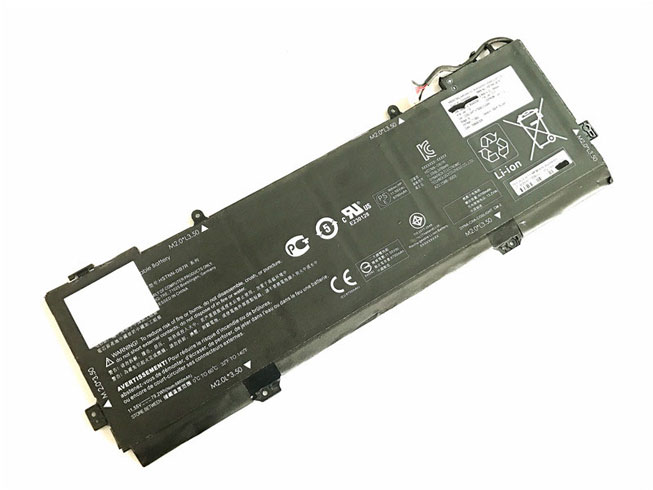
Current:79.2Wh
Voltage: 11.55V
KB06XL Notebook Battery
battery Part Numbers:
902401-2C1 902499-855 HSTNN-DB7R KB06XL TPN-Q179
battery Fit Models:
HP X360 15-BL002XX
Here,buy it now
ES: HP KB06XL Batería
NL: HP KB06XL ACCU
IT: HP KB06XL batteria
DE: KB06XL Akku
We ship to the Notebook Battery around Globe [USA, Canada, UK, NZ and Ireland, Australia]. View more Notebook Battery. Contact with us if any problem on selecting power Notebook Battery.
HP KB06XL Features:
All our high quality HP KB06XL replacement Notebook Battery have been tested and proven to match and / or match the performance of the original HP Notebook Battery and are 100% compatible with the original manufacturer's specifications. This HP KB06XL Notebook Battery comes with a 1-year limited warranty.
Thank you for purchasing this high quality HP KB06XL replacement Notebook Battery. We have a rigorous testing process to ensure that your ordered products (like this Notebook Battery for HP KB06XL) are functionally correct before being packaged and sent to you. And before placing an order, make sure that your old original part number of the HP KB06XL Notebook Battery is listed below and that the shape is identical to the images in our Notebook Battery.
Wholesale and retail Notebook Battery in NZ. Replacement for Acer,Apple, Compaq,Dell, FUJITSU, IBM,Lenovo,Sony and so on.
Extend Notebook Battery HP KB06XL Service life
1. Charge the battery! Consider keeping it plugged in for 12 hours before you unplug.
2. Switch on the optimized battery or power feature. You'll find this option — sometimes referred to as max battery mode — in your laptop system's built-in power management control panel. You can select the option to reduce the amount of time your inactive laptop stays on before powering itself down and going to sleep.
3. Remove the battery and clean the metal contacts. Wipe them with alcohol, ideally every two months, to ensure that the power transfer between the laptop and its battery is as efficient as possible. Allow the battery to dry thoroughly before replacing it!
4. Unplug any laptop accessories you aren't using. Even if they're not in use, accessories drain power from the battery.
http://www.notebookbattery.co.nz/laptop-batteies-hp/replace-battery-kb06xl-b179569.htm
These may be you want to look for :
SQU-1208 battery replace for HP Chromebook 11 G1
P21GK3 battery replace for Samsung SDI Microsoft Surface RT 1516
L14M4P23 battery replace for Lenovo Y700-17iSK
PA04-A701-C battery replace for Luggie PA04-A701-C PA04-A702-B PA04-A700 series
DS5020 battery replace for IBM 81Y2432 371-4676