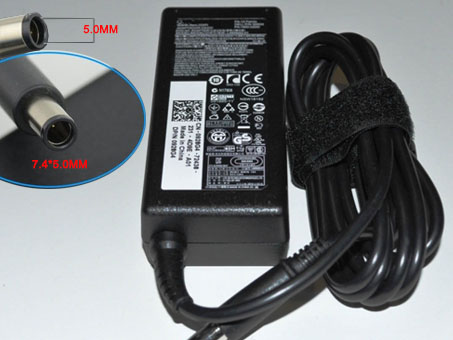
74VT4 LA65NS2-01 Universal Laptop Power Adapter. 100% Compatible with Dell XPS M140 XPS M1530 M1020.
DELL 74VT4 LA65NS2-01 Power Adapter – Product information
NZ laptop Ac Adapter shop, buy cheap Dell 74VT4 replacement laptop Ac Adapter, 74VT4 LA65NS2-01 AC Adapter with low price and high quality! Brand New Adapters for Dell XPS M140 XPS M1530 M1020.
AC Input:100 ~ 240V, 50~ 60Hz
DC Output: 19.5V~3.34A , 65 Watt
74VT4 LA65NS2-01 Power Adapter
Adapter Part Numbers:
Connector: 7.4mm*5.0mm
PA-12, PA12, 9T215, NADP- 90KB, 00001, 310-2860, 310-3149, 310-4408, 310-7251, 310-7696, 310-7697, 310-7866, 310-8363, 310-8941, 310-9048, 310-9050, 310-9249, 310-9438, 310-9439, 5U092, DF263, F7970, HF991, MK911, N2765, N2768, NF642, PA-1650-05D, PC531, XD733, XD802, YR733
Adapter Fit Models:
Dell Inspiron 300M, 500M, 505M, 510M, 600M, 610M, 630M, 640M, 700M, 710M
Dell Inspiron 1401,1410,1420,1440,1464,1501,1520,1521,1525,1526,1545,1750,6000,6400,8600,9200
Dell Inspiron E1405, E1505
Dell Latitude 120L, 131L
Dell Latitude D400, D410, D420, D430
Dell Latitude D500, D505, D510, D520, D530, D531, D531N
Dell Latitude D600, D610, D620, D630, D630N, D631, D631N
Dell Latitude D800, D810, D830, D830N
Dell Latitude X300, E4300
Dell studio 1535
Dell Precision M20, M60, M65, M70, M140, M1210
Dell XPS M140, M1020, M1210, M1330, M1530
Dell Vostro 1000, 1400, 1500
JP:Dell 74VT4
DE:74VT4 LA65NS2-01 Notebook-Netzteile.Das richtige DELL Laptop Netzteil finden.
The Dell 74VT4 AC adapter is used to recharge the battery in a notebook and to provide dependable power for operating the notebook for long periods of time. If an AC adapter fails it will not recharge the battery and it will not provide power to operate the notebook without a battery.
Test the Dell 74VT4 AC Adapter
Connect the output cord from the AC adapter to the notebook and plug the power cord into a working electrical outlet. Perform one or more of the following tasks to check the operation of the AC power adapter.
Check the power icon in the system tray.
If the icon resembles a power cord, and if moving the cursor over the icon displays the On AC Power message, the AC adapter is operating properly.
If the icon resembles a battery when the AC adapter is connected, the adapter is defective.
Check if the AC power adapter can operate the notebook when the battery is removed.
Do a normal shutdown of the PC.
Remove the battery from the Notebook.
Connect the DELL power adapter and press the Power button to start the notebook.
If the PC does not start and operate normally, the AC adapter is defective and must be replaced.
If the PC does start and operate normally, the AC adapter is working properly
Determine the AC Adapter Part Number
Different notebook models require different AC adapters. You will need to know the Product Number of your notebook to determine the Part Number of the replacement part.
Perform one of the following tasks to find the Product Number of your notebook.
Click Start, then click Help & Support. The product name, product number, and serial number of the notebook are displayed in the upper left hand corner of the Help and Support home page.
If the Notebook computer is not powered on, turn it over and locate the DELL Service Tag fastened to the back of the notebook. The Product Number (P/N) is printed on this tag. On some Notebook computers, the DELL Service Tag is located inside the battery compartment. Remove the battery from the Notebook to view the DELL Service Tag information.
Power Adapter Fast Shipping
Why buy laptop batteries & AC adapters from us?
www.notebookbattery.co.nz is quite a big site for selling laptop batteries,laptop AC adapters and electronic products online.
Low Prices Guarantee – Your best source for batteries and adapters. We are a new lithium battery manufacturer,Wholesaler and distributor of notebook computer batteries & AC adapter. Factory-direct price!
High Quality Guarantee – The batteries and adapters are rigorously tested for voltage, capacity, compatibility and safety to exceed original equipment manufacturer’s specifications . The cheap batteries meet or exceed the original batteries.
Secure Shopping Guarantee- Shopping is easy and 100% secure. We value your privacy and keep your order and personal information safe. We never share or rent our customer’s data. Click the “Add to cart” button to order what you need easily.
Wholesale and retail laptop adapter in NZ. Replacement for Acer,Apple, Compaq,Dell, FUJITSU, IBM,Lenovo,Sony and so on.
How to select laptop Adapter? Make sure the volt and currect of adapter is same as your origial. carefully check the size of tip of adapter is correct. check and confirm with the photo of power adapter is the one you are looking for. We ship to the Laptop adapter around Globe [USA, Canada, UK, NZ and Ireland, Australia]. View more laptop adapter. Contact with us if any problem on selecting power adapter.
These may be you want to look for : dell P2721 power supply, LENOVO 54Y8861 power supply, HP 403777-001 power supply, Dell 3WN11 power supply, dell FR610 power supply,