Replace Laptop battery in NZ

Tag: Replacement AC Power Adapter

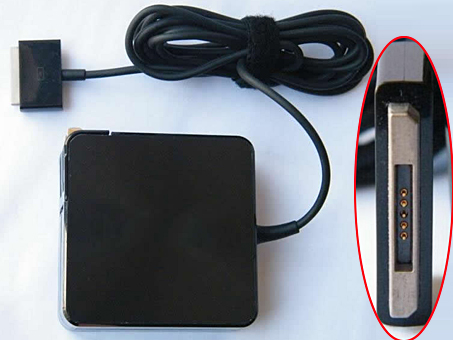
  • Buy Replacement AC Power Adapter ADP-65AW_A for ASUS Transformer Book TX300CA Convertible

    ASUS ADP-65AW_A adapter
    Buy Replacement AC Power Adapter ADP-65AW_A for ASUS Transformer Book TX300CA Convertible

    ASUS ADP-65AW_A Power Adapter – Product information

    NZ laptop Ac Adapter shop, buy cheap ASUS ADP-65AW_A replacement laptop Ac Adapter, ADP-65AW_A AC Adapter with low price and high quality! Brand New Adapters for ASUS Transformer Book TX300CA Convertible.
    AC Input:100-240V 50-60Hz
    DC Output: 19V 3.42A 65W
    ADP-65AW_A Power Adapter
    Adapter Part Numbers:
    Connecter size: 5PIN

    ADP-65AW A
    Adapter Fit Models:
    ASUS Transpourmer Book TX300CA Convertible

    JP:ASUS ADP-65AW_A
    DE:ADP-65AW_A Notebook-Netzteile.Das richtige ASUS Laptop Netzteil finden.

    The ASUS ADP-65AW_A AC adapter is used to recharge the battery in a notebook and to provide dependable power for operating the notebook for long periods of time. If an AC adapter fails it will not recharge the battery and it will not provide power to operate the notebook without a battery.

    Test the ASUS ADP-65AW_A AC Adapter
    Connect the output cord from the AC adapter to the notebook and plug the power cord into a working electrical outlet. Perform one or more of the following tasks to check the operation of the AC power adapter.
    Check the power icon in the system tray.
    If the icon resembles a power cord, and if moving the cursor over the icon displays the On AC Power message, the AC adapter is operating properly.
    If the icon resembles a battery when the AC adapter is connected, the adapter is defective.
    Check if the AC power adapter can operate the notebook when the battery is removed.
    Do a normal shutdown of the PC.
    Remove the battery from the Notebook.
    Connect the ASUS power adapter and press the Power button to start the notebook.
    If the PC does not start and operate normally, the AC adapter is defective and must be replaced.
    If the PC does start and operate normally, the AC adapter is working properly

    Determine the AC Adapter Part Number
    Different notebook models require different AC adapters. You will need to know the Product Number of your notebook to determine the Part Number of the replacement part.
    Perform one of the following tasks to find the Product Number of your notebook.
    Click Start, then click Help & Support. The product name, product number, and serial number of the notebook are displayed in the upper left hand corner of the Help and Support home page.
    If the Notebook computer is not powered on, turn it over and locate the ASUS Service Tag fastened to the back of the notebook. The Product Number (P/N) is printed on this tag. On some Notebook computers, the ASUS Service Tag is located inside the battery compartment. Remove the battery from the Notebook to view the ASUS Service Tag information.

    Power Adapter Fast Shipping

    Adapter for 10.5V/5V

    Adapter for PA-1650-02

    Adapter for PA3714E-1AC3

    Adapter for VGP-AC19V27

    Adapter for PA-1200-22HB

    Adapter for PA3714U-1ACA

    Adapter for 06TFFF

    Adapter for 2.58A

    Why buy laptop batteries & AC adapters from us?
    www.notebookbattery.co.nz is quite a big site for selling laptop batteries,laptop AC adapters and electronic products online.
    Low Prices Guarantee – Your best source for batteries and adapters. We are a new lithium battery manufacturer,Wholesaler and distributor of notebook computer batteries & AC adapter. Factory-direct price!
    High Quality Guarantee – The batteries and adapters are rigorously tested for voltage, capacity, compatibility and safety to exceed original equipment manufacturer’s specifications . The cheap batteries meet or exceed the original batteries.
    Secure Shopping Guarantee- Shopping is easy and 100% secure. We value your privacy and keep your order and personal information safe. We never share or rent our customer’s data. Click the “Add to cart” button to order what you need easily.

    Wholesale and retail laptop adapter in NZ. Replacement for Acer,Apple, Compaq,Dell, FUJITSU, IBM,Lenovo,Sony and so on.

    How to select laptop Adapter? Make sure the volt and currect of adapter is same as your origial. carefully check the size of tip of adapter is correct. check and confirm with the photo of power adapter is the one you are looking for. We ship to the Laptop adapter around Globe [USA, Canada, UK, NZ and Ireland, Australia]. View more laptop adapter. Contact with us if any problem on selecting power adapter.

    These may be you want to look for : Dell H250AD-00 power supply, FSP FSP180-50PLA1 power supply, HP PCA222 power supply, Acbel 250W power supply, Dell RM112 power supply,
  • Replacement AC Power Adapter VGP-AC19V33 VGP-AC19V19

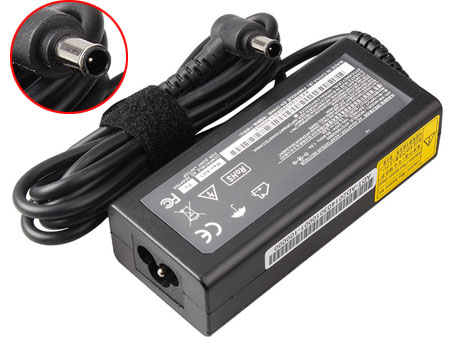
    Sony VGP-AC19V33 adapter
    Buy Replacement AC Power Adapter VGP-AC19V33 VGP-AC19V19 for Sony Vaio PCG-7133L PCG-7141L PCG-71911L

    SONY VGP-AC19V33 VGP-AC19V19 Power Adapter – Product information

    NZ laptop Ac Adapter shop, buy cheap Sony VGP-AC19V33 replacement laptop Ac Adapter, VGP-AC19V33 VGP-AC19V19 AC Adapter with low price and high quality! Brand New Adapters for Sony Vaio PCG-7133L PCG-7141L PCG-71911L .
    AC Input:100-240V 50-60Hz (for wor
    DC Output: 19.5V 3.9A, 75W
    VGP-AC19V33 VGP-AC19V19 Power Adapter
    Adapter Part Numbers:
    Connecter size: 6.5 mm×4.4 mm, with central pin inside (ref to the picture).
    Power LED indicator
    Outlet: 2-prong

    VGP-AC19V33,VGP-AC19V34 ,VGP-AC19V37,VGP-AC19V38
    Adapter Fit Models:

    Sony Vaio VPCEA Series

    VPCEA12EA VPCEA12EA/BI VPCEA12EG VPCEA12EG/WI VPCEA12EH
    VPCEA12EH/WI VPCEA12EN VPCEA12EN/BI VPCEA13EH VPCEA13EH/L
    VPCEA13EN VPCEA13EN/L VPCEA15FA VPCEA15FA/P VPCEA15FG
    VPCEA15FG/P VPCEA15FN VPCEA15FN/L VPCEA16FG VPCEA17FG
    VPCEA17FH VPCEA1AGG VPCEA1BGN VPCEA21EG VPCEA21EH
    VPCEA21EN VPCEA22EA VPCEA22EG VPCEA22EH VPCEA22EN
    VPCEA23EH VPCEA23EN VPCEA25FA VPCEA25FG VPCEA25FN
    VPCEA26FA VPCEA26FF VPCEA26FG VPCEA31EG VPCEA32EA
    VPCEA32EG VPCEA32EH VPCEA32EN VPCEA33EN VPCEA35FA
    VPCEA35FH VPCEA36FA VPCEA36FF VPCEA36FG VPCEA36FH
    VPCEA37FA VPCEA37FG VPCEA37FH VPCEA3BGN VPCEA42EA VPCEA42EA/BI
    JP:Sony VGP-AC19V33
    DE:VGP-AC19V33 VGP-AC19V19 Notebook-Netzteile.Das richtige SONY Laptop Netzteil finden.

    The Sony VGP-AC19V33 AC adapter is used to recharge the battery in a notebook and to provide dependable power for operating the notebook for long periods of time. If an AC adapter fails it will not recharge the battery and it will not provide power to operate the notebook without a battery.

    Test the Sony VGP-AC19V33 AC Adapter
    Connect the output cord from the AC adapter to the notebook and plug the power cord into a working electrical outlet. Perform one or more of the following tasks to check the operation of the AC power adapter.
    Check the power icon in the system tray.
    If the icon resembles a power cord, and if moving the cursor over the icon displays the On AC Power message, the AC adapter is operating properly.
    If the icon resembles a battery when the AC adapter is connected, the adapter is defective.
    Check if the AC power adapter can operate the notebook when the battery is removed.
    Do a normal shutdown of the PC.
    Remove the battery from the Notebook.
    Connect the SONY power adapter and press the Power button to start the notebook.
    If the PC does not start and operate normally, the AC adapter is defective and must be replaced.
    If the PC does start and operate normally, the AC adapter is working properly

    Determine the AC Adapter Part Number
    Different notebook models require different AC adapters. You will need to know the Product Number of your notebook to determine the Part Number of the replacement part.
    Perform one of the following tasks to find the Product Number of your notebook.
    Click Start, then click Help & Support. The product name, product number, and serial number of the notebook are displayed in the upper left hand corner of the Help and Support home page.
    If the Notebook computer is not powered on, turn it over and locate the SONY Service Tag fastened to the back of the notebook. The Product Number (P/N) is printed on this tag. On some Notebook computers, the SONY Service Tag is located inside the battery compartment. Remove the battery from the Notebook to view the SONY Service Tag information.

    Power Adapter Fast Shipping

    Adapter for AD-6019R

    Adapter for 19.5V

    Adapter for ADP-90VH_D

    Adapter for SMT-170QN

    Adapter for 74X5J

    Adapter for ADP-65JH_DB

    Adapter for VGN-CR510E

    Adapter for ADP-135KB_T

    Why buy laptop batteries & AC adapters from us?
    www.notebookbattery.co.nz is quite a big site for selling laptop batteries,laptop AC adapters and electronic products online.
    Low Prices Guarantee – Your best source for batteries and adapters. We are a new lithium battery manufacturer,Wholesaler and distributor of notebook computer batteries & AC adapter. Factory-direct price!
    High Quality Guarantee – The batteries and adapters are rigorously tested for voltage, capacity, compatibility and safety to exceed original equipment manufacturer’s specifications . The cheap batteries meet or exceed the original batteries.
    Secure Shopping Guarantee- Shopping is easy and 100% secure. We value your privacy and keep your order and personal information safe. We never share or rent our customer’s data. Click the “Add to cart” button to order what you need easily.

    Wholesale and retail laptop adapter in NZ. Replacement for Acer,Apple, Compaq,Dell, FUJITSU, IBM,Lenovo,Sony and so on.

    How to select laptop Adapter? Make sure the volt and currect of adapter is same as your origial. carefully check the size of tip of adapter is correct. check and confirm with the photo of power adapter is the one you are looking for. We ship to the Laptop adapter around Globe [USA, Canada, UK, NZ and Ireland, Australia]. View more laptop adapter. Contact with us if any problem on selecting power adapter.

    These may be you want to look for : Dell 2TXYM power supply, FSP FSP270-60LE power supply, Dell P3JW1 power supply, Enhance ENP-3927B power supply, HIGH HPC-1000-G14C power supply,

  • Buy Replacement AC Power Adapter W860CU W870CU for 150W

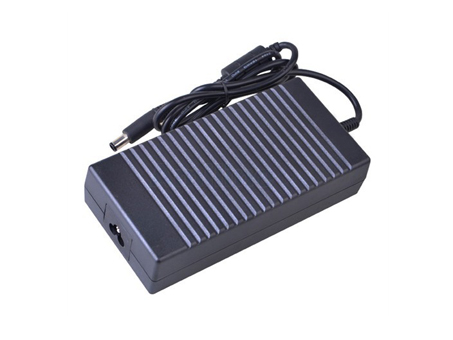
    CLEVO W860CU adapter
    Buy Replacement AC Power Adapter W860CU W870CU for 150W (EPS2.0)(TUV) 19V 7.9A DC O/P 2P HIPRO (HP-A1501A3B1)

    CLEVO W860CU W870CU Power Adapter – Product information

    NZ laptop Ac Adapter shop, buy cheap CLEVO W860CU replacement laptop Ac Adapter, W860CU W870CU AC Adapter with low price and high quality! Brand New Adapters for 150W (EPS2.0)(TUV) 19V 7.9A DC O/P 2P HIPRO (HP-A1501A3B1).
    AC Input:100-240V 50-60Hz
    DC Output: 19V-7.9A 150W
    W860CU W870CU Power Adapter
    Adapter Part Numbers:
    ADP-65YB B
    Adapter Fit Models:
    CLEVO W860CU W870CU 6-51-W8702-010


    Outlet: 3-prong
    Cord Cable: US/ UK/ EU/ AU plug
    One Power cord is included with this adapter for FREE
    Note: Please make sure the DC output and Connecter size of ac adapter are accordant before you bid!!!

    JP:CLEVO W860CU
    DE:W860CU W870CU Notebook-Netzteile.Das richtige CLEVO Laptop Netzteil finden.

    The CLEVO W860CU AC adapter is used to recharge the battery in a notebook and to provide dependable power for operating the notebook for long periods of time. If an AC adapter fails it will not recharge the battery and it will not provide power to operate the notebook without a battery.

    Test the CLEVO W860CU AC Adapter
    Connect the output cord from the AC adapter to the notebook and plug the power cord into a working electrical outlet. Perform one or more of the following tasks to check the operation of the AC power adapter.
    Check the power icon in the system tray.
    If the icon resembles a power cord, and if moving the cursor over the icon displays the On AC Power message, the AC adapter is operating properly.
    If the icon resembles a battery when the AC adapter is connected, the adapter is defective.
    Check if the AC power adapter can operate the notebook when the battery is removed.
    Do a normal shutdown of the PC.
    Remove the battery from the Notebook.
    Connect the CLEVO power adapter and press the Power button to start the notebook.
    If the PC does not start and operate normally, the AC adapter is defective and must be replaced.
    If the PC does start and operate normally, the AC adapter is working properly

    Determine the AC Adapter Part Number
    Different notebook models require different AC adapters. You will need to know the Product Number of your notebook to determine the Part Number of the replacement part.
    Perform one of the following tasks to find the Product Number of your notebook.
    Click Start, then click Help & Support. The product name, product number, and serial number of the notebook are displayed in the upper left hand corner of the Help and Support home page.
    If the Notebook computer is not powered on, turn it over and locate the CLEVO Service Tag fastened to the back of the notebook. The Product Number (P/N) is printed on this tag. On some Notebook computers, the CLEVO Service Tag is located inside the battery compartment. Remove the battery from the Notebook to view the CLEVO Service Tag information.

    Power Adapter Fast Shipping

    Adapter for DA130PM130

    Adapter for AP.0650A.005

    Adapter for E5430

    Adapter for 78W

    Adapter for ADP-135KB_T

    Adapter for 140W

    Adapter for 19V

    Adapter for PSC11R-050

    Why buy laptop batteries & AC adapters from us?
    www.notebookbattery.co.nz is quite a big site for selling laptop batteries,laptop AC adapters and electronic products online.
    Low Prices Guarantee – Your best source for batteries and adapters. We are a new lithium battery manufacturer,Wholesaler and distributor of notebook computer batteries & AC adapter. Factory-direct price!
    High Quality Guarantee – The batteries and adapters are rigorously tested for voltage, capacity, compatibility and safety to exceed original equipment manufacturer’s specifications . The cheap batteries meet or exceed the original batteries.
    Secure Shopping Guarantee- Shopping is easy and 100% secure. We value your privacy and keep your order and personal information safe. We never share or rent our customer’s data. Click the “Add to cart” button to order what you need easily.

    Wholesale and retail laptop adapter in NZ. Replacement for Acer,Apple, Compaq,Dell, FUJITSU, IBM,Lenovo,Sony and so on.

    How to select laptop Adapter? Make sure the volt and currect of adapter is same as your origial. carefully check the size of tip of adapter is correct. check and confirm with the photo of power adapter is the one you are looking for. We ship to the Laptop adapter around Globe [USA, Canada, UK, NZ and Ireland, Australia]. View more laptop adapter. Contact with us if any problem on selecting power adapter.

    These may be you want to look for : HP 445102-002 power supply, Dell 0T122K power supply, HP PCA222 power supply, dell K340R power supply, HP 504965-001 power supply,