Replace Laptop battery in NZ

Category: Laptop Battery

Battery introduction about hp,acer,sony… in notebookbattery.co.nz

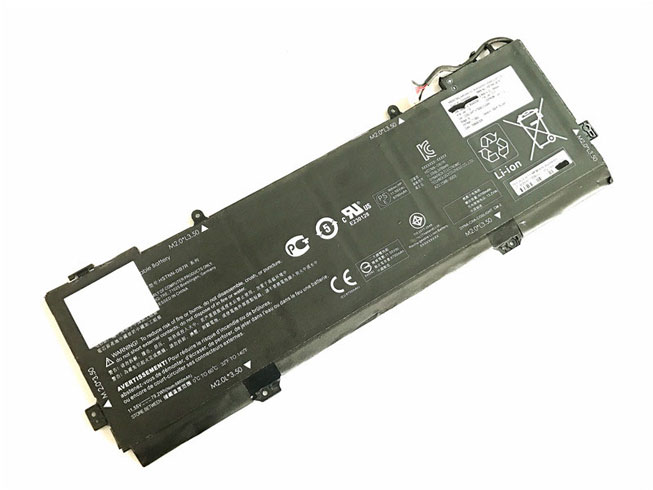
  • 5685mAh/43.7wh Battery Replacement for HP SPECTRE 13-V117TU(Y8J13PA) – (BF04XL)

    Shopping HP BF04XL Battery 7.7v 5685mAh/43.7wh at www.notebookbattery.co.nz. You could get a brand new 100% and compatible with battery for HP SPECTRE 13-V117TU(Y8J13PA). Fast shipping!. 1-year warranty, 30-day money-back guarantee.

    HP BF04XL 5685mAh/43.7wh 7.7v Notebook Battery
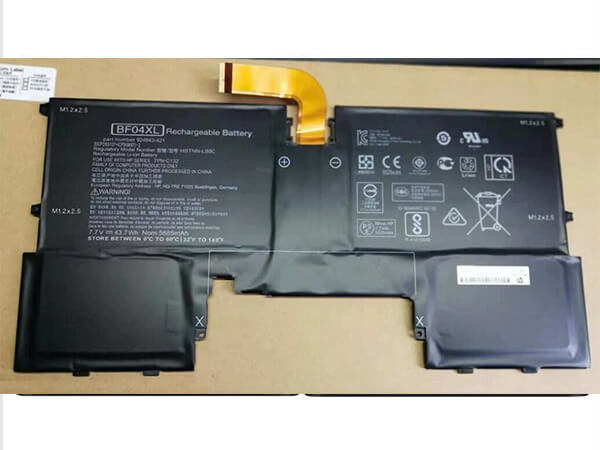
    HP BF04XL battery

      Product details:

    • Brand: HP BF04XL Notebook batteries

    • Type: Li-ion battery

    • Voltage: 7.7v

    • Capacity: 5685mAh/43.7wh

    Replace the following batteries:

    924843-421 HSTNN-LB8C BF04XL BF04043XL

    Compatible with the following models:

    HP Spectre 13-af000
    HP Spectre 13-af000ng
    HP Spectre 13-af000TU

    HP Spectre 13-af001ng
    HP Spectre 13-AF001TU

    HP Spectre 13-af002ng
    HP Spectre 13-AF002TU

    HP Spectre 13-af003ng
    HP Spectre 13-af003TU

    HP Spectre 13-AF004TU
    HP Spectre 13-af006nf
    HP Spectre 13-af031ng
    HP Spectre 13-af032ng
    HP Spectre 13-af033ng
    HP Spectre 13-af034ng
    HP Spectre 13-af035ng

    HP Spectre 13-v100

    HP Spectre 13-V115TU
    HP Spectre 13-V115TU(Y8J11PA)

    HP Spectre 13-V116TU
    HP Spectre 13-V116TU(Y8J12PA)

    HP Spectre 13-v117TU
    HP Spectre 13-V117TU(Y8J13PA)

    http://www.notebookbattery.co.nz/laptop-batteies-hp/replace-battery-bf04xl-b180867.htm

    Laptop battery tips

    Newly bought notebooks, the first three charges do not need to reach 12 hours

    because the current laptop batteries have a management chip that can control the charging limit, when the battery is full, it will automatically cut off the charging function, thus protecting the battery life and avoiding overcharging.

    It is not necessary to discharge completely before each charge

    because this deep discharge will shorten the battery life. It is recommended to charge when the remaining 10% is left. In addition, when there is still more than 30% of the battery power, it is best not to charge, because the memory effect does exist. The power management software allows you to check the battery level at any time, and the HP SPECTRE 13-V117TU(Y8J13PA) come with a battery indicator that allows you to check the remaining battery even without turning it on.

    When plugging in AC power (connecting the power adapter), you don't need to remove the battery

    because most laptop batteries need to be charged below 90%, and the battery naturally discharges to this capacity takes two weeks to a month, so use it every day. Notebooks don't have to worry about repeated charging and unloading, not to mention the fact that emergency power outages are more damaging to data.

    If you want to store unused batteries for a long time, you need to put them in a dry, low temperature environment while maintaining 40% of the remaining power in the battery. In addition, it is best to take out the battery once a month to ensure a good storage state and service life of the battery.

    Reducing the brightness of your notebook screen can extend the life of your notebook and reduce the number of times it is charged.

    Use some power management tools, such as the Power Assistant on the HP SPECTRE 13-V117TU(Y8J13PA), which can even monitor the energy consumption of each component in real time through the PMC circuit, and accurately summarize the company's status to the HP client Configuration Manager software, and optionally Turn off the specified parts to extend battery life.

    Why you buy a BF04XL battery in our store

    1. BF04XL battery will be tested repeatedly before leaving the factory to ensure that it is compatible with the original model and finally packaged.

    2. We are committed to providing quality services. All replace batteries, adapters and other electronic products have quality assurance and discount up to 35%.

    3. All products are 1-year warranty and 30-days money-back guarantee.

    4. All products are acknowledged by CE.

    5. Here you can enjoy more services and experiences, happy shopping and happy life!

    These may be you want to look for :

    L17M3PG2 battery replacement for Lenovo Legion Y7000P Y570 Y530 Y740-15ICH

    BTY-M47 battery replacement for MSI GS40 GS43VR 6RE GS40 6QE

    L13M4P61 battery replacement for LENOVO EDGE 15 80H1 15.6inch

    A32N1405 battery replacement for ASUS G551 G551J G551JK G551JM ROG G771 G771J G771JK

    BL242 battery replacement for Lenovo A6000 A6000 Plus Lemo K3 K3-W K3-T
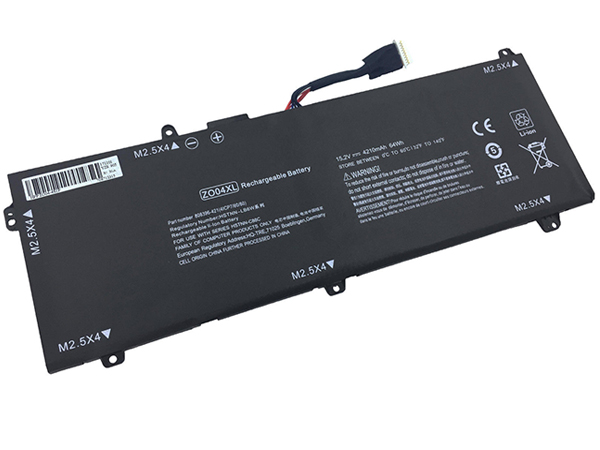
  • High-quality HP ZO04XL battery on sale

    This HP ZO04XL Battery has a capacity of 4210mAh / 64Wh and a voltage of 15.2V. Suitable for HP ZBook Studio G3 Mobile Workstation 808396-421. 100% compatible and 100% safe. 1-year warranty, 30-day money back guarantee. 

    HP ZO04XL 4210mAh / 64Wh 15.2V Notebook Battery

    HP ZO04XL battery

      Product details:

    • Brand: HP ZO04XL Notebook batteries

    • Type: Li-Polymer battery

    • Voltage: 15.2V

    • Capacity: 4210mAh / 64Wh

    Replace the following batteries:

    ZO04 ZO04XL 808396-421 808450-001 HSTNN-CS8C HSTNN-C88C HSTNN-LB6W ENR606080A2-CZO04

    Compatible with the following models:

    HP ZBook Studio G3 Mobile Workstation

    http://www.notebookbattery.co.nz/laptop-batteies-hp/replace-battery-zo04xl-b179379.htm

    ZO04XL Laptop battery tips

    Newly bought notebooks, the first three charges do not need to reach 12 hours

    because the current laptop batteries have a management chip that can control the charging limit, when the battery is full, it will automatically cut off the charging function, thus protecting the battery life and avoiding overcharging.

    It is not necessary to discharge completely before each charge

    because this deep discharge will shorten the battery life. It is recommended to charge when the remaining 10% is left. In addition, when there is still more than 30% of the battery power, it is best not to charge, because the memory effect does exist. The power management software allows you to check the battery level at any time, and the HP ZBook Studio G3 Mobile Workstation 808396-421 come with a battery indicator that allows you to check the remaining battery even without turning it on.

    When plugging in AC power (connecting the power adapter), you don't need to remove the battery

    because most laptop batteries need to be charged below 90%, and the battery naturally discharges to this capacity takes two weeks to a month, so use it every day. Notebooks don't have to worry about repeated charging and unloading, not to mention the fact that emergency power outages are more damaging to data.

    If you want to store unused batteries for a long time, you need to put them in a dry, low temperature environment while maintaining 40% of the remaining power in the battery. In addition, it is best to take out the battery once a month to ensure a good storage state and service life of the battery.

    Reducing the brightness of your notebook screen can extend the life of your notebook and reduce the number of times it is charged.

    Use some power management tools, such as the Power Assistant on the HP ZBook Studio G3 Mobile Workstation 808396-421, which can even monitor the energy consumption of each component in real time through the PMC circuit, and accurately summarize the company's status to the HPclient Configuration Manager software, and optionally Turn off the specified parts to extend battery life.

    ABOUT US

    Wholesale and retail Notebook Battery in NZ. Replacement for Acer, Apple, Compaq, Dell, FUJITSU, IBM, Lenovo, Sony and so on.

    These may be you want to look for :

    VR03XL battery replacement for HP Envy 13-D046TU D051TU Pavilion 13-D Series

    G3HTA027H battery replacement for Microsoft Surface Pro 4 Tablet

    B_22/1.6/1.6Ah battery replacement for Hilti B 22/1.6/1.6Ah Cordless tool

    EG04XL battery replacement for HP Envy Sleekbook 6 Series Laptop 681881-1B1

    BL-N3500 battery replacement for BLU Pure XL P0010UU 3500mAh BL-N3500 Displace

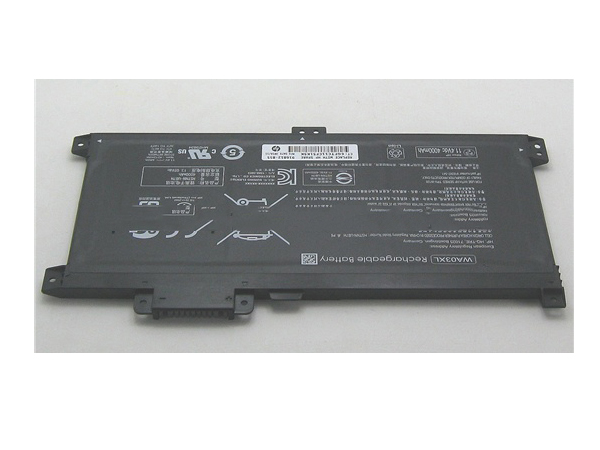
  • HP WA03XL 48.01Wh/4212mAh 11.4V battery

    This HP WA03XL Battery has a capacity of 48.01Wh/4212mAh and a voltage of 11.4V. Suitable for HP HSTNN-UB7H TPN-W126 HSTNN-LB7T 916367-541 4212mAh. 100% compatible and 100% safe. 1-year warranty, 30-day money back guarantee. 

    HP WA03XL 48.01Wh/4212mAh 11.4V Notebook Battery

    HP WA03XL battery

      Product details:

    • Brand: HP WA03XL Notebook batteries

    • Type: Li-ion battery

    • Voltage: 11.4V

    • Capacity: 48.01Wh/4212mAh

    Replace the following batteries:

    916367-541 916812-055 HSTNN-UB7H TPN-W126 WA03XL HSTNN-LB7T 916812-855

    Compatible with the following models:

    HP 916367-541 916812-055 HSTNN-UB7H TPN-W126 WA03XL HSTNN-LB7T 916812-855

    http://www.notebookbattery.co.nz/laptop-batteies-hp/replace-battery-wa03xl-b179380.htm

    WA03XL Laptop battery tips

    Newly bought notebooks, the first three charges do not need to reach 12 hours

    because the current laptop batteries have a management chip that can control the charging limit, when the battery is full, it will automatically cut off the charging function, thus protecting the battery life and avoiding overcharging.

    It is not necessary to discharge completely before each charge

    because this deep discharge will shorten the battery life. It is recommended to charge when the remaining 10% is left. In addition, when there is still more than 30% of the battery power, it is best not to charge, because the memory effect does exist. The power management software allows you to check the battery level at any time, and the HP HSTNN-UB7H TPN-W126 HSTNN-LB7T 916367-541 4212mAh come with a battery indicator that allows you to check the remaining battery even without turning it on.

    When plugging in AC power (connecting the power adapter), you don't need to remove the battery

    because most laptop batteries need to be charged below 90%, and the battery naturally discharges to this capacity takes two weeks to a month, so use it every day. Notebooks don't have to worry about repeated charging and unloading, not to mention the fact that emergency power outages are more damaging to data.

    If you want to store unused batteries for a long time, you need to put them in a dry, low temperature environment while maintaining 40% of the remaining power in the battery. In addition, it is best to take out the battery once a month to ensure a good storage state and service life of the battery.

    Reducing the brightness of your notebook screen can extend the life of your notebook and reduce the number of times it is charged.

    Use some power management tools, such as the Power Assistant on the HP HSTNN-UB7H TPN-W126 HSTNN-LB7T 916367-541 4212mAh, which can even monitor the energy consumption of each component in real time through the PMC circuit, and accurately summarize the company's status to the HPclient Configuration Manager software, and optionally Turn off the specified parts to extend battery life.

    ABOUT US

    Wholesale and retail Notebook Battery in NZ. Replacement for Acer, Apple, Compaq, Dell, FUJITSU, IBM, Lenovo, Sony and so on.

    These may be you want to look for :

    PT6V8 battery replacement for Dell Alienware M11x M14x R1 R2 R3 T7YJR P06T 8P6X6 08P6X6

    A31-B34 battery replacement for haier s500 series medion series/Drive battery

    EB-BT561ABE battery replacement for Samsung GALAXY Tab E T560 T561 SM-T560 5000m

    PA5195U-1BRS battery replacement for Toshiba Satellite C50D C55D L50t L55 S50Dt S50t

    BTY-M6F battery replacement for MSI GS60

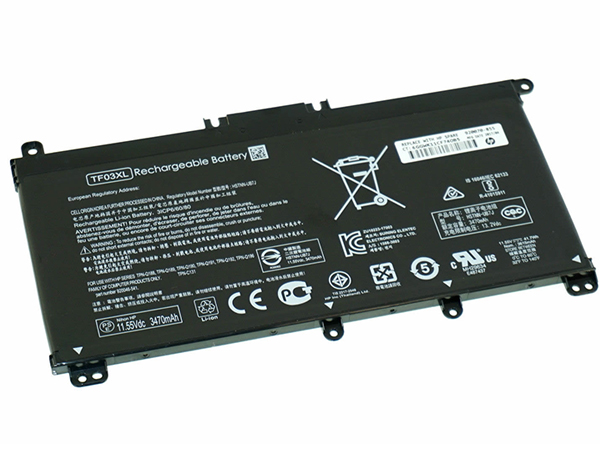
  • Best price for HP TF03XL Notebook Battery

    This HP TF03XL Battery has a capacity of 3470mAh/41.7Wh and a voltage of 11.55V. Suitable for HP Pavilion 15-CD HSTNN-LB7X 920046-421 920070-855. 100% compatible and 100% safe. 1-year warranty, 30-day money back guarantee. 

    HP TF03XL 3470mAh/41.7Wh 11.55V Notebook Battery

    HP TF03XL battery

      Product details:

    • Brand: HP TF03XL Notebook batteries

    • Type: Li-ion battery

    • Voltage: 11.55V

    • Capacity: 3470mAh/41.7Wh

    Replace the following batteries:

    TF03XL HSTNN-LB7X HSTNN-LB7L 920070-855 920046-421

    Compatible with the following models:

    HP Pavilion 15-CD Series

    http://www.notebookbattery.co.nz/laptop-batteies-hp/replace-battery-tf03xl-b179381.htm

    TF03XL Laptop battery tips

    Newly bought notebooks, the first three charges do not need to reach 12 hours

    because the current laptop batteries have a management chip that can control the charging limit, when the battery is full, it will automatically cut off the charging function, thus protecting the battery life and avoiding overcharging.

    It is not necessary to discharge completely before each charge

    because this deep discharge will shorten the battery life. It is recommended to charge when the remaining 10% is left. In addition, when there is still more than 30% of the battery power, it is best not to charge, because the memory effect does exist. The power management software allows you to check the battery level at any time, and the HP Pavilion 15-CD HSTNN-LB7X 920046-421 920070-855 come with a battery indicator that allows you to check the remaining battery even without turning it on.

    When plugging in AC power (connecting the power adapter), you don't need to remove the battery

    because most laptop batteries need to be charged below 90%, and the battery naturally discharges to this capacity takes two weeks to a month, so use it every day. Notebooks don't have to worry about repeated charging and unloading, not to mention the fact that emergency power outages are more damaging to data.

    If you want to store unused batteries for a long time, you need to put them in a dry, low temperature environment while maintaining 40% of the remaining power in the battery. In addition, it is best to take out the battery once a month to ensure a good storage state and service life of the battery.

    Reducing the brightness of your notebook screen can extend the life of your notebook and reduce the number of times it is charged.

    Use some power management tools, such as the Power Assistant on the HP Pavilion 15-CD HSTNN-LB7X 920046-421 920070-855, which can even monitor the energy consumption of each component in real time through the PMC circuit, and accurately summarize the company's status to the HPclient Configuration Manager software, and optionally Turn off the specified parts to extend battery life.

    ABOUT US

    Wholesale and retail Notebook Battery in NZ. Replacement for Acer, Apple, Compaq, Dell, FUJITSU, IBM, Lenovo, Sony and so on.

    These may be you want to look for :

    CI03XL battery replacement for HP ProBook 640 645 650 655 G2

    BL245 battery replacement for Lenovo BL245 S60 S60T S60W

    L15S4A01 battery replacement for Lenovo Ideapad 100 80QQ

    10S2P18650 battery replacement for 2 Wheels Hover Scooter Banlance

    U5 battery replacement for EYU T11

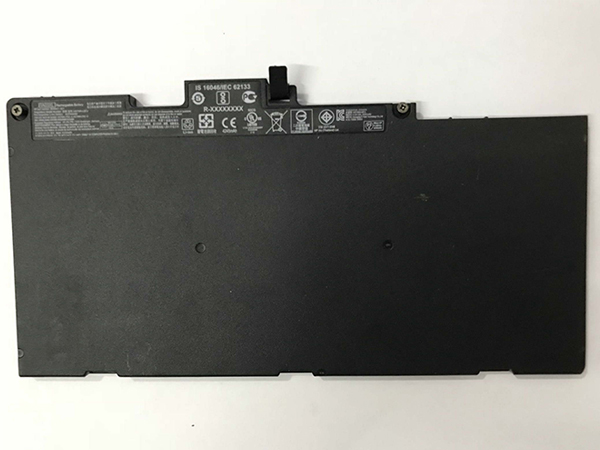
  • HP TA03XL battery replacement HP EliteBook 755 G4 840 G4 HSTNN-IB7L 854047-1C1

    This HP TA03XL Battery has a capacity of 51Wh and a voltage of 11.55V. Suitable for HP EliteBook 755 G4 840 G4 HSTNN-IB7L 854047-1C1. 100% compatible and 100% safe. 1-year warranty, 30-day money back guarantee. 

    HP TA03XL 51Wh 11.55V Notebook Battery

    HP TA03XL battery

      Product details:

    • Brand: HP TA03XL Notebook batteries

    • Type: Li-ion battery

    • Voltage: 11.55V

    • Capacity: 51Wh

    Replace the following batteries:

    TA03XL TA03051XL 854047-1C1 854108-850 996QA101H HSTNN-172C-4 HSTNN-175C-5 HSTNN-I72C-4 HSTNN-I75C-5 HSTNN-IB7L

    Compatible with the following models:

    HP TA03XL TA03051XL 854047-1C1 854108-850 996QA101H
    HP HSTNN-172C-4 HSTNN-175C-5 HSTNN-I72C-4 HSTNN-I75C-5 HSTNN-IB7L3

    http://www.notebookbattery.co.nz/laptop-batteies-hp/replace-battery-ta03xl-b179382.htm

    TA03XL Laptop battery tips

    Newly bought notebooks, the first three charges do not need to reach 12 hours

    because the current laptop batteries have a management chip that can control the charging limit, when the battery is full, it will automatically cut off the charging function, thus protecting the battery life and avoiding overcharging.

    It is not necessary to discharge completely before each charge

    because this deep discharge will shorten the battery life. It is recommended to charge when the remaining 10% is left. In addition, when there is still more than 30% of the battery power, it is best not to charge, because the memory effect does exist. The power management software allows you to check the battery level at any time, and the HP EliteBook 755 G4 840 G4 HSTNN-IB7L 854047-1C1 come with a battery indicator that allows you to check the remaining battery even without turning it on.

    When plugging in AC power (connecting the power adapter), you don't need to remove the battery

    because most laptop batteries need to be charged below 90%, and the battery naturally discharges to this capacity takes two weeks to a month, so use it every day. Notebooks don't have to worry about repeated charging and unloading, not to mention the fact that emergency power outages are more damaging to data.

    If you want to store unused batteries for a long time, you need to put them in a dry, low temperature environment while maintaining 40% of the remaining power in the battery. In addition, it is best to take out the battery once a month to ensure a good storage state and service life of the battery.

    Reducing the brightness of your notebook screen can extend the life of your notebook and reduce the number of times it is charged.

    Use some power management tools, such as the Power Assistant on the HP EliteBook 755 G4 840 G4 HSTNN-IB7L 854047-1C1, which can even monitor the energy consumption of each component in real time through the PMC circuit, and accurately summarize the company's status to the HPclient Configuration Manager software, and optionally Turn off the specified parts to extend battery life.

    ABOUT US

    Wholesale and retail Notebook Battery in NZ. Replacement for Acer, Apple, Compaq, Dell, FUJITSU, IBM, Lenovo, Sony and so on.

    These may be you want to look for :

    BP4S1P2100S battery replacement for Getac 4ICP6/51/61 441122100003 Series

    PA70BAT-4 battery replacement for Clevo PA70HP6-G PA70HS-G PA71HP6-G 4ICP6/66/83 Series

    BL225 battery replacement for Lenovo A785E A858 A858T S8 A708T A628T A620T A780E

    CF-VZSU80U battery replacement for Panasonic CF-C2 MK1 Toughbook Standard

    74XCR battery replacement for Dell Venue 8 Pro (5830) Tablet

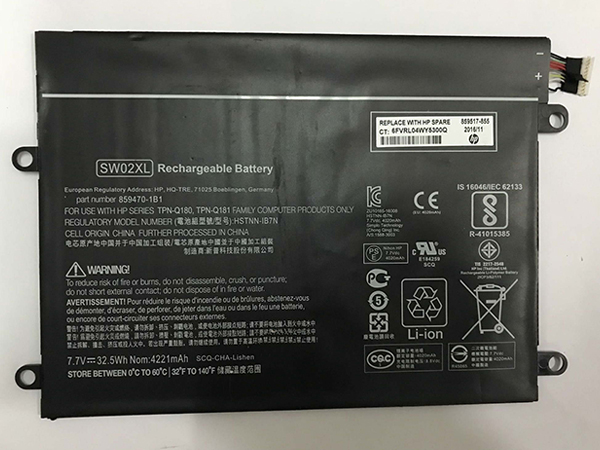
  • Cheap HP HSTNN-IB7N laptop battery

    This HP HSTNN-IB7N Battery has a capacity of 32.5Wh and a voltage of 7.7V. Suitable for HP Notebook x2 210 G2 Detachable PC 10 SW02XL. 100% compatible and 100% safe. 1-year warranty, 30-day money back guarantee. 

    HP HSTNN-IB7N 32.5Wh 7.7V Notebook Battery

    HP HSTNN-IB7N battery

      Product details:

    • Brand: HP HSTNN-IB7N Notebook batteries

    • Type: Li-ion battery

    • Voltage: 7.7V

    • Capacity: 32.5Wh

    Replace the following batteries:

    SW02XL HSTNN-IB7N

    Compatible with the following models:

    For HP Notebook x2 210 G2 Detachable PC 10

    http://www.notebookbattery.co.nz/laptop-batteies-hp/replace-battery-hstnn-ib7n-b179383.htm

    HSTNN-IB7N Laptop battery tips

    Newly bought notebooks, the first three charges do not need to reach 12 hours

    because the current laptop batteries have a management chip that can control the charging limit, when the battery is full, it will automatically cut off the charging function, thus protecting the battery life and avoiding overcharging.

    It is not necessary to discharge completely before each charge

    because this deep discharge will shorten the battery life. It is recommended to charge when the remaining 10% is left. In addition, when there is still more than 30% of the battery power, it is best not to charge, because the memory effect does exist. The power management software allows you to check the battery level at any time, and the HP Notebook x2 210 G2 Detachable PC 10 SW02XL come with a battery indicator that allows you to check the remaining battery even without turning it on.

    When plugging in AC power (connecting the power adapter), you don't need to remove the battery

    because most laptop batteries need to be charged below 90%, and the battery naturally discharges to this capacity takes two weeks to a month, so use it every day. Notebooks don't have to worry about repeated charging and unloading, not to mention the fact that emergency power outages are more damaging to data.

    If you want to store unused batteries for a long time, you need to put them in a dry, low temperature environment while maintaining 40% of the remaining power in the battery. In addition, it is best to take out the battery once a month to ensure a good storage state and service life of the battery.

    Reducing the brightness of your notebook screen can extend the life of your notebook and reduce the number of times it is charged.

    Use some power management tools, such as the Power Assistant on the HP Notebook x2 210 G2 Detachable PC 10 SW02XL, which can even monitor the energy consumption of each component in real time through the PMC circuit, and accurately summarize the company's status to the HPclient Configuration Manager software, and optionally Turn off the specified parts to extend battery life.

    ABOUT US

    Wholesale and retail Notebook Battery in NZ. Replacement for Acer, Apple, Compaq, Dell, FUJITSU, IBM, Lenovo, Sony and so on.

    These may be you want to look for :

    SB10F46465 battery replacement for Lenovo ThinkPad Yoga 260

    BL204 battery replacement for Lenovo A670T A586 A630T A765E A696

    SB10F46456 battery replacement for Lenovo Thinkpad 10 2 Generation Laptop

    W-5 battery replacement for Netgear Sierra Wireless Router Aircard 770S 771S 782S 790S

    TLp020EC battery replacement for Alcatel Onetouch

  • HP KB06XL Notebook Battery Replacement

    High Quality HP KB06XL Notebook Battery, secure and stable! 100% Quality Assurance and Rigorous Testing! 100% Compatible with Original Model & Completely Chargered by Original adapter. Ordering and gettiing a 30% discount!“The shortest answer is doing”! 1year warranty and 30 days money back guarantee. 

    HP KB06XL Notebook Battery

    HP KB06XL battery

    Current:79.2Wh
    Voltage: 11.55V
    KB06XL Notebook Battery
    battery Part Numbers:
    902401-2C1 902499-855 HSTNN-DB7R KB06XL TPN-Q179
    battery Fit Models:
    HP X360 15-BL002XX

    Here,buy it now
    ES: HP KB06XL Batería
    NL: HP KB06XL ACCU
    IT: HP KB06XL batteria
    DE: KB06XL Akku

    We ship to the Notebook Battery around Globe [USA, Canada, UK, NZ and Ireland, Australia]. View more Notebook Battery. Contact with us if any problem on selecting power Notebook Battery.

    HP KB06XL Features:
    All our high quality HP KB06XL replacement Notebook Battery have been tested and proven to match and / or match the performance of the original HP Notebook Battery and are 100% compatible with the original manufacturer's specifications. This HP KB06XL Notebook Battery comes with a 1-year limited warranty.
    Thank you for purchasing this high quality HP KB06XL replacement Notebook Battery. We have a rigorous testing process to ensure that your ordered products (like this Notebook Battery for HP KB06XL) are functionally correct before being packaged and sent to you. And before placing an order, make sure that your old original part number of the HP KB06XL Notebook Battery is listed below and that the shape is identical to the images in our Notebook Battery.

    Wholesale and retail Notebook Battery in NZ. Replacement for Acer,Apple, Compaq,Dell, FUJITSU, IBM,Lenovo,Sony and so on.

    Extend Notebook Battery HP KB06XL Service life

    1. Charge the battery! Consider keeping it plugged in for 12 hours before you unplug.
    2. Switch on the optimized battery or power feature. You'll find this option — sometimes referred to as max battery mode — in your laptop system's built-in power management control panel. You can select the option to reduce the amount of time your inactive laptop stays on before powering itself down and going to sleep.
    3. Remove the battery and clean the metal contacts. Wipe them with alcohol, ideally every two months, to ensure that the power transfer between the laptop and its battery is as efficient as possible. Allow the battery to dry thoroughly before replacing it! 
    4. Unplug any laptop accessories you aren't using. Even if they're not in use, accessories drain power from the battery.

    http://www.notebookbattery.co.nz/laptop-batteies-hp/replace-battery-kb06xl-b179569.htm

    These may be you want to look for :

    SQU-1208 battery replace for HP Chromebook 11 G1

    P21GK3 battery replace for Samsung SDI Microsoft Surface RT 1516

    L14M4P23 battery replace for Lenovo Y700-17iSK

    PA04-A701-C battery replace for Luggie PA04-A701-C PA04-A702-B PA04-A700 series

    DS5020 battery replace for IBM 81Y2432 371-4676

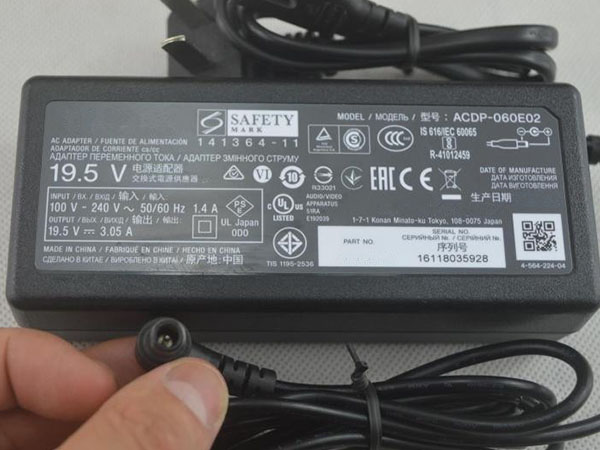
  • Best Choice Sony ACDP-045S02 AC Adapter Charger

    100-240V 50/60Hz (for worldwid 19.5V 2.35A 45W, Sony ACDP-045S02, adapter 1 year warranty, 30 days money back, 100% new. 30% off all products! Warranty: 12 months! Short circuit protection Meets the environment according to RoHS European Standards. All our products are certified to CE Certificate CE Approval Certificate – Approved Safety. 
    Sony ACDP-045S02 adapter

    SONY ACDP-045S02 AC Power Adapter Charger

    AC Input:100-240V 50/60Hz (for worldwid
    DC Output: 19.5V 2.35A 45W
    ACDP-045S02 Power Adapter
    Adapter Part Numbers:
    ACDP-045S02
    Adapter Fit Models:
    Sony ACDP LCD LED HDTV

    NotebookBattery.co.nz is professional selling the highest quality notebook batteries and laptop power adapters for the lowest price with the highest level of service in NewZeland, all in a secure and convenient platform. Our product range include replacement laptop batteries for most major laptop brands, including Dell, Apple, Compaq/HP, IBM/Lenovo, Fujitsu, Gateway, Sony and Toshiba.

    http://www.notebookbattery.co.nz/sony-laptop-power-adapter/acdp-045s02-a179720.htm

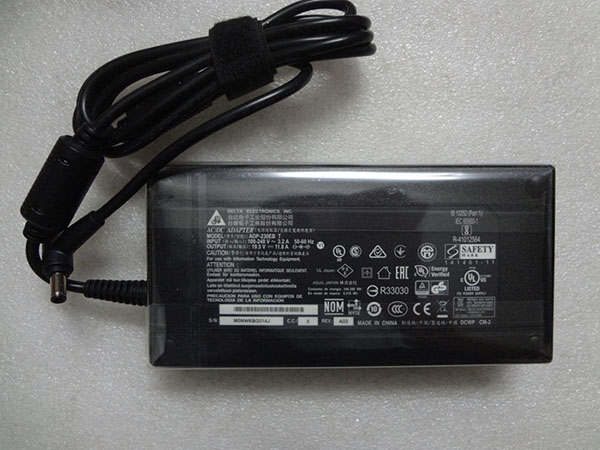
  • High quality ASUS ADP-230GB_B AC adapter

    ASUS ADP-230GB_B laptop adapter 100% compatible +100% stable. Meet original or exceed original specifications. High quality material, cheaper than original, low power consumption, strict safety test and performance test to ensure your computer is safely charged. We are committed to a one-year, 30-day unconditional refund for all notebook adapters.

    High quality ASUS ADP-230GB_B adapter on sale,Save up to 30%! We sell ASUS ADP-230GB_B adapter Replacement at the best price! with 1 Year Warranty! The ASUS adapter is a replacement adapter for original ASUS ADP-230GB_B laptop computer. 
    ASUS ADP-230GB_B adapter

    ASUS ADP-230GB_B AC Power Adapter Charger

    AC Input:100-240V, 50-60Hz (for worldwi
    DC Output: 19.5V 11.8A 230W
    ADP-230GB_B Power Adapter


    Adapter Part Numbers:
    ADP-230EB_T,ADP-230GB_B
    Adapter Fit Models:
    ASUS ROG Zephyrus GX501VI-GZ028T GX501GI-XS7

    http://www.notebookbattery.co.nz/asus-laptop-power-adapter/adp-230gb_b-a179738.htm,

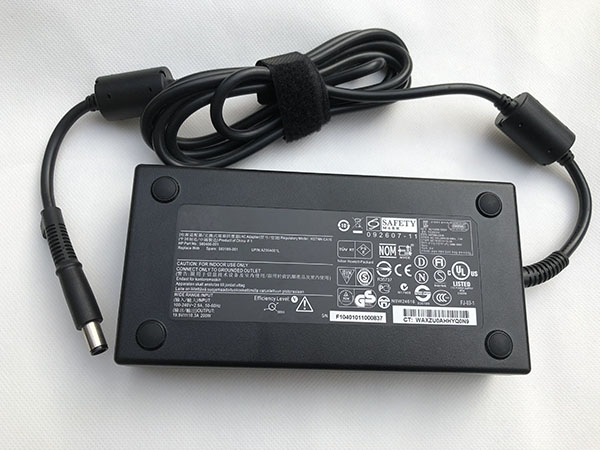
  • HP HSTNN-CA24 laptop Power Adapter replacement for HP Zbook 15 17 608431-002 609945-001

    100-240V, 50-60Hz 19.5V 10.5A, HP HSTNN-CA24, adapter 1 year warranty, 30 days money back, 100% new. 30% off all products! Warranty: 12 months! Short circuit protection Meets the environment according to RoHS European Standards. All our products are certified to CE Certificate CE Approval Certificate – Approved Safety. 
    HP HSTNN-CA24 adapter

    HP HSTNN-CA24 AC Power Adapter Charger

    AC Input:100-240V, 50-60Hz
    DC Output: 19.5V 10.5A
    HSTNN-CA24 Power Adapter
    Adapter Part Numbers:
    608431-002, 609945-001,HSTNN-CA16, HSTNN-DA16, ADP-200CB BA, 608431-001, 677764-002 693708-001 644698-002 645154-001 
    Adapter Fit Models:
    HP Zbook 15 17 608431-002 609945-001

    Finding the Right Model of Adapter :

    · Get the laptop's model number. This is usually printed on a small sticker affixed to the underside of the laptop.

    · Get the power requirements for the laptop. This is also printed on a small sticker affixed to the underside of the laptop. It may also be printed near the laptop power port. Look for the amperage and the voltage required.

    · Look up the model number online to find if there are compatible adapters available. The voltage and amperage of the adapter need to match the requirements of the laptop.

    · Compare the connector type of the laptop adapter to any available adapters found online. They need to match to ensure that the adapter can plug into the laptop.

    http://www.notebookbattery.co.nz/hp-laptop-power-adapter/hstnn-ca24-a179744.htm