Replace Laptop battery in NZ

Tag: ASUS

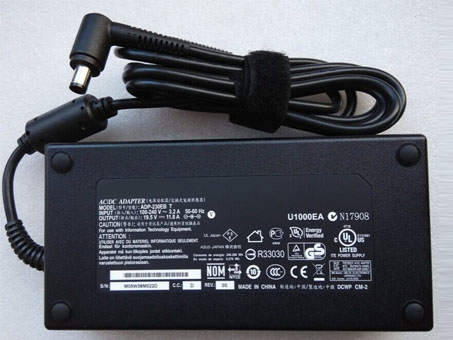
  • ASUS G750JH-DB71 ADP-230EB_T Power Adapter

    asus G750JH-DB71 adapter
    G750JH-DB71 ADP-230EB_T Universal Laptop Power Adapter. 100% Compatible with Delta 230W Cord Charger ASUS G750JH-DB71.

    ASUS G750JH-DB71 ADP-230EB_T Power Adapter – Product information

    NZ laptop Ac Adapter shop, buy cheap asus G750JH-DB71 replacement laptop Ac Adapter, G750JH-DB71 ADP-230EB_T AC Adapter with low price and high quality! Brand New Adapters for Delta 230W Cord Charger ASUS G750JH-DB71.
    AC Input:100-240V 50-60Hz (for worldwid
    DC Output: 19.5V 11.8A,230W
    G750JH-DB71 ADP-230EB_T Power Adapter
    Adapter Part Numbers:
    NW230-01,ADP-230EB T,0A001-00390000
    Adapter Fit Models:
    Connecter size: 7.4mm ×5.0mm, ,with central pin inside (ref to the picture).
    Power LED indicator
    Outlet: 3-prong
    One Power cord is included with this adapter for FREE(fit your country )

    ASUS G750JH-DB71 Gaming Laprtop
    JP:asus G750JH-DB71
    DE:G750JH-DB71 ADP-230EB_T Notebook-Netzteile.Das richtige ASUS Laptop Netzteil finden.

    The asus G750JH-DB71 AC adapter is used to recharge the battery in a notebook and to provide dependable power for operating the notebook for long periods of time. If an AC adapter fails it will not recharge the battery and it will not provide power to operate the notebook without a battery.

    Test the asus G750JH-DB71 AC Adapter
    Connect the output cord from the AC adapter to the notebook and plug the power cord into a working electrical outlet. Perform one or more of the following tasks to check the operation of the AC power adapter.
    Check the power icon in the system tray.
    If the icon resembles a power cord, and if moving the cursor over the icon displays the On AC Power message, the AC adapter is operating properly.
    If the icon resembles a battery when the AC adapter is connected, the adapter is defective.
    Check if the AC power adapter can operate the notebook when the battery is removed.
    Do a normal shutdown of the PC.
    Remove the battery from the Notebook.
    Connect the ASUS power adapter and press the Power button to start the notebook.
    If the PC does not start and operate normally, the AC adapter is defective and must be replaced.
    If the PC does start and operate normally, the AC adapter is working properly

    Determine the AC Adapter Part Number
    Different notebook models require different AC adapters. You will need to know the Product Number of your notebook to determine the Part Number of the replacement part.
    Perform one of the following tasks to find the Product Number of your notebook.
    Click Start, then click Help & Support. The product name, product number, and serial number of the notebook are displayed in the upper left hand corner of the Help and Support home page.
    If the Notebook computer is not powered on, turn it over and locate the ASUS Service Tag fastened to the back of the notebook. The Product Number (P/N) is printed on this tag. On some Notebook computers, the ASUS Service Tag is located inside the battery compartment. Remove the battery from the Notebook to view the ASUS Service Tag information.

    Power Adapter Fast Shipping

    Adapter for PA-1450-26

    Adapter for PA-1650-02

    Adapter for ADP-33AW

    Adapter for 19.5V

    Adapter for EAY62549202

    Adapter for 74VT4

    Adapter for CCSB042

    Adapter for N5010

    Why buy laptop batteries & AC adapters from us?
    www.notebookbattery.co.nz is quite a big site for selling laptop batteries,laptop AC adapters and electronic products online.
    Low Prices Guarantee – Your best source for batteries and adapters. We are a new lithium battery manufacturer,Wholesaler and distributor of notebook computer batteries & AC adapter. Factory-direct price!
    High Quality Guarantee – The batteries and adapters are rigorously tested for voltage, capacity, compatibility and safety to exceed original equipment manufacturer’s specifications . The cheap batteries meet or exceed the original batteries.
    Secure Shopping Guarantee- Shopping is easy and 100% secure. We value your privacy and keep your order and personal information safe. We never share or rent our customer’s data. Click the “Add to cart” button to order what you need easily.

    Wholesale and retail laptop adapter in NZ. Replacement for Acer,Apple, Compaq,Dell, FUJITSU, IBM,Lenovo,Sony and so on.

    How to select laptop Adapter? Make sure the volt and currect of adapter is same as your origial. carefully check the size of tip of adapter is correct. check and confirm with the photo of power adapter is the one you are looking for. We ship to the Laptop adapter around Globe [USA, Canada, UK, NZ and Ireland, Australia]. View more laptop adapter. Contact with us if any problem on selecting power adapter.

    These may be you want to look for : Dell L220NS-00 power supply, hp ENP-2320 power supply, Dell 290W power supply, Dell H525EF-00 power supply, FSP SPI400U4BB power supply,

  • ASUS AD82030 Power Adapter

    AD82030 Universal Laptop Power Adapter. 100% Compatible with US Plug AC/DC Asus Eee PC 1001HA 1001P 1001PX 1005HA 1201HAG FR ASUS Eee Pad.

    ASUS AD82030 Power Adapter – Product information

    NZ laptop Ac Adapter shop, buy cheap ASUS AD82030 replacement laptop Ac Adapter, AD82030 AC Adapter with low price and high quality! Brand New Adapters for US Plug AC/DC Asus Eee PC 1001HA 1001P 1001PX 1005HA 1201HAG FR ASUS Eee Pad.
    AC Input:100-240v / 50-60hz
    DC Output: 19V 1.58A-2.1A 30W- 40W
    AD82030 Power Adapter
    Adapter Part Numbers:
    Out power: 30W- 40w
    Connector: 2.5*0.7mm
    AD820M0,EXA1004EH,EXA1004UH,AD6630,EXA0901XH,
    90-XB02OAPW00010Q,90-XB020APW00050Q,
    90-XB02OAPW00110Q,90-XB02OAPW00100Q,90-XB02OAPW00000Q
    Adapter Fit Models:
    Asus Eee PC 1001P
    ASUS Eee PC 1005 Series:
    Asus Eee PC 1005H
    Asus Eee PC 1005HE
    Asus Eee PC 1005HR
    Asus Eee PC 1005P
    Asus Eee PC 1005PE
    Asus Eee PC 1001P
    ASUS Eee PC 1005 Series:
    Asus Eee PC 1005H
    Asus Eee PC 1005HE
    Asus Eee PC 1005HR
    Asus Eee PC 1005P
    Asus Eee PC 1005PE
    ASUS Eee PC 1005HA Series:
    Asus Eee PC 1005HA
    Asus Eee PC 1005HAB
    Asus Eee PC 1005HA-B
    Asus Eee PC 1005HA-E
    Asus Eee PC 1005HA-P
    Asus Eee PC 1005HA-V
    Asus Eee PC 1005HA-A
    Asus Eee PC 1005HA-E
    Asus Eee PC 1005HA-P
    Asus Eee PC 1005HA-V
    Asus Eee PC 1005HA_GG
    Asus Eee PC 1005HA-EU1X
    Asus Eee PC 1005HA-EU1X-BK
    Asus Eee PC 1005HA-PU1X
    Asus Eee PC 1005HA-PU1X-BK
    Asus Eee PC 1005HA-PU1X-BU
    Asus Eee PC 1005HA-VU1X
    Asus Eee PC 1005HA-VU1X-BK
    Asus Eee PC 1005HA-VU1X-WT
    Asus Eee PC 1005HA-VU1X-BU
    Asus Eee PC 1005HA-VU1X-PI
    ASUS Eee PC 1008HA Series:
    Asus Eee PC 1008HA
    Asus Eee PC 1008HAG
    Asus Eee PC 1008P
    ASUS Eee PC 1101HA Series:
    Asus Eee PC 1101HA
    Asus Eee PC 1101HA_GG
    Asus Eee PC 1101HAG
    Asus Eee PC 1101HAB
    Asus Eee PC 1101HGO
    Asus Eee PC 101HA-MU1X
    Asus Eee PC 101HA-MU1X-BK
    ASUS Eee PC 1104HA Series
    ASUS Eee PC 1106HA Series
    ASUS Eee PC 1201 Series:
    Asus Eee PC 1201N
    Asus Eee PC 1201NL
    Asus Eee PC 1201T
    Asus Eee PC 1201HA
    Asus Eee PC 1201HAG

    JP:ASUS AD82030
    DE:AD82030 Notebook-Netzteile.Das richtige ASUS Laptop Netzteil finden.

    The ASUS AD82030 AC adapter is used to recharge the battery in a notebook and to provide dependable power for operating the notebook for long periods of time. If an AC adapter fails it will not recharge the battery and it will not provide power to operate the notebook without a battery.

    Test the ASUS AD82030 AC Adapter
    Connect the output cord from the AC adapter to the notebook and plug the power cord into a working electrical outlet. Perform one or more of the following tasks to check the operation of the AC power adapter.
    Check the power icon in the system tray.
    If the icon resembles a power cord, and if moving the cursor over the icon displays the On AC Power message, the AC adapter is operating properly.
    If the icon resembles a battery when the AC adapter is connected, the adapter is defective.
    Check if the AC power adapter can operate the notebook when the battery is removed.
    Do a normal shutdown of the PC.
    Remove the battery from the Notebook.
    Connect the ASUS power adapter and press the Power button to start the notebook.
    If the PC does not start and operate normally, the AC adapter is defective and must be replaced.
    If the PC does start and operate normally, the AC adapter is working properly

    Determine the AC Adapter Part Number
    Different notebook models require different AC adapters. You will need to know the Product Number of your notebook to determine the Part Number of the replacement part.
    Perform one of the following tasks to find the Product Number of your notebook.
    Click Start, then click Help & Support. The product name, product number, and serial number of the notebook are displayed in the upper left hand corner of the Help and Support home page.
    If the Notebook computer is not powered on, turn it over and locate the ASUS Service Tag fastened to the back of the notebook. The Product Number (P/N) is printed on this tag. On some Notebook computers, the ASUS Service Tag is located inside the battery compartment. Remove the battery from the Notebook to view the ASUS Service Tag information.

    Power Adapter Fast Shipping

    Adapter for 0A001-00232100

    Adapter for O5U092

    Adapter for AD820M0

    Adapter for ADP-90VH_D

    Adapter for S200L

    Adapter for S24A300B

    Adapter for 19.5V

    Adapter for 19V

    Why buy laptop batteries & AC adapters from us?
    www.notebookbattery.co.nz is quite a big site for selling laptop batteries,laptop AC adapters and electronic products online.
    Low Prices Guarantee – Your best source for batteries and adapters. We are a new lithium battery manufacturer,Wholesaler and distributor of notebook computer batteries & AC adapter. Factory-direct price!
    High Quality Guarantee – The batteries and adapters are rigorously tested for voltage, capacity, compatibility and safety to exceed original equipment manufacturer’s specifications . The cheap batteries meet or exceed the original batteries.
    Secure Shopping Guarantee- Shopping is easy and 100% secure. We value your privacy and keep your order and personal information safe. We never share or rent our customer’s data. Click the “Add to cart” button to order what you need easily.

    Wholesale and retail laptop adapter in NZ. Replacement for Acer,Apple, Compaq,Dell, FUJITSU, IBM,Lenovo,Sony and so on.

    How to select laptop Adapter? Make sure the volt and currect of adapter is same as your origial. carefully check the size of tip of adapter is correct. check and confirm with the photo of power adapter is the one you are looking for. We ship to the Laptop adapter around Globe [USA, Canada, UK, NZ and Ireland, Australia]. View more laptop adapter. Contact with us if any problem on selecting power adapter.

    These may be you want to look for : HP 504965-001 power supply, Lenovo HKF2002-32 power supply, hp ENP-2320 power supply, Dell 0T122K power supply, dell K340R power supply,

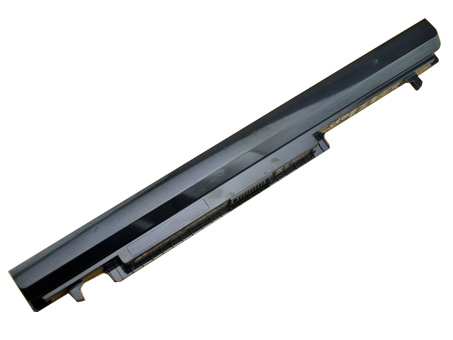
  • New Replacement asus A31-K56 for ASUS A56CM A56CA A56C A56 serie

    • asus A31-K56 battery
      Brand New Battery For asus A31-K56, laptop battery specifications(Li-ion, 2200mAh ,15V), lowest price and 30 days money back, 1-year warranty. 100% compatible with ASUS A56CM A56CA A56C A56 serie.

      ASUS A31-K56 A32-K56 A41-K56 A42-K56 Replacement laptop Battery [2200mAh, 15V]

      Battery UK >>asus A31-K56

      Replace the following part numbers:
      A42-K56,A41-K56,A32-K56,A31-K56
      Fits the Following Models:
      ASUS A46 Ultrabook
      ASUS A46C Series ASUS A46CA Series ASUS A46CM Series
      ASUS A56 Ultrabook
      ASUS A56C Series ASUS A56CA Series ASUS A56CM Series
      ASUS K46 Ultrabook
      ASUS K46C Series ASUS K46CA Series ASUS K46CM Series
      ASUS K56 Ultrabook
      ASUS K56C Series ASUS K56CA Series ASUS K56CM Series
      ASUS S40 Ultrabook
      ASUS S40C Series ASUS S40CA Series ASUS S40CM Series
      ASUS S405 Ultrabook
      ASUS S405C Series ASUS S405CA Series ASUS S405CM Series
      ASUS S46 Ultrabook
      ASUS S46C Series ASUS S46CA Series ASUS S46CM Series
      ASUS S505 Ultrabook
      ASUS S505C Series ASUS S505CA Series ASUS S505CM Series
      ASUS S56 Ultrabook
      ASUS S56C Series ASUS S56CA Series ASUS S56CM Series

      Q:How do I extend the life of my laptop battery?

      • + New asus A31-K56 Battery Pack must be fully charged before use.If you don’t use your laptop for a period of time,you must fully discharge then recharge the asus A31-K56 battery.
      • + Always use a laptop on a hard surface. Don’t put it on your lap (despite its name) or on thermal insulating materials such as cushions. If you like to work in bed with your laptop, I recommend using a laptop table. I have this one, and I am quite content with it.
      • + Try to avoid charging the battery while you are working with the laptop. Charging the asus A31-K56 batteries increases your laptop’s temperature. The problem is that the CPU, the graphics card and the hard disk also heat up your laptop, which adds to the temperature increase experienced when charging the asus A31-K56 battery. Many vendors deliver their laptops with software that allows you to disable charging. You also can remove the asus A31-K56 battery while you are working on AC current.
      • + Make sure the laptop’s ventilation can always work properly. Don’t place objects before the ventilation systems opening. Don’t run or charge the laptop while it is in its case.
      • + Don’t leave the laptop in the car or under the sun in summer. Use a bike. It keeps your  2200mAh 15V ASUS A31-K56 A32-K56 A41-K56 A42-K56 laptop battery cool and your own battery healthy. And too much sun exposure causes only skin cancer anyway.

      You are in the biggest replacement laptop battery and laptop ac adapters online store, We offer more than 18000 types laptop battery, compatable more than 2000000 laptop models, related 180 top laptop brand. We specialize in replacement laptop batteries and Laptop adapter for most top brand laptop on the market, Such as Acer, Apple, Asus, Dell, HP, IBM, Sony, Toshiba, Samsung and so on.

      Sony LIS1485ERPC Cell Phone Battery replacement for Sony 4 Xperia Ion LT28i LT28 LT28at LT28h Aoba

      Sony LIS1509ERPC Cell Phone Battery replacement for Sony Ericsson Xperia SP M35H C5302 C5303 C5306 4.2V

      Samsung EB-BA700ABE Cell Phone Battery replacement for Samsung Galaxy A7 A700 A700FD A700S A700L

      Apple 616-0805 Cell Phone Battery replacement for Li-Ion Battery w/ Flex Cable For Apple iPhone 6 4.7inch + Tools

      THL BL-06 Cell Phone Battery replacement for THL T6S THL T6 PRO

      Intermec 1001AB01 Cell Phone Battery replacement for Intermec CK70 CK71

      Nokia BP-3L Cell Phone Battery replacement for Nokia Lumia 710 BP3L

      HTC BL83100 Cell Phone Battery replacement for HTC Droid DNA ADR643

      NOKIA BL-L4A Cell Phone Battery replacement for Lumia 535 RM-1090 RM1089 NOKIA

      Sony LIS1499ERPC Cell Phone Battery replacement for SONY LT30 LT30p Xperia T Xperia TL BDRG

      Teach you how to do here:
      1. When first time using asus A31-K56 battery, Please carefully read the user manual about Battery maintain parts.
      2. Please fully charge at most 12 hours in first asus A31-K56 battery charge time. Bcause it is need three/four times for charge/discharge cycles to get the maximum capacity of battery.
      3. If without using notebook long time(more than 3 weeks) or found that your asus A31-K56 battery charge/discharge time become shorter and shorter, you have to fully discharge the battery before next time charge again.
      4. It is better to keep the laptop power off during charge the asus A31-K56 battery pack. And don’t unplugged power or using your notebook during the battery half-way charge. The best time using is 30 minutes fully charge later.
      5. Keep your asus A31-K56 battery far away from damp,exposure,and erosion some chemical liquids and others to avoid making battery short-circuit.

      Batterijen Sales Nederland / België asus A31-K56 ACCU >> ASUS ACCU

      Laptop power adaptors and chargers are necessary accessories that enable the charging of such portable devices. Adaptors and charges aren’t created equal, which is why you should always be looking for premium quality. Each of the Laptop Battery Express adaptors has been chosen because of its quality and affordability. You can rest assured that you’re getting access to some of the best replacement items on the market. We have laptop power adaptors for a vast range of brands and models.Discover laptop power adaptors that will be just right for you.

  • Replacement Li-ion Battery Power Pack for ASUS A31-B43

    ASUS A31-B43 battery
    ASUS A31-B43 4400mAh ,11.1V Li-ion laptop battery is made from the highest quality cells and parts. The ASUS A31-B43 is designed to meet or exceed original equipment specifications. Shopping with us is safe and secure! 100% Guarantee Quality and Fully Test! ASUS A31-B43 laptop battery pack for Asus B43 serie

    ASUS A31-B43 A32-B43 Replacement laptop Battery [4400mAh, 11.1V]

    Battery UK >>ASUS A31-B43

    Replace the following part numbers:
    A31-B43,A32-B43
    Fits the Following Models:
    For Asus
    B43 Series(All) B43E B43EI
    B43F B43J B43JC
    B43JE B43JF B43JH
    B43JN B43JR B43S
    B43SJ B43J-B1B

    Q:How do I extend the life of my laptop battery?

    • + New ASUS A31-B43 Battery Pack must be fully charged before use.If you don’t use your laptop for a period of time,you must fully discharge then recharge the ASUS A31-B43 battery.
    • + Always use a laptop on a hard surface. Don’t put it on your lap (despite its name) or on thermal insulating materials such as cushions. If you like to work in bed with your laptop, I recommend using a laptop table. I have this one, and I am quite content with it.
    • + Try to avoid charging the battery while you are working with the laptop. Charging the ASUS A31-B43 batteries increases your laptop’s temperature. The problem is that the CPU, the graphics card and the hard disk also heat up your laptop, which adds to the temperature increase experienced when charging the ASUS A31-B43 battery. Many vendors deliver their laptops with software that allows you to disable charging. You also can remove the ASUS A31-B43 battery while you are working on AC current.
    • + Make sure the laptop’s ventilation can always work properly. Don’t place objects before the ventilation systems opening. Don’t run or charge the laptop while it is in its case.
    • + Don’t leave the laptop in the car or under the sun in summer. Use a bike. It keeps your  4400mAh 11.1V ASUS A31-B43 A32-B43 laptop battery cool and your own battery healthy. And too much sun exposure causes only skin cancer anyway.

    You are in the biggest replacement laptop battery and laptop ac adapters online store, We offer more than 18000 types laptop battery, compatable more than 2000000 laptop models, related 180 top laptop brand. We specialize in replacement laptop batteries and Laptop adapter for most top brand laptop on the market, Such as Acer, Apple, Asus, Dell, HP, IBM, Sony, Toshiba, Samsung and so on.

    MobiWire 178092716 Cell Phone Battery replacement for MobiWire 178092716 Phone panels

    Sony LIS1485ERPC Cell Phone Battery replacement for Sony 4 Xperia Ion LT28i LT28 LT28at LT28h Aoba

    SANYO DB-L80 Cell Phone Battery replacement for SANYO DB-L80 VPC-CS1 CG20 CG88 CG100 CA100 GH1 GH3

    MOTOROLA 55-060112-05 Cell Phone Battery replacement for Symbol MOTOROLA MC3000 MC3100 MC3090 IMAGER Scanner

    Lenovo BL243 Cell Phone Battery replacement for lenovo a7000 lenovo k50 k50t

    Motorola 21-65587-03 Cell Phone Battery replacement for Symbol MOTOROLA MC9000 MC9090 MC9090-G

    HTC BL01100 Cell Phone Battery replacement for HTC A320 Desire C Golf One V a320e

    THL BL-06 Cell Phone Battery replacement for THL T6S THL T6 PRO

    Sony LIS1509ERPC Cell Phone Battery replacement for Sony Ericsson Xperia SP M35H C5302 C5303 C5306 4.2V

    LG BL-T8 Cell Phone Battery replacement for LG G Flex D950 D955 D958 D959 F340 LS995 +Tools

    Teach you how to do here:
    1. When first time using ASUS A31-B43 battery, Please carefully read the user manual about Battery maintain parts.
    2. Please fully charge at most 12 hours in first ASUS A31-B43 battery charge time. Bcause it is need three/four times for charge/discharge cycles to get the maximum capacity of battery.
    3. If without using notebook long time(more than 3 weeks) or found that your ASUS A31-B43 battery charge/discharge time become shorter and shorter, you have to fully discharge the battery before next time charge again.
    4. It is better to keep the laptop power off during charge the ASUS A31-B43 battery pack. And don’t unplugged power or using your notebook during the battery half-way charge. The best time using is 30 minutes fully charge later.
    5. Keep your ASUS A31-B43 battery far away from damp,exposure,and erosion some chemical liquids and others to avoid making battery short-circuit.

    Batterijen Sales Nederland / België ASUS A31-B43 ACCU >> ASUS ACCU

    Laptop power adaptors and chargers are necessary accessories that enable the charging of such portable devices. Adaptors and charges aren’t created equal, which is why you should always be looking for premium quality. Each of the Laptop Battery Express adaptors has been chosen because of its quality and affordability. You can rest assured that you’re getting access to some of the best replacement items on the market. We have laptop power adaptors for a vast range of brands and models.Discover laptop power adaptors that will be just right for you.

  • ASUS C22-1018 Laptop Battery in UK Europe

    ASUS C22-1018 battery
    ASUS C22-1018 replacement laptop battery for Asus Eee PC 1018P serie, UK laptop battery shop, buy cheap ASUS C22-1018 laptop batteries, ASUS C22-1018 notebook battery with low price and high quality!This Li-ion ASUS C22-1018 meet or exceed the original laptop battery specifications.

    ASUS C22-1018 70-OA282B1000 Replacement laptop Battery [6000mah, 7.4V]

    Battery UK >>ASUS C22-1018

    Replace the following part numbers:
    70-OA282B1000,70-OA282B1200,C22-1018
    Fits the Following Models:
    Asus Eee PC 1018
    Asus Eee PC 1018P
    Asus Eee PC 1018PB
    Asus Eee PC 1018PD
    Asus Eee PC 1018PE
    Asus Eee PC 1018PEB
    Asus Eee PC 1018PED
    Asus Eee PC 1018PEM
    Asus Eee PC 1018PG
    Asus Eee PC 1018PN

    Q:How do I extend the life of my laptop battery?

    • + New ASUS C22-1018 Battery Pack must be fully charged before use.If you don’t use your laptop for a period of time,you must fully discharge then recharge the ASUS C22-1018 battery.
    • + Always use a laptop on a hard surface. Don’t put it on your lap (despite its name) or on thermal insulating materials such as cushions. If you like to work in bed with your laptop, I recommend using a laptop table. I have this one, and I am quite content with it.
    • + Try to avoid charging the battery while you are working with the laptop. Charging the ASUS C22-1018 batteries increases your laptop’s temperature. The problem is that the CPU, the graphics card and the hard disk also heat up your laptop, which adds to the temperature increase experienced when charging the ASUS C22-1018 battery. Many vendors deliver their laptops with software that allows you to disable charging. You also can remove the ASUS C22-1018 battery while you are working on AC current.
    • + Make sure the laptop’s ventilation can always work properly. Don’t place objects before the ventilation systems opening. Don’t run or charge the laptop while it is in its case.
    • + Don’t leave the laptop in the car or under the sun in summer. Use a bike. It keeps your  6000mah 7.4V ASUS C22-1018 70-OA282B1000 laptop battery cool and your own battery healthy. And too much sun exposure causes only skin cancer anyway.

    You are in the biggest replacement laptop battery and laptop ac adapters online store, We offer more than 18000 types laptop battery, compatable more than 2000000 laptop models, related 180 top laptop brand. We specialize in replacement laptop batteries and Laptop adapter for most top brand laptop on the market, Such as Acer, Apple, Asus, Dell, HP, IBM, Sony, Toshiba, Samsung and so on.

    Motorola EG30 Cell Phone Battery replacement for DROID SNN5916A XT907 RAZR I XT890

    Lenovo BL204 Cell Phone Battery replacement for Lenovo A670T A586 A630T A765E A696

    HTC BL83100 Cell Phone Battery replacement for HTC Droid DNA ADR643

    MOTOROLA 82-71364-03 Cell Phone Battery replacement for Symbol MOTOROLA MC70 MC75 FR68 MC7090 MC7004

    HTC BL01100 Cell Phone Battery replacement for HTC A320 Desire C Golf One V a320e

    MobiWire 178092716 Cell Phone Battery replacement for MobiWire 178092716 Phone panels

    SONY LIS1529ERPC Cell Phone Battery replacement for Sony Xperia Z1 Compact D5503 M51W/mini

    Motorola EV40 Cell Phone Battery replacement for Motorola XT926 Droid Razr Maxx HD

    Lenovo BL253 Cell Phone Battery replacement for Lenovo A2010 A2800-D A3600d a2580 a2860 A3800d

    Nokia BV-T4B Cell Phone Battery replacement for Nokia Lumia 640 XL RM-1096 1062 1063(AT&T Microsoft)

    Teach you how to do here:
    1. When first time using ASUS C22-1018 battery, Please carefully read the user manual about Battery maintain parts.
    2. Please fully charge at most 12 hours in first ASUS C22-1018 battery charge time. Bcause it is need three/four times for charge/discharge cycles to get the maximum capacity of battery.
    3. If without using notebook long time(more than 3 weeks) or found that your ASUS C22-1018 battery charge/discharge time become shorter and shorter, you have to fully discharge the battery before next time charge again.
    4. It is better to keep the laptop power off during charge the ASUS C22-1018 battery pack. And don’t unplugged power or using your notebook during the battery half-way charge. The best time using is 30 minutes fully charge later.
    5. Keep your ASUS C22-1018 battery far away from damp,exposure,and erosion some chemical liquids and others to avoid making battery short-circuit.

    Batterijen Sales Nederland / België ASUS C22-1018 ACCU >> ASUS ACCU

    Laptop power adaptors and chargers are necessary accessories that enable the charging of such portable devices. Adaptors and charges aren’t created equal, which is why you should always be looking for premium quality. Each of the Laptop Battery Express adaptors has been chosen because of its quality and affordability. You can rest assured that you’re getting access to some of the best replacement items on the market. We have laptop power adaptors for a vast range of brands and models.Discover laptop power adaptors that will be just right for you.

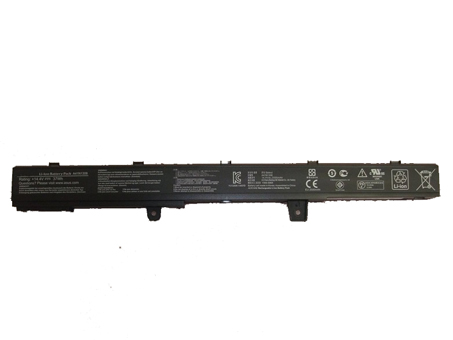
  • New Replacement asus A41-U36 for Asus U36 U36J U36JC U36S U36SD serie


  • Battery asus A32-K93 – Low Prices + Fast Shipping‎

    asus A32-K93 battery
    Brand New Battery For asus A32-K93, laptop battery specifications(Li-ion, 5200mAh ,10.8V), lowest price and 30 days money back, 1-year warranty. 100% compatible with ASUS K93 K93S K93SV serie.

    ASUS A32-K93 A42-K93 Replacement laptop Battery [5200mAh, 10.8V]

    Battery UK >>asus A32-K93

    Replace the following part numbers:
    A32-K93,A42-K93
    Fits the Following Models:
    ASUS K93 K93S K93SV Series

    Q:How do I extend the life of my laptop battery?

    • + New asus A32-K93 Battery Pack must be fully charged before use.If you don’t use your laptop for a period of time,you must fully discharge then recharge the asus A32-K93 battery.
    • + Always use a laptop on a hard surface. Don’t put it on your lap (despite its name) or on thermal insulating materials such as cushions. If you like to work in bed with your laptop, I recommend using a laptop table. I have this one, and I am quite content with it.
    • + Try to avoid charging the battery while you are working with the laptop. Charging the asus A32-K93 batteries increases your laptop’s temperature. The problem is that the CPU, the graphics card and the hard disk also heat up your laptop, which adds to the temperature increase experienced when charging the asus A32-K93 battery. Many vendors deliver their laptops with software that allows you to disable charging. You also can remove the asus A32-K93 battery while you are working on AC current.
    • + Make sure the laptop’s ventilation can always work properly. Don’t place objects before the ventilation systems opening. Don’t run or charge the laptop while it is in its case.
    • + Don’t leave the laptop in the car or under the sun in summer. Use a bike. It keeps your  5200mAh 10.8V ASUS A32-K93 A42-K93 laptop battery cool and your own battery healthy. And too much sun exposure causes only skin cancer anyway.

    You are in the biggest replacement laptop battery and laptop ac adapters online store, We offer more than 18000 types laptop battery, compatable more than 2000000 laptop models, related 180 top laptop brand. We specialize in replacement laptop batteries and Laptop adapter for most top brand laptop on the market, Such as Acer, Apple, Asus, Dell, HP, IBM, Sony, Toshiba, Samsung and so on.

    Samsung EB-BA800ABE Cell Phone Battery replacement for Samsung Galaxy A8 SM-A8000 EB- BA800ABE

    Motorola GK40 Cell Phone Battery replacement for motorola GK40 Motorola Moto G4 Play (XT1607)

    LG BL-T10 Cell Phone Battery replacement for LG GPAD G PAD 8.3 BL-T10 VK810 V500

    LEICA GEB121 Cell Phone Battery replacement for LEICA TPS400 TPS700 TPS800 TPS1000 Total stations battery

    MOTOROLA 82-71364-03 Cell Phone Battery replacement for Symbol MOTOROLA MC70 MC75 FR68 MC7090 MC7004

    LG BL-T5 Cell Phone Battery replacement for LG F180L/S/K Optimus G (LG Gee)

    Motorola FX30 Cell Phone Battery replacement for Motorola XT1575 Moto X Pure Edition / Moto X Style

    HTC BM35100 Cell Phone Battery replacement for HTC One X G23 S720E One X+ S728E 720T 2100mAh with tools

    Samsung EB-BN910BBE Cell Phone Battery replacement for Samsung Galaxy Note 4

    iPhone 616-0772 Cell Phone Battery replacement for iPhone 6 Plus +Tool

    Teach you how to do here:
    1. When first time using asus A32-K93 battery, Please carefully read the user manual about Battery maintain parts.
    2. Please fully charge at most 12 hours in first asus A32-K93 battery charge time. Bcause it is need three/four times for charge/discharge cycles to get the maximum capacity of battery.
    3. If without using notebook long time(more than 3 weeks) or found that your asus A32-K93 battery charge/discharge time become shorter and shorter, you have to fully discharge the battery before next time charge again.
    4. It is better to keep the laptop power off during charge the asus A32-K93 battery pack. And don’t unplugged power or using your notebook during the battery half-way charge. The best time using is 30 minutes fully charge later.
    5. Keep your asus A32-K93 battery far away from damp,exposure,and erosion some chemical liquids and others to avoid making battery short-circuit.

    Batterijen Sales Nederland / België asus A32-K93 ACCU >> ASUS ACCU

    Laptop power adaptors and chargers are necessary accessories that enable the charging of such portable devices. Adaptors and charges aren’t created equal, which is why you should always be looking for premium quality. Each of the Laptop Battery Express adaptors has been chosen because of its quality and affordability. You can rest assured that you’re getting access to some of the best replacement items on the market. We have laptop power adaptors for a vast range of brands and models.Discover laptop power adaptors that will be just right for you.

  • New Replacement ASUS A41N1308 for Asus X551C serie

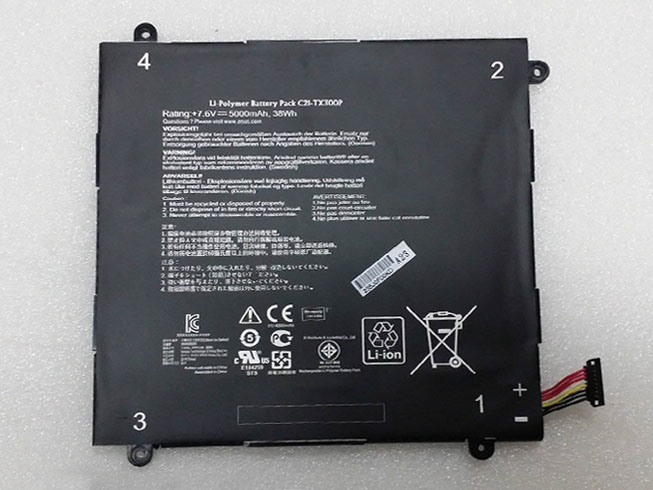
  • Brand New Battery For Asus C21-TX300P

    Asus C21-TX300P battery
    Brand New Battery For Asus C21-TX300P, laptop battery specifications(Li-ion, 5000mah/38wh ,7.6v), lowest price and 30 days money back, 1-year warranty. 100% compatible with Asus Transformer Book.

    ASUS C21-TX300P Replacement laptop Battery [5000mah/38wh, 7.6v]

    Battery UK >>Asus C21-TX300P

    Replace the following part numbers:
    C21-TX300P
    Fits the Following Models:
    Asus C21-TX300P Series

    Q:How do I extend the life of my laptop battery?

    • + New Asus C21-TX300P Battery Pack must be fully charged before use.If you don’t use your laptop for a period of time,you must fully discharge then recharge the Asus C21-TX300P battery.
    • + Always use a laptop on a hard surface. Don’t put it on your lap (despite its name) or on thermal insulating materials such as cushions. If you like to work in bed with your laptop, I recommend using a laptop table. I have this one, and I am quite content with it.
    • + Try to avoid charging the battery while you are working with the laptop. Charging the Asus C21-TX300P batteries increases your laptop’s temperature. The problem is that the CPU, the graphics card and the hard disk also heat up your laptop, which adds to the temperature increase experienced when charging the Asus C21-TX300P battery. Many vendors deliver their laptops with software that allows you to disable charging. You also can remove the Asus C21-TX300P battery while you are working on AC current.
    • + Make sure the laptop’s ventilation can always work properly. Don’t place objects before the ventilation systems opening. Don’t run or charge the laptop while it is in its case.
    • + Don’t leave the laptop in the car or under the sun in summer. Use a bike. It keeps your 5000mah/38wh 7.6v ASUS C21-TX300P laptop battery cool and your own battery healthy. And too much sun exposure causes only skin cancer anyway.

    You are in the biggest replacement laptop battery and laptop ac adapters online store, We offer more than 18000 types laptop battery, compatable more than 2000000 laptop models, related 180 top laptop brand. We specialize in replacement laptop batteries and Laptop adapter for most top brand laptop on the market, Such as Acer, Apple, Asus, Dell, HP, IBM, Sony, Toshiba, Samsung and so on.

    Motorola EG30 Cell Phone Battery replacement for DROID SNN5916A XT907 RAZR I XT890

    Sony LIS1499ERPC Cell Phone Battery replacement for SONY LT30 LT30p Xperia T Xperia TL BDRG

    Nokia BV-5JW Cell Phone Battery replacement for NOKIA Lumia 800 N9

    NOKIA BV-T3G Cell Phone Battery replacement for NOKIA Microsoft Lumia 650

    NOKIA BL-L4A Cell Phone Battery replacement for Lumia 535 RM-1090 RM1089 NOKIA

    LG BL-54SH Cell Phone Battery replacement for LG OPTIMUS L90 D410 D415 OPTIMUS F7 LG870

    Lenovo BL203 Cell Phone Battery replacement for Lenovo A308T A318T A365E A369 A66

    LG BL-51YF Cell Phone Battery replacement for LG G4 F500 H810 H815 LS991 VS986

    NEC BAT909B Cell Phone Battery replacement for NEC NEC909E CASIO G’zOne IS11CA

    HTC BM35100 Cell Phone Battery replacement for HTC One X G23 S720E One X+ S728E 720T 2100mAh with tools

    Teach you how to do here:
    1. When first time using Asus C21-TX300P battery, Please carefully read the user manual about Battery maintain parts.
    2. Please fully charge at most 12 hours in first Asus C21-TX300P battery charge time. Bcause it is need three/four times for charge/discharge cycles to get the maximum capacity of battery.
    3. If without using notebook long time(more than 3 weeks) or found that your Asus C21-TX300P battery charge/discharge time become shorter and shorter, you have to fully discharge the battery before next time charge again.
    4. It is better to keep the laptop power off during charge the Asus C21-TX300P battery pack. And don’t unplugged power or using your notebook during the battery half-way charge. The best time using is 30 minutes fully charge later.
    5. Keep your Asus C21-TX300P battery far away from damp,exposure,and erosion some chemical liquids and others to avoid making battery short-circuit.

    Batterijen Sales Nederland / België Asus C21-TX300P ACCU >> ASUS ACCU

    Laptop power adaptors and chargers are necessary accessories that enable the charging of such portable devices. Adaptors and charges aren’t created equal, which is why you should always be looking for premium quality. Each of the Laptop Battery Express adaptors has been chosen because of its quality and affordability. You can rest assured that you’re getting access to some of the best replacement items on the market. We have laptop power adaptors for a vast range of brands and models.Discover laptop power adaptors that will be just right for you.

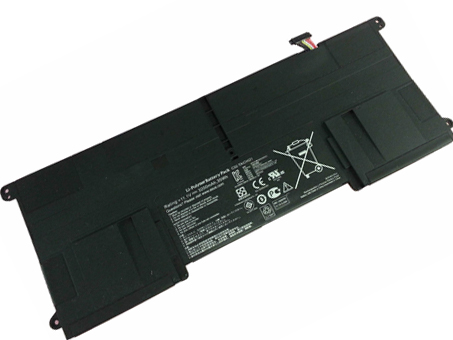
  • Brand New Battery For ASUS C32-TAICHI21

    Brand New Battery For ASUS C32-TAICHI21 Buit-in , laptop battery specifications(Li-ion, 3200mAh/35Wh ,11.1V), lowest price and 30 days money back, 1-year warranty. 100% compatible with Asus Ultrabook Taichi 21.
    Battery » C32-TAICHI21 Buit-in

    ASUS C32-TAICHI21 Buit-in Battery Pack [3200mAh/35Wh, 11.1V]


    ASUS C32-TAICHI21 battery

    Teach you how to do here:
    1. When first time using ASUS C32-TAICHI21 battery, Please carefully read the user manual about Battery maintain parts.
    2. Please fully charge at most 12 hours in first ASUS C32-TAICHI21 battery charge time. Bcause it is need three/four times for charge/discharge cycles to get the maximum capacity of battery.
    3. If without using notebook long time(more than 3 weeks) or found that your ASUS C32-TAICHI21 battery charge/discharge time become shorter and shorter, you have to fully discharge the battery before next time charge again.
    4. It is better to keep the laptop power off during charge the ASUS C32-TAICHI21 battery pack. And don’t unplugged power or using your notebook during the battery half-way charge. The best time using is 30 minutes fully charge later.
    5. Keep your ASUS C32-TAICHI21 battery far away from damp,exposure,an