-
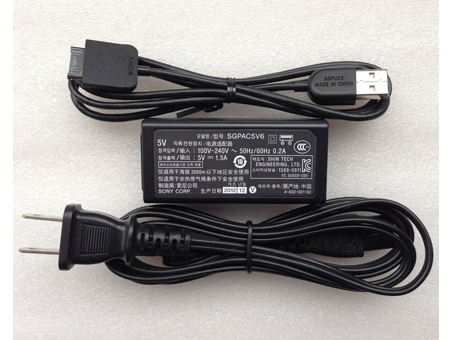
SGPAC5V6 SGPUC2 Universal Laptop Power Adapter. 100% Compatible with Sony Xperia Tablet S SGPT121US/S SGPT122US/S.SONY SGPAC5V6 SGPUC2 Power Adapter – Product information
NZ laptop Ac Adapter shop, buy cheap SONY SGPAC5V6 replacement laptop Ac Adapter, SGPAC5V6 SGPUC2 AC Adapter with low price and high quality! Brand New Adapters for Sony Xperia Tablet S SGPT121US/S SGPT122US/S.
AC Input:100-240V 50-60Hz
DC Output: 5V 1.5A, 7.5W
SGPAC5V6 SGPUC2 Power Adapter
Adapter Part Numbers:
SGPAC5V6 SGPUC2
Adapter Fit Models:
Cord Cable: US/ UK/ EU/ AU plug
Sony Xperia Tablet S SGPT12/SGPT13 Series
SGPT121
SGPT122
SGPT123
SGPT131
SGPT132
SGPT133
SGPT121US/S
SGPT122US/S
SGPT123US/S
SGPT121GB
SGPT122GB
SGPT123GB
SGPT131GB
SGPT121DE
SGPT122DE
SGPT131DE
SGPT133DE
SGPT121AU/S
SGPT122AU/S
SGPT131AU/S
SGPT133AU/S
SGPT121A1/S
SGPT122A1/S
SGPT131A1/S
SGPT132A1/S
SGPT133A1/S
SGPT121NZ/S
SGPT123NZ/S
SGPT121CAS
SGPT122CAS
SGPT121CN/S
SGPT122CN/S
SGPT132CN/S
SGPT131E1S
SGPT121FR
SGPT122FR
SGPT123FR
SGPT131FR
SGPT121IN
SGPT131IN
SGPT132IN
SGPT121ITS
SGPT131ITS
SGPT121JP/S
SGPT122JP/S
SGPT123JP/S
SGPT121KR
SGPT121L1/S
SGPT121HK
SGPT123HK
SGPT132HK
SGPT121TW/S
SGPT122TW/S
SGPT123TW/S
SGPT132TW/S
SGPT121E1/S
SGPT123E1/S
SGPT121RU
SGPT123RU
SGPT131RU
SGPT132RU
SGPT133RU
SGPT121E2
SGPT131E2
SGPT132E2
SGPT121E3
SGPT123E3
SGPT131E3
SGPT133E3
SGPT121ES
SGPT122ES
SGPT131ES
SGPT133ES
SGPT121L1
SGPT122L1
SGPT123L1
SGPT121MX
SGPT122MX
SGPT123MX
SGPT132MX
SGPT121TR
SGPT131TR
SGPT132TR
SGPT121IT
SGPT131ITJP:SONY SGPAC5V6
DE:SGPAC5V6 SGPUC2 Notebook-Netzteile.Das richtige SONY Laptop Netzteil finden.The SONY SGPAC5V6 AC adapter is used to recharge the battery in a notebook and to provide dependable power for operating the notebook for long periods of time. If an AC adapter fails it will not recharge the battery and it will not provide power to operate the notebook without a battery.Test the SONY SGPAC5V6 AC Adapter
Connect the output cord from the AC adapter to the notebook and plug the power cord into a working electrical outlet. Perform one or more of the following tasks to check the operation of the AC power adapter.
Check the power icon in the system tray.
If the icon resembles a power cord, and if moving the cursor over the icon displays the On AC Power message, the AC adapter is operating properly.
If the icon resembles a battery when the AC adapter is connected, the adapter is defective.
Check if the AC power adapter can operate the notebook when the battery is removed.
Do a normal shutdown of the PC.
Remove the battery from the Notebook.
Connect the SONY power adapter and press the Power button to start the notebook.
If the PC does not start and operate normally, the AC adapter is defective and must be replaced.
If the PC does start and operate normally, the AC adapter is working properlyDetermine the AC Adapter Part Number
Different notebook models require different AC adapters. You will need to know the Product Number of your notebook to determine the Part Number of the replacement part.
Perform one of the following tasks to find the Product Number of your notebook.
Click Start, then click Help & Support. The product name, product number, and serial number of the notebook are displayed in the upper left hand corner of the Help and Support home page.
If the Notebook computer is not powered on, turn it over and locate the SONY Service Tag fastened to the back of the notebook. The Product Number (P/N) is printed on this tag. On some Notebook computers, the SONY Service Tag is located inside the battery compartment. Remove the battery from the Notebook to view the SONY Service Tag information.Power Adapter Fast Shipping
Why buy laptop batteries & AC adapters from us?
www.notebookbattery.co.nz is quite a big site for selling laptop batteries,laptop AC adapters and electronic products online.
Low Prices Guarantee – Your best source for batteries and adapters. We are a new lithium battery manufacturer,Wholesaler and distributor of notebook computer batteries & AC adapter. Factory-direct price!
High Quality Guarantee – The batteries and adapters are rigorously tested for voltage, capacity, compatibility and safety to exceed original equipment manufacturer’s specifications . The cheap batteries meet or exceed the original batteries.
Secure Shopping Guarantee- Shopping is easy and 100% secure. We value your privacy and keep your order and personal information safe. We never share or rent our customer’s data. Click the “Add to cart” button to order what you need easily.Wholesale and retail laptop adapter in NZ. Replacement for Acer,Apple, Compaq,Dell, FUJITSU, IBM,Lenovo,Sony and so on.
How to select laptop Adapter? Make sure the volt and currect of adapter is same as your origial. carefully check the size of tip of adapter is correct. check and confirm with the photo of power adapter is the one you are looking for. We ship to the Laptop adapter around Globe [USA, Canada, UK, NZ and Ireland, Australia]. View more laptop adapter. Contact with us if any problem on selecting power adapter.
These may be you want to look for : Dell 2TXYM power supply, hp ENP-2320 power supply, LENOVO 54Y8861 power supply, HP 503376-001 power supply, dell FR610 power supply,
Author: admin
-
Purchasing a Replacement AC Adapter SONY SGPAC5V6
-
hasee SQU-817 replacement laptop battery for PC ONKYO DC205 UK
hasee SQU-817 replacement laptop battery for PC ONKYO DC205 UK laptop battery shop, buy cheap SQU-817 laptop batteries, SQU-817 notebook battery with low price and high quality! This Li-ion hasee SQU-817 meet or exceed the original laptop battery specifications.
Compatible Part Numbers:
SQU-817,916T8000F
Compatible Model Numbers:
Hasee SQU-817
Hasee 916T8000F
PC ONKYO?DC205Shop with confidence! UK-ONLINE.co.uk stands behind its products by carrying a 1-year warranty on most of our products. If you are not happy with your purchase, we offer a 30-day money-back guarantee with no questions asked.
Features:
Warranty:We promise that the hasee SQU-817 laptop Battery sold in our website are 100% brand new – We never sell used or refurbished SQU-817 laptop Battery.
1.100% new high quality Replacement battery Compatible your SQU-817hasee laptops.
2.Provides excellent discharge characteristics.
3.30-Day Money Back,1 Year Extended Warranty for SQU-817 laptop Battery.
4.Quick delivery for every order.We are a manufacturer representative and wholesaler that specializes in Laptop Batteries , Laptop AC Adapters and Some Electronics. We have tested hasee SQU-817 Batteries from virtually every manufacturer on the market. Our commitment is to provide our customers with the price/performance available on the market.
- We play our part by offering great products, service and support at prices you can afford.
- Our Mission:
UK-ONLINE.co.uk mission is create the most efficient product distribution system from supplier to consumer, for the benefit of all.
- Our Values
- Super Fast Delivery Time. We ship within 24 hours from payment update to our bank account of all items in stock!
- Specialisation – we do batteries and components with excellence!
- Passion – We love what we do – the secret of our success!
- Customer Service – The customer is king. We know that building trusting, long-term relationships with our customers is key to our collaborative success.Prompt email response and good communication.Fast shipping and tracking number email notification.Simple procedures for merchandise return,exchange,or replacement.
- Sharp Pricing – The formula is simple. We have to make a profit, or we go out of business, right? Above that we aim to pass on the benefits of competitive pricing to our customers. We also build great relationships with our suppliers to make this pricing possible. We may not always be the cheapest but we do offer the best value.
You can buy it from our store :
hasee SQU-817バッテリー>>SQU-817 Batterijen>>SQU-817 Battery UK>>hasee SQU-817 Akku
Buy cell phones accessories online for the latest iPhones, Android smartphones,Windows phones. Find the best deals on Apple,LG,Sony,Lenovo and Samsung devices.
SONY LIS1547ERPC Battery
Asus C11-A68 Battery
SONY L35h Battery
Motorola 82-160955-01 Battery
iPhone 616-0721 Battery
Motorola FX30 Battery
Samsung EB- BA500ABE Battery
HTC BL83100 BatteryThank you for using uk-online.co.uk. We offer wholesale and retail cheap replacement batteries / chargers for laptops. We hope we have made your shopping fast and easy.
Each of our batteries is engineered to be 100% compatible and thoroughly tested before it leaves the factory floor and because we take advantage of the latest battery technology, we offer the highest-capacity batteries on the market to power your laptop longer. -
Dell F7HVR replacement laptop battery for Dell Inspiron 15 7000 Series 7537 UK
Dell F7HVR replacement laptop battery for Dell Inspiron 15 7000 Series 7537 UK laptop battery shop, buy cheap F7HVR laptop batteries, F7HVR notebook battery with low price and high quality! This Li-ion Dell F7HVR meet or exceed the original laptop battery specifications.
Compatible Part Numbers:
F7HVR
Compatible Model Numbers:
DELL Inspiron 17HR-1728T,
DELL Inspiron 14 7000 Series,
DELL Inspiron 14 7000 Series-7437,
DELL Inspiron 14 Series,
DELL Inspiron 14-7437 Series,
DELL Inspiron 15 7000 Series,
DELL Inspiron 15 7000 Series-7537,
DELL Inspiron 15 Series,
DELL Inspiron 15-7537,
DELL Inspiron 15-7537 SeriesYou can buy it from our store :
Dell F7HVRバッテリー>>F7HVR Batterijen>>F7HVR Battery UK>>Dell F7HVR Akku
Buy cell phones accessories online for the latest iPhones, Android smartphones,Windows phones. Find the best deals on Apple,LG,Sony,Lenovo and Samsung devices.
Lenovo BL204 Battery
Asus C11- A80 Battery
Nokia BL-4YW Battery
Motorola EB20 Battery
Nokia BV-4BWA Battery
SONY LIS1502ERPC Battery
PLC BR2/3A-AB Battery
LG BL-T7 BatteryCheap Laptop Adapters. Our laptop adapters can enhance your productivity by powering your notebook while plugged in, as well as charging your battery so that you can take your notebook with you when you unplug. AC Adapters help you save on equipment, power consumption costs.
Sony ACDP-085E03 ADAPTER
LENOVO PC9051 ADAPTER
LENOVO 54Y8861 ADAPTER
Apple A1466 ADAPTER
Acer A13-045N2A ADAPTER
Lenovo 230W ADAPTER
HP 45W ADAPTER
ASUS EXA1202YH ADAPTERThank you for using uk-online.co.uk. We offer wholesale and retail cheap replacement batteries / chargers for laptops. We hope we have made your shopping fast and easy.
Each of our batteries is engineered to be 100% compatible and thoroughly tested before it leaves the factory floor and because we take advantage of the latest battery technology, we offer the highest-capacity batteries on the market to power your laptop longer. -
Lenovo 45N1704 replacement laptop battery for Lenovo Thinkpad 12.5inch S1 Yoga UK
Lenovo 45N1704 replacement laptop battery for Lenovo Thinkpad 12.5inch S1 Yoga UK laptop battery shop, buy cheap 45N1704 laptop batteries, 45N1704 notebook battery with low price and high quality! This Li-ion Lenovo 45N1704 meet or exceed the original laptop battery specifications.
Compatible Part Numbers:
45N1705 45N1707 45N1704 45N1706
Compatible Model Numbers:
Lenovo Thinkpad 12.5inch S1 Yoga 20cds00800 20cds00700 20cds00500 LaptopShop with confidence! UK-ONLINE.co.uk stands behind its products by carrying a 1-year warranty on most of our products. If you are not happy with your purchase, we offer a 30-day money-back guarantee with no questions asked.
Features:
Warranty:We promise that the Lenovo 45N1704 laptop Battery sold in our website are 100% brand new – We never sell used or refurbished 45N1704 laptop Battery.
1.100% new high quality Replacement battery Compatible your 45N1704Lenovo laptops.
2.Provides excellent discharge characteristics.
3.30-Day Money Back,1 Year Extended Warranty for 45N1704 laptop Battery.
4.Quick delivery for every order.We are a manufacturer representative and wholesaler that specializes in Laptop Batteries , Laptop AC Adapters and Some Electronics. We have tested Lenovo 45N1704 Batteries from virtually every manufacturer on the market. Our commitment is to provide our customers with the price/performance available on the market.
- We play our part by offering great products, service and support at prices you can afford.
- Our Mission:
UK-ONLINE.co.uk mission is create the most efficient product distribution system from supplier to consumer, for the benefit of all.
- Our Values
- Super Fast Delivery Time. We ship within 24 hours from payment update to our bank account of all items in stock!
- Specialisation – we do batteries and components with excellence!
- Passion – We love what we do – the secret of our success!
- Customer Service – The customer is king. We know that building trusting, long-term relationships with our customers is key to our collaborative success.Prompt email response and good communication.Fast shipping and tracking number email notification.Simple procedures for merchandise return,exchange,or replacement.
- Sharp Pricing – The formula is simple. We have to make a profit, or we go out of business, right? Above that we aim to pass on the benefits of competitive pricing to our customers. We also build great relationships with our suppliers to make this pricing possible. We may not always be the cheapest but we do offer the best value.
You can buy it from our store :
Lenovo 45N1704バッテリー>>45N1704 Batterijen>>45N1704 Battery UK>>Lenovo 45N1704 Akku
HOT BATTERY – If you are looking for the best brand new laptop batteries at the most preferred price, you have come to the right place. We provide the highest quality laptop batteries for the lowest price with the highest level of service, all in a secure and convenient platform.
HP ME03XL Battery
HP HSTNN-UB6M Battery
Clevo P750BAT-8 BatteryCheap Laptop Adapters. Our laptop adapters can enhance your productivity by powering your notebook while plugged in, as well as charging your battery so that you can take your notebook with you when you unplug. AC Adapters help you save on equipment, power consumption costs.
Sony ACDP-085E03 ADAPTER
LENOVO PC9051 ADAPTER
LENOVO 54Y8861 ADAPTER
Apple A1466 ADAPTER
Acer A13-045N2A ADAPTER
Lenovo 230W ADAPTER
HP 45W ADAPTER
ASUS EXA1202YH ADAPTER -
ASUS PA-1900-24 ADP-65DB Power Adapter
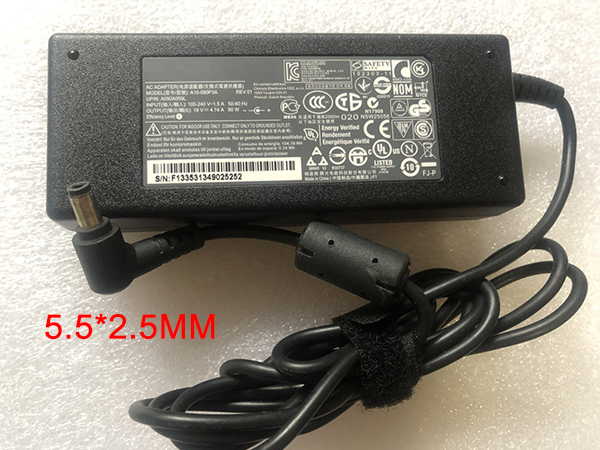
Find your Asus K53JS K53JT K53S K53SA Laptop PC laptop model information and buy model specific compatible products like laptop chargers with ac power adapters online at lowest price.ASUS PA-1900-24 ADP-65DB Power Adapter – Product information
NZ laptop Ac Adapter shop, buy cheap Asus PA-1900-24 replacement laptop Ac Adapter, PA-1900-24 ADP-65DB AC Adapter with low price and high quality! Brand New Adapters for Asus K53JS K53JT K53S K53SA Laptop.
AC Input:100-240V 50-60Hz (for worldwi
DC Output: 19V, 4.74A, 90W
PA-1900-24 ADP-65DB Power Adapter
Adapter Part Numbers:
PA-1900-24,ADP-65DB REV B, ADP-90FB, ADP-90SB BB, PA3380U-1ACA, 90-N6EPW2000, 90-N6EPW2010,PA-190-36
Adapter Fit Models:
Outlet: 3-prong
Cord Cable: US/ UK/ EU/ AU plug
One Power cord is included with this adapter for FREE(fit your country)

Asus K53
Asus K53B
Asus K53BY
Asus K53E
Asus K53F
Asus K53J
Asus K53JA
Asus K53JC
Asus K53JE
Asus K53JF
Asus K53JG
Asus K53JN
Asus K53JS
Asus K53JT
Asus K53S
Asus K53SA
Asus K53SC
Asus K53SD
Asus K53SE
Asus K53SJ
Asus K53SN
Asus K53SV
Asus K53T
Asus K53TA
Asus K53U
Asus K53-3
Asus K53E-A1
Asus K53E-B
Asus K53E-B1
Asus K53E-SX048X
Asus K53E-SX049X
Asus K53E
JP:Asus PA-1900-24
DE:PA-1900-24 ADP-65DB Notebook-Netzteile.Das richtige ASUS Laptop Netzteil finden.The Asus PA-1900-24 AC adapter is used to recharge the battery in a notebook and to provide dependable power for operating the notebook for long periods of time. If an AC adapter fails it will not recharge the battery and it will not provide power to operate the notebook without a battery.
Test the Asus PA-1900-24 AC Adapter
Connect the output cord from the AC adapter to the notebook and plug the power cord into a working electrical outlet. Perform one or more of the following tasks to check the operation of the AC power adapter.
Check the power icon in the system tray.
If the icon resembles a power cord, and if moving the cursor over the icon displays the On AC Power message, the AC adapter is operating properly.
If the icon resembles a battery when the AC adapter is connected, the adapter is defective.
Check if the AC power adapter can operate the notebook when the battery is removed.
Do a normal shutdown of the PC.
Remove the battery from the Notebook.
Connect the ASUS power adapter and press the Power button to start the notebook.
If the PC does not start and operate normally, the AC adapter is defective and must be replaced.
If the PC does start and operate normally, the AC adapter is working properlyDetermine the AC Adapter Part Number
Different notebook models require different AC adapters. You will need to know the Product Number of your notebook to determine the Part Number of the replacement part.
Perform one of the following tasks to find the Product Number of your notebook.
Click Start, then click Help & Support. The product name, product number, and serial number of the notebook are displayed in the upper left hand corner of the Help and Support home page.
If the Notebook computer is not powered on, turn it over and locate the ASUS Service Tag fastened to the back of the notebook. The Product Number (P/N) is printed on this tag. On some Notebook computers, the ASUS Service Tag is located inside the battery compartment. Remove the battery from the Notebook to view the ASUS Service Tag information.Power Adapter Fast Shipping
Why buy laptop batteries & AC adapters from us?
www.notebookbattery.co.nz is quite a big site for selling laptop batteries,laptop AC adapters and electronic products online.
Low Prices Guarantee – Your best source for batteries and adapters. We are a new lithium battery manufacturer,Wholesaler and distributor of notebook computer batteries & AC adapter. Factory-direct price!
High Quality Guarantee – The batteries and adapters are rigorously tested for voltage, capacity, compatibility and safety to exceed original equipment manufacturer’s specifications . The cheap batteries meet or exceed the original batteries.
Secure Shopping Guarantee- Shopping is easy and 100% secure. We value your privacy and keep your order and personal information safe. We never share or rent our customer’s data. Click the “Add to cart” button to order what you need easily.Wholesale and retail laptop adapter in NZ. Replacement for Acer,Apple, Compaq,Dell, FUJITSU, IBM,Lenovo,Sony and so on.
How to select laptop Adapter? Make sure the volt and currect of adapter is same as your origial. carefully check the size of tip of adapter is correct. check and confirm with the photo of power adapter is the one you are looking for. We ship to the Laptop adapter around Globe [USA, Canada, UK, NZ and Ireland, Australia]. View more laptop adapter. Contact with us if any problem on selecting power adapter.
These may be you want to look for : dell FR610 power supply, FSP FSP270-60LE power supply, HP 633195-001 power supply, HP 445102-002 power supply, dell 6RG54 power supply,
-
ACER PA-1650-80 Power Adapter
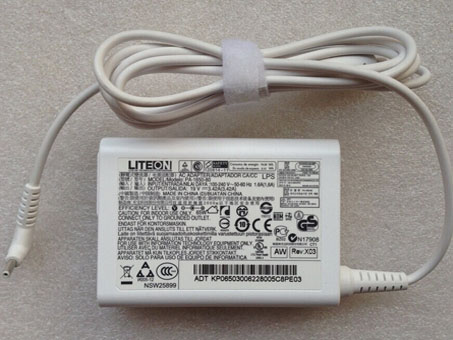
Replacement PA-1650-80 power chargers or AC adapters available for your Acer Aspire S7-191 Series Ultrabook.ACER PA-1650-80 Power Adapter – Product information
NZ laptop Ac Adapter shop, buy cheap ACER PA-1650-80 replacement laptop Ac Adapter, PA-1650-80 AC Adapter with low price and high quality! Brand New Adapters for Acer Aspire S7-191 Series Ultrabook.
AC Input:100-240V 50-60Hz
DC Output: 19V 3.42A,65W
PA-1650-80 Power Adapter
Adapter Part Numbers:
INPUT: 100-240V ?50- 60Hz (for worldwide use)
OUTPUT: 19V 3.42A, 65W
Connecter size: 3.0mm×1.1 mm (ref to the picture).
Outlet: 3-prong
Cord Cable: US/ UK/ EU/ AU plug
One Power cord is included with this adapter for Free
SKU:GSB-AFBKP.06503.007,KP.06503.006,PA-1650-80,NP.ADT11.00F,NPADT1100F,TP.SW7AD.65W- AS-A05

Adapter Fit Models:
Acer Aspire S7-191 Series Ultrabook
JP:ACER PA-1650-80
DE:PA-1650-80 Notebook-Netzteile.Das richtige ACER Laptop Netzteil finden.The ACER PA-1650-80 AC adapter is used to recharge the battery in a notebook and to provide dependable power for operating the notebook for long periods of time. If an AC adapter fails it will not recharge the battery and it will not provide power to operate the notebook without a battery.
Test the ACER PA-1650-80 AC Adapter
Connect the output cord from the AC adapter to the notebook and plug the power cord into a working electrical outlet. Perform one or more of the following tasks to check the operation of the AC power adapter.
Check the power icon in the system tray.
If the icon resembles a power cord, and if moving the cursor over the icon displays the On AC Power message, the AC adapter is operating properly.
If the icon resembles a battery when the AC adapter is connected, the adapter is defective.
Check if the AC power adapter can operate the notebook when the battery is removed.
Do a normal shutdown of the PC.
Remove the battery from the Notebook.
Connect the ACER power adapter and press the Power button to start the notebook.
If the PC does not start and operate normally, the AC adapter is defective and must be replaced.
If the PC does start and operate normally, the AC adapter is working properlyDetermine the AC Adapter Part Number
Different notebook models require different AC adapters. You will need to know the Product Number of your notebook to determine the Part Number of the replacement part.
Perform one of the following tasks to find the Product Number of your notebook.
Click Start, then click Help & Support. The product name, product number, and serial number of the notebook are displayed in the upper left hand corner of the Help and Support home page.
If the Notebook computer is not powered on, turn it over and locate the ACER Service Tag fastened to the back of the notebook. The Product Number (P/N) is printed on this tag. On some Notebook computers, the ACER Service Tag is located inside the battery compartment. Remove the battery from the Notebook to view the ACER Service Tag information.Power Adapter Fast Shipping
Why buy laptop batteries & AC adapters from us?
www.notebookbattery.co.nz is quite a big site for selling laptop batteries,laptop AC adapters and electronic products online.
Low Prices Guarantee – Your best source for batteries and adapters. We are a new lithium battery manufacturer,Wholesaler and distributor of notebook computer batteries & AC adapter. Factory-direct price!
High Quality Guarantee – The batteries and adapters are rigorously tested for voltage, capacity, compatibility and safety to exceed original equipment manufacturer’s specifications . The cheap batteries meet or exceed the original batteries.
Secure Shopping Guarantee- Shopping is easy and 100% secure. We value your privacy and keep your order and personal information safe. We never share or rent our customer’s data. Click the “Add to cart” button to order what you need easily.Wholesale and retail laptop adapter in NZ. Replacement for Acer,Apple, Compaq,Dell, FUJITSU, IBM,Lenovo,Sony and so on.
How to select laptop Adapter? Make sure the volt and currect of adapter is same as your origial. carefully check the size of tip of adapter is correct. check and confirm with the photo of power adapter is the one you are looking for. We ship to the Laptop adapter around Globe [USA, Canada, UK, NZ and Ireland, Australia]. View more laptop adapter. Contact with us if any problem on selecting power adapter.
These may be you want to look for : FSP FSP180-50PLA1 power supply, HP PCA222 power supply, HP ATX0300D5WC power supply, Dell 0T122K power supply, Dell RM112 power supply,
-
ASUS G750JH-DB71 ADP-230EB_T Power Adapter
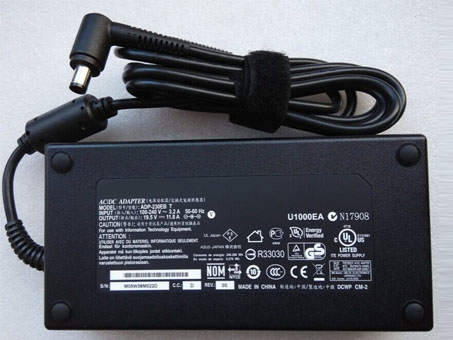
G750JH-DB71 ADP-230EB_T Universal Laptop Power Adapter. 100% Compatible with Delta 230W Cord Charger ASUS G750JH-DB71.ASUS G750JH-DB71 ADP-230EB_T Power Adapter – Product information
NZ laptop Ac Adapter shop, buy cheap asus G750JH-DB71 replacement laptop Ac Adapter, G750JH-DB71 ADP-230EB_T AC Adapter with low price and high quality! Brand New Adapters for Delta 230W Cord Charger ASUS G750JH-DB71.
AC Input:100-240V 50-60Hz (for worldwid
DC Output: 19.5V 11.8A,230W
G750JH-DB71 ADP-230EB_T Power Adapter
Adapter Part Numbers:
NW230-01,ADP-230EB T,0A001-00390000
Adapter Fit Models:
Connecter size: 7.4mm ×5.0mm, ,with central pin inside (ref to the picture).
Power LED indicator
Outlet: 3-prong
One Power cord is included with this adapter for FREE(fit your country )ASUS G750JH-DB71 Gaming Laprtop
JP:asus G750JH-DB71
DE:G750JH-DB71 ADP-230EB_T Notebook-Netzteile.Das richtige ASUS Laptop Netzteil finden.The asus G750JH-DB71 AC adapter is used to recharge the battery in a notebook and to provide dependable power for operating the notebook for long periods of time. If an AC adapter fails it will not recharge the battery and it will not provide power to operate the notebook without a battery.
Test the asus G750JH-DB71 AC Adapter
Connect the output cord from the AC adapter to the notebook and plug the power cord into a working electrical outlet. Perform one or more of the following tasks to check the operation of the AC power adapter.
Check the power icon in the system tray.
If the icon resembles a power cord, and if moving the cursor over the icon displays the On AC Power message, the AC adapter is operating properly.
If the icon resembles a battery when the AC adapter is connected, the adapter is defective.
Check if the AC power adapter can operate the notebook when the battery is removed.
Do a normal shutdown of the PC.
Remove the battery from the Notebook.
Connect the ASUS power adapter and press the Power button to start the notebook.
If the PC does not start and operate normally, the AC adapter is defective and must be replaced.
If the PC does start and operate normally, the AC adapter is working properlyDetermine the AC Adapter Part Number
Different notebook models require different AC adapters. You will need to know the Product Number of your notebook to determine the Part Number of the replacement part.
Perform one of the following tasks to find the Product Number of your notebook.
Click Start, then click Help & Support. The product name, product number, and serial number of the notebook are displayed in the upper left hand corner of the Help and Support home page.
If the Notebook computer is not powered on, turn it over and locate the ASUS Service Tag fastened to the back of the notebook. The Product Number (P/N) is printed on this tag. On some Notebook computers, the ASUS Service Tag is located inside the battery compartment. Remove the battery from the Notebook to view the ASUS Service Tag information.Power Adapter Fast Shipping
Why buy laptop batteries & AC adapters from us?
www.notebookbattery.co.nz is quite a big site for selling laptop batteries,laptop AC adapters and electronic products online.
Low Prices Guarantee – Your best source for batteries and adapters. We are a new lithium battery manufacturer,Wholesaler and distributor of notebook computer batteries & AC adapter. Factory-direct price!
High Quality Guarantee – The batteries and adapters are rigorously tested for voltage, capacity, compatibility and safety to exceed original equipment manufacturer’s specifications . The cheap batteries meet or exceed the original batteries.
Secure Shopping Guarantee- Shopping is easy and 100% secure. We value your privacy and keep your order and personal information safe. We never share or rent our customer’s data. Click the “Add to cart” button to order what you need easily.Wholesale and retail laptop adapter in NZ. Replacement for Acer,Apple, Compaq,Dell, FUJITSU, IBM,Lenovo,Sony and so on.
How to select laptop Adapter? Make sure the volt and currect of adapter is same as your origial. carefully check the size of tip of adapter is correct. check and confirm with the photo of power adapter is the one you are looking for. We ship to the Laptop adapter around Globe [USA, Canada, UK, NZ and Ireland, Australia]. View more laptop adapter. Contact with us if any problem on selecting power adapter.
These may be you want to look for : Dell L220NS-00 power supply, hp ENP-2320 power supply, Dell 290W power supply, Dell H525EF-00 power supply, FSP SPI400U4BB power supply,
-
MICROSOFT S89S Power Adapter
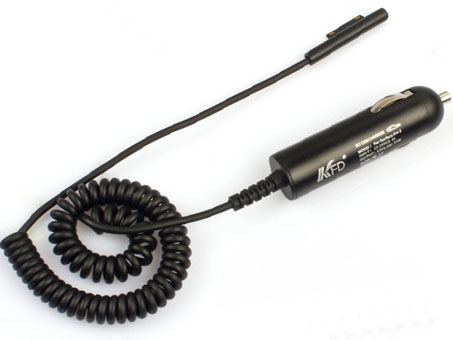
Buy Replacement AC Power Adapter S89S for DC 12V 2.58A Car Charger Charging for Microsoft Surface PRO 3 Tablet S89SMICROSOFT S89S Power Adapter – Product information
NZ laptop Ac Adapter shop, buy cheap Microsoft S89S replacement laptop Ac Adapter, S89S AC Adapter with low price and high quality! Brand New Adapters for DC 12V 2.58A Car Charger Charging for Microsoft Surface PRO 3 Tablet S89S.
AC Input:10-15VDC
DC Output: DC 12V 2.58A
S89S Power Adapter
Adapter Part Numbers:
Package Content:
1X DC 12V 2.58A Car Charger Charging for Microsoft Surface PRO 3 Tablet
Adapter Fit Models:
Compatible for Microsoft Windows Surface Pro 3


JP:Microsoft S89S
DE:S89S Notebook-Netzteile.Das richtige MICROSOFT Laptop Netzteil finden.The Microsoft S89S AC adapter is used to recharge the battery in a notebook and to provide dependable power for operating the notebook for long periods of time. If an AC adapter fails it will not recharge the battery and it will not provide power to operate the notebook without a battery.
Test the Microsoft S89S AC Adapter
Connect the output cord from the AC adapter to the notebook and plug the power cord into a working electrical outlet. Perform one or more of the following tasks to check the operation of the AC power adapter.
Check the power icon in the system tray.
If the icon resembles a power cord, and if moving the cursor over the icon displays the On AC Power message, the AC adapter is operating properly.
If the icon resembles a battery when the AC adapter is connected, the adapter is defective.
Check if the AC power adapter can operate the notebook when the battery is removed.
Do a normal shutdown of the PC.
Remove the battery from the Notebook.
Connect the MICROSOFT power adapter and press the Power button to start the notebook.
If the PC does not start and operate normally, the AC adapter is defective and must be replaced.
If the PC does start and operate normally, the AC adapter is working properlyDetermine the AC Adapter Part Number
Different notebook models require different AC adapters. You will need to know the Product Number of your notebook to determine the Part Number of the replacement part.
Perform one of the following tasks to find the Product Number of your notebook.
Click Start, then click Help & Support. The product name, product number, and serial number of the notebook are displayed in the upper left hand corner of the Help and Support home page.
If the Notebook computer is not powered on, turn it over and locate the MICROSOFT Service Tag fastened to the back of the notebook. The Product Number (P/N) is printed on this tag. On some Notebook computers, the MICROSOFT Service Tag is located inside the battery compartment. Remove the battery from the Notebook to view the MICROSOFT Service Tag information.Power Adapter Fast Shipping
Why buy laptop batteries & AC adapters from us?
www.notebookbattery.co.nz is quite a big site for selling laptop batteries,laptop AC adapters and electronic products online.
Low Prices Guarantee – Your best source for batteries and adapters. We are a new lithium battery manufacturer,Wholesaler and distributor of notebook computer batteries & AC adapter. Factory-direct price!
High Quality Guarantee – The batteries and adapters are rigorously tested for voltage, capacity, compatibility and safety to exceed original equipment manufacturer’s specifications . The cheap batteries meet or exceed the original batteries.
Secure Shopping Guarantee- Shopping is easy and 100% secure. We value your privacy and keep your order and personal information safe. We never share or rent our customer’s data. Click the “Add to cart” button to order what you need easily.Wholesale and retail laptop adapter in NZ. Replacement for Acer,Apple, Compaq,Dell, FUJITSU, IBM,Lenovo,Sony and so on.
How to select laptop Adapter? Make sure the volt and currect of adapter is same as your origial. carefully check the size of tip of adapter is correct. check and confirm with the photo of power adapter is the one you are looking for. We ship to the Laptop adapter around Globe [USA, Canada, UK, NZ and Ireland, Australia]. View more laptop adapter. Contact with us if any problem on selecting power adapter.
These may be you want to look for : Acbel 250W power supply, dell K340R power supply, HP 611484-001 power supply, Dell G238T power supply, Dell HP-P3017F3P power supply,
-
DELL PA-5M10 ADP-150RB_B 331-7224 FMGV3 450-15192 Power Adapter
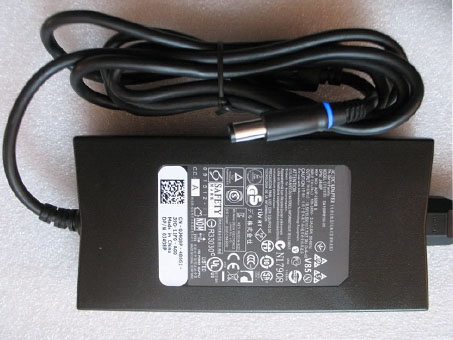
Find your Dell XPS 17 150W Slim AC Power Adapter Supply Charger PC laptop model information and buy model specific compatible products like laptop chargers with ac power adapters online at lowest price.DELL PA-5M10 ADP-150RB_B 331-7224 FMGV3 450-15192 Power Adapter – Product information
NZ laptop Ac Adapter shop, buy cheap dell PA-5M10 replacement laptop Ac Adapter, PA-5M10 ADP-150RB_B 331-7224 FMGV3 450-15192 AC Adapter with low price and high quality! Brand New Adapters for Dell XPS 17 150W Slim AC Power Adapter Supply Charger.
AC Input:100-240V 50-60Hz
DC Output: 19.5V 7.7A 150W
PA-5M10 ADP-150RB_B 331-7224 FMGV3 450-15192 Power Adapter
Adapter Part Numbers:
PA-5M10,ADP-150RB B,330-5829,330-5830,ADP-150RB B,DA150PM100-00,J408P,N426P,R940P,331-7224,FMGV3,450-15192
Adapter Fit Models:Dell Alienware M14x series
Dell Alienware M15x, P08G seriesDell Inspiron M5030,M5110,N5110,17R(N7110)
Dell Latitude Notebooks: E4200,E4300,E4310,E5400,E5410,E5420,E5430,E5500,E5510,E5520,E5530,
Dell Latitude Notebooks: E6220,E6230,E6320,E6330,E6400, E6400 ATG,E6400 XFR,
Dell Latitude Notebooks: E6410,E6410 ATG,E6420,E6420 ATG,E6420 XFR
Dell Latitude Notebooks: E6430,E6430 ATG,E6430s,E6430u,E6500,E6510,E6520,E6530Dell Precision M70,M90,M4400,M4500,M4600,M6300
Dell XPS 14(L401X),15(L501X),15(L502X),17(L701X),17(L702X),GEN 2,M170,M1710,M2010
Dell Vostro 3700,3750
Dell Studio XPS 16(1645),16(1647)

JP:dell PA-5M10
DE:PA-5M10 ADP-150RB_B 331-7224 FMGV3 450-15192 Notebook-Netzteile.Das richtige DELL Laptop Netzteil finden.The dell PA-5M10 AC adapter is used to recharge the battery in a notebook and to provide dependable power for operating the notebook for long periods of time. If an AC adapter fails it will not recharge the battery and it will not provide power to operate the notebook without a battery.
Test the dell PA-5M10 AC Adapter
Connect the output cord from the AC adapter to the notebook and plug the power cord into a working electrical outlet. Perform one or more of the following tasks to check the operation of the AC power adapter.
Check the power icon in the system tray.
If the icon resembles a power cord, and if moving the cursor over the icon displays the On AC Power message, the AC adapter is operating properly.
If the icon resembles a battery when the AC adapter is connected, the adapter is defective.
Check if the AC power adapter can operate the notebook when the battery is removed.
Do a normal shutdown of the PC.
Remove the battery from the Notebook.
Connect the DELL power adapter and press the Power button to start the notebook.
If the PC does not start and operate normally, the AC adapter is defective and must be replaced.
If the PC does start and operate normally, the AC adapter is working properlyDetermine the AC Adapter Part Number
Different notebook models require different AC adapters. You will need to know the Product Number of your notebook to determine the Part Number of the replacement part.
Perform one of the following tasks to find the Product Number of your notebook.
Click Start, then click Help & Support. The product name, product number, and serial number of the notebook are displayed in the upper left hand corner of the Help and Support home page.
If the Notebook computer is not powered on, turn it over and locate the DELL Service Tag fastened to the back of the notebook. The Product Number (P/N) is printed on this tag. On some Notebook computers, the DELL Service Tag is located inside the battery compartment. Remove the battery from the Notebook to view the DELL Service Tag information.Power Adapter Fast Shipping
Why buy laptop batteries & AC adapters from us?
www.notebookbattery.co.nz is quite a big site for selling laptop batteries,laptop AC adapters and electronic products online.
Low Prices Guarantee – Your best source for batteries and adapters. We are a new lithium battery manufacturer,Wholesaler and distributor of notebook computer batteries & AC adapter. Factory-direct price!
High Quality Guarantee – The batteries and adapters are rigorously tested for voltage, capacity, compatibility and safety to exceed original equipment manufacturer’s specifications . The cheap batteries meet or exceed the original batteries.
Secure Shopping Guarantee- Shopping is easy and 100% secure. We value your privacy and keep your order and personal information safe. We never share or rent our customer’s data. Click the “Add to cart” button to order what you need easily.Wholesale and retail laptop adapter in NZ. Replacement for Acer,Apple, Compaq,Dell, FUJITSU, IBM,Lenovo,Sony and so on.
How to select laptop Adapter? Make sure the volt and currect of adapter is same as your origial. carefully check the size of tip of adapter is correct. check and confirm with the photo of power adapter is the one you are looking for. We ship to the Laptop adapter around Globe [USA, Canada, UK, NZ and Ireland, Australia]. View more laptop adapter. Contact with us if any problem on selecting power adapter.
These may be you want to look for : dell FY632 power supply, Bestec W207D power supply, HP ATX0300D5WC power supply, Dell 2TXYM power supply, LENOVO PC9051 power supply,
-
Replacement ST2 power chargers or AC adapters available for your Car Charger Adapter
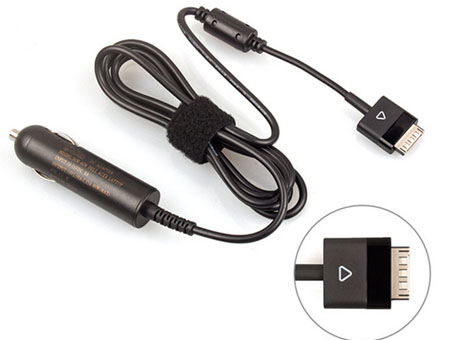
Replacement ST2 power chargers or AC adapters available for your Car Charger Adapter for DELL Latitude 10 Streak 10 XPS 10 19V 1.58A.DELL ST2 Power Adapter – Product information
NZ laptop Ac Adapter shop, buy cheap dell ST2 replacement laptop Ac Adapter, ST2 AC Adapter with low price and high quality! Brand New Adapters for Car Charger Adapter for DELL Latitude 10 Streak 10 XPS 10 19V 1.58A.
AC Input:AC 10-15V,8A (MAX)
DC Output: 19v 1.58a
ST2 Power Adapter
Adapter Part Numbers:
Input:AC 10-15V, 8A (MAX) FOR DELL CAR CHARGER
Power:30W
Output: 19v 1.58a
Connector: SPECIAL USB CONNECTOR
Adapter Fit Models:
FOR DELL Latitude 10 ( ST, ST2 ST2e)
FOR DELL Streak 10 Tablets
FOR DELL Latitude 10 (ST2e) Tablet
FOR DELL Latitude ST Tablet
FOR DELL XPS 10 TABLET
JP:dell ST2
DE:ST2 Notebook-Netzteile.Das richtige DELL Laptop Netzteil finden.The dell ST2 AC adapter is used to recharge the battery in a notebook and to provide dependable power for operating the notebook for long periods of time. If an AC adapter fails it will not recharge the battery and it will not provide power to operate the notebook without a battery.
Test the dell ST2 AC Adapter
Connect the output cord from the AC adapter to the notebook and plug the power cord into a working electrical outlet. Perform one or more of the following tasks to check the operation of the AC power adapter.
Check the power icon in the system tray.
If the icon resembles a power cord, and if moving the cursor over the icon displays the On AC Power message, the AC adapter is operating properly.
If the icon resembles a battery when the AC adapter is connected, the adapter is defective.
Check if the AC power adapter can operate the notebook when the battery is removed.
Do a normal shutdown of the PC.
Remove the battery from the Notebook.
Connect the DELL power adapter and press the Power button to start the notebook.
If the PC does not start and operate normally, the AC adapter is defective and must be replaced.
If the PC does start and operate normally, the AC adapter is working properlyDetermine the AC Adapter Part Number
Different notebook models require different AC adapters. You will need to know the Product Number of your notebook to determine the Part Number of the replacement part.
Perform one of the following tasks to find the Product Number of your notebook.
Click Start, then click Help & Support. The product name, product number, and serial number of the notebook are displayed in the upper left hand corner of the Help and Support home page.
If the Notebook computer is not powered on, turn it over and locate the DELL Service Tag fastened to the back of the notebook. The Product Number (P/N) is printed on this tag. On some Notebook computers, the DELL Service Tag is located inside the battery compartment. Remove the battery from the Notebook to view the DELL Service Tag information.Power Adapter Fast Shipping
Why buy laptop batteries & AC adapters from us?
www.notebookbattery.co.nz is quite a big site for selling laptop batteries,laptop AC adapters and electronic products online.
Low Prices Guarantee – Your best source for batteries and adapters. We are a new lithium battery manufacturer,Wholesaler and distributor of notebook computer batteries & AC adapter. Factory-direct price!
High Quality Guarantee – The batteries and adapters are rigorously tested for voltage, capacity, compatibility and safety to exceed original equipment manufacturer’s specifications . The cheap batteries meet or exceed the original batteries.
Secure Shopping Guarantee- Shopping is easy and 100% secure. We value your privacy and keep your order and personal information safe. We never share or rent our customer’s data. Click the “Add to cart” button to order what you need easily.Wholesale and retail laptop adapter in NZ. Replacement for Acer,Apple, Compaq,Dell, FUJITSU, IBM,Lenovo,Sony and so on.
How to select laptop Adapter? Make sure the volt and currect of adapter is same as your origial. carefully check the size of tip of adapter is correct. check and confirm with the photo of power adapter is the one you are looking for. We ship to the Laptop adapter around Globe [USA, Canada, UK, NZ and Ireland, Australia]. View more laptop adapter. Contact with us if any problem on selecting power adapter.
These may be you want to look for : Dell HP-P3017F3P power supply, HP 503376-001 power supply, HIGH HPC-1000-G14C power supply, Dell H250AD-00 power supply, HP 504965-001 power supply,