Replace Laptop battery in NZ

Author: admin

  • buy cheap Acer 135W replacement laptop Ac Adapter

    Shop from the world’s largest selection and best deals for Laptop Power Adapters for Acer Aspire PA-1131-05 Laptop Charger & Cord. Shop with confidence on notebookbattery.co.nz.

    ACER 135W Power Adapter – Product information

    NZ laptop Ac Adapter shop, buy cheap Acer 135W replacement laptop Ac Adapter, 135W AC Adapter with low price and high quality! Brand New Adapters for Acer Aspire PA-1131-05 Laptop Charger & Cord.
    AC Input:100-240V 50-60Hz (for worldwide use)
    DC Output: 19V 7.1A, 135W
    135W Power Adapter
    Adapter Part Numbers:
    Please Note: NO 5.5*1.7MM Purple connector
    Outlet: 3-prong
    Cord Cable: US/ UK/ EU/ AU plug
    Warranty: 12 months
    Package includes:
    1 X AC Adapter
    1 X Free Power cord
    Adapter Fit Models:
    Acer Aspire L100 L310 L320 L3600 L460G
    Acer Aspire VN7-591G-74SK,VN7-591G-70JY,VN7-591G-792U
    ACER L100 L320 L3600 L460G 3000 PA-1131-08
    Acer Aspire VN7-591G-74LK Notebook
    Acer Aspire V15 Nitro VN7-591G-73MJ,VN7-591G-75H9,VN7-591G-796V
    ACER Aspire VN7-791-7939,VN7-791G-73AW
    JP:Acer 135W
    DE:135W Notebook-Netzteile.Das richtige ACER Laptop Netzteil finden.

    The Acer 135W AC adapter is used to recharge the battery in a notebook and to provide dependable power for operating the notebook for long periods of time. If an AC adapter fails it will not recharge the battery and it will not provide power to operate the notebook without a battery.

    Test the Acer 135W AC Adapter
    Connect the output cord from the AC adapter to the notebook and plug the power cord into a working electrical outlet. Perform one or more of the following tasks to check the operation of the AC power adapter.
    Check the power icon in the system tray.
    If the icon resembles a power cord, and if moving the cursor over the icon displays the On AC Power message, the AC adapter is operating properly.
    If the icon resembles a battery when the AC adapter is connected, the adapter is defective.
    Check if the AC power adapter can operate the notebook when the battery is removed.
    Do a normal shutdown of the PC.
    Remove the battery from the Notebook.
    Connect the ACER power adapter and press the Power button to start the notebook.
    If the PC does not start and operate normally, the AC adapter is defective and must be replaced.
    If the PC does start and operate normally, the AC adapter is working properly

    Determine the AC Adapter Part Number
    Different notebook models require different AC adapters. You will need to know the Product Number of your notebook to determine the Part Number of the replacement part.
    Perform one of the following tasks to find the Product Number of your notebook.
    Click Start, then click Help & Support. The product name, product number, and serial number of the notebook are displayed in the upper left hand corner of the Help and Support home page.
    If the Notebook computer is not powered on, turn it over and locate the ACER Service Tag fastened to the back of the notebook. The Product Number (P/N) is printed on this tag. On some Notebook computers, the ACER Service Tag is located inside the battery compartment. Remove the battery from the Notebook to view the ACER Service Tag information.

    Power Adapter Fast Shipping

    Adapter for 1.75A

    Adapter for PA-1900-24

    Adapter for 135W

    Adapter for EXA1206CH

    Adapter for PA-1650-21

    Adapter for HP-A2301A3B1

    Adapter for ADP-90CD

    Adapter for AA-PA3N40W

    Why buy laptop batteries & AC adapters from us?
    www.notebookbattery.co.nz is quite a big site for selling laptop batteries,laptop AC adapters and electronic products online.
    Low Prices Guarantee – Your best source for batteries and adapters. We are a new lithium battery manufacturer,Wholesaler and distributor of notebook computer batteries & AC adapter. Factory-direct price!
    High Quality Guarantee – The batteries and adapters are rigorously tested for voltage, capacity, compatibility and safety to exceed original equipment manufacturer’s specifications . The cheap batteries meet or exceed the original batteries.
    Secure Shopping Guarantee- Shopping is easy and 100% secure. We value your privacy and keep your order and personal information safe. We never share or rent our customer’s data. Click the “Add to cart” button to order what you need easily.

    Wholesale and retail laptop adapter in NZ. Replacement for Acer,Apple, Compaq,Dell, FUJITSU, IBM,Lenovo,Sony and so on.

    How to select laptop Adapter? Make sure the volt and currect of adapter is same as your origial. carefully check the size of tip of adapter is correct. check and confirm with the photo of power adapter is the one you are looking for. We ship to the Laptop adapter around Globe [USA, Canada, UK, NZ and Ireland, Australia]. View more laptop adapter. Contact with us if any problem on selecting power adapter.

    These may be you want to look for : Dell H250AD-00 power supply, HP 445102-002 power supply, FSP FSP270-60LE power supply, HP 403777-001 power supply, HP DPS-800GB_A power supply,
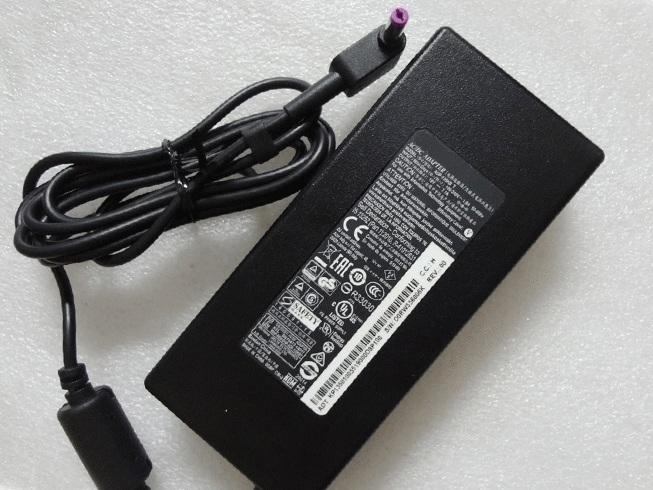
  • ACER 135W 19V 7.1A Power Adapter

    Acer 135W adapter
    Buy Replacement AC Power Adapter 135W 19V 7.1A for Acer Aspire ADP-135KB T 5.5*1.7 Purple connector

    ACER 135W 19V 7.1A Power Adapter – Product information

    NZ laptop Ac Adapter shop, buy cheap Acer 135W replacement laptop Ac Adapter, 135W 19V 7.1A AC Adapter with low price and high quality! Brand New Adapters for Acer Aspire ADP-135KB T 5.5*1.7 Purple connector.
    AC Input:100-240V
    DC Output: 19V 7.1A, 135W
    135W 19V 7.1A Power Adapter
    Adapter Part Numbers:
    Please Note: NO 5.5MM*2.5MM Orange connector
    Outlet: 3-prong
    Cord Cable: US/ UK/ EU/ AU plug
    Warranty:12 months
    Package includes:
    1 X AC Adapter
    1 X Free Power cord
    Adapter Fit Models:
    Acer Aspire V17 Nitro VN7-792G-797V Laptop
    Acer Aspire V15 Nitro VN7-592G-788W
    Acer Aspire VN7-592G-77LB Notebook
    Acer Aspire T5000-73CF Laptop
    Acer Aspire VN7-592G-77QY Notebook
    Acer Aspire V15 Nitro VN7-592G-71ZL
    Acer Aspire V15 Nitro VN7-591G
    JP:Acer 135W
    DE:135W 19V 7.1A Notebook-Netzteile.Das richtige ACER Laptop Netzteil finden.

    The Acer 135W AC adapter is used to recharge the battery in a notebook and to provide dependable power for operating the notebook for long periods of time. If an AC adapter fails it will not recharge the battery and it will not provide power to operate the notebook without a battery.

    Test the Acer 135W AC Adapter
    Connect the output cord from the AC adapter to the notebook and plug the power cord into a working electrical outlet. Perform one or more of the following tasks to check the operation of the AC power adapter.
    Check the power icon in the system tray.
    If the icon resembles a power cord, and if moving the cursor over the icon displays the On AC Power message, the AC adapter is operating properly.
    If the icon resembles a battery when the AC adapter is connected, the adapter is defective.
    Check if the AC power adapter can operate the notebook when the battery is removed.
    Do a normal shutdown of the PC.
    Remove the battery from the Notebook.
    Connect the ACER power adapter and press the Power button to start the notebook.
    If the PC does not start and operate normally, the AC adapter is defective and must be replaced.
    If the PC does start and operate normally, the AC adapter is working properly

    Determine the AC Adapter Part Number
    Different notebook models require different AC adapters. You will need to know the Product Number of your notebook to determine the Part Number of the replacement part.
    Perform one of the following tasks to find the Product Number of your notebook.
    Click Start, then click Help & Support. The product name, product number, and serial number of the notebook are displayed in the upper left hand corner of the Help and Support home page.
    If the Notebook computer is not powered on, turn it over and locate the ACER Service Tag fastened to the back of the notebook. The Product Number (P/N) is printed on this tag. On some Notebook computers, the ACER Service Tag is located inside the battery compartment. Remove the battery from the Notebook to view the ACER Service Tag information.

    Power Adapter Fast Shipping

    Adapter for LCAP31

    Adapter for 45W

    Adapter for EXA1202YH

    Adapter for KFD19237

    Adapter for 45W

    Adapter for 1627

    Adapter for FA180PM111

    Adapter for 19V

    Why buy laptop batteries & AC adapters from us?
    www.notebookbattery.co.nz is quite a big site for selling laptop batteries,laptop AC adapters and electronic products online.
    Low Prices Guarantee – Your best source for batteries and adapters. We are a new lithium battery manufacturer,Wholesaler and distributor of notebook computer batteries & AC adapter. Factory-direct price!
    High Quality Guarantee – The batteries and adapters are rigorously tested for voltage, capacity, compatibility and safety to exceed original equipment manufacturer’s specifications . The cheap batteries meet or exceed the original batteries.
    Secure Shopping Guarantee- Shopping is easy and 100% secure. We value your privacy and keep your order and personal information safe. We never share or rent our customer’s data. Click the “Add to cart” button to order what you need easily.

    Wholesale and retail laptop adapter in NZ. Replacement for Acer,Apple, Compaq,Dell, FUJITSU, IBM,Lenovo,Sony and so on.

    How to select laptop Adapter? Make sure the volt and currect of adapter is same as your origial. carefully check the size of tip of adapter is correct. check and confirm with the photo of power adapter is the one you are looking for. We ship to the Laptop adapter around Globe [USA, Canada, UK, NZ and Ireland, Australia]. View more laptop adapter. Contact with us if any problem on selecting power adapter.

    These may be you want to look for : FSP SPI400U4BB power supply, Dell P3JW1 power supply, HP 611484-001 power supply, IBM 39Y7201 power supply, ACER AXC105 power supply,

  • ACER 135W Power Adapter

    • Acer 135W adapter
      Find your Acer Aspire V15 Nitro VN7-591G 5.5×1.7 PC laptop model information and buy model specific compatible products like laptop chargers with ac power adapters online at lowest price.

      ACER 135W Power Adapter – Product information

      NZ laptop Ac Adapter shop, buy cheap Acer 135W replacement laptop Ac Adapter, 135W AC Adapter with low price and high quality! Brand New Adapters for Acer Aspire V15 Nitro VN7-591G 5.5×1.7.
      AC Input:100-240V
      DC Output: 19V 7.1A, 135W
      135W Power Adapter
      Adapter Part Numbers:
      Please Note: NO 5.5MM*2.5MM Orange connector
      Outlet: 3-prong
      Cord Cable: US/ UK/ EU/ AU plug
      Warranty:12 months
      Package includes:
      1 X AC Adapter
      1 X Free Power cord
      Adapter Fit Models:
      Acer Aspire V17 Nitro VN7-792G-797V Laptop
      Acer Aspire V15 Nitro VN7-592G-788W
      Acer Aspire VN7-592G-77LB Notebook
      Acer Aspire T5000-73CF Laptop
      Acer Aspire VN7-592G-77QY Notebook
      Acer Aspire V15 Nitro VN7-592G-71ZL
      Acer Aspire V15 Nitro VN7-591G
      JP:Acer 135W
      DE:135W Notebook-Netzteile.Das richtige ACER Laptop Netzteil finden.The Acer 135W AC adapter is used to recharge the battery in a notebook and to provide dependable power for operating the notebook for long periods of time. If an AC adapter fails it will not recharge the battery and it will not provide power to operate the notebook without a battery.

      Test the Acer 135W AC Adapter
      Connect the output cord from the AC adapter to the notebook and plug the power cord into a working electrical outlet. Perform one or more of the following tasks to check the operation of the AC power adapter.
      Check the power icon in the system tray.
      If the icon resembles a power cord, and if moving the cursor over the icon displays the On AC Power message, the AC adapter is operating properly.
      If the icon resembles a battery when the AC adapter is connected, the adapter is defective.
      Check if the AC power adapter can operate the notebook when the battery is removed.
      Do a normal shutdown of the PC.
      Remove the battery from the Notebook.
      Connect the ACER power adapter and press the Power button to start the notebook.
      If the PC does not start and operate normally, the AC adapter is defective and must be replaced.
      If the PC does start and operate normally, the AC adapter is working properly

      Determine the AC Adapter Part Number
      Different notebook models require different AC adapters. You will need to know the Product Number of your notebook to determine the Part Number of the replacement part.
      Perform one of the following tasks to find the Product Number of your notebook.
      Click Start, then click Help & Support. The product name, product number, and serial number of the notebook are displayed in the upper left hand corner of the Help and Support home page.
      If the Notebook computer is not powered on, turn it over and locate the ACER Service Tag fastened to the back of the notebook. The Product Number (P/N) is printed on this tag. On some Notebook computers, the ACER Service Tag is located inside the battery compartment. Remove the battery from the Notebook to view the ACER Service Tag information.

      Power Adapter Fast Shipping

      Adapter for A13-045N2A

      Adapter for 15V

      Adapter for X200CA-DB02

      Adapter for ADP-90CD

      Adapter for 74VT4

      Adapter for O5U092

      Adapter for VGN-CR510E

      Adapter for 1627

      Why buy laptop batteries & AC adapters from us?
      www.notebookbattery.co.nz is quite a big site for selling laptop batteries,laptop AC adapters and electronic products online.
      Low Prices Guarantee – Your best source for batteries and adapters. We are a new lithium battery manufacturer,Wholesaler and distributor of notebook computer batteries & AC adapter. Factory-direct price!
      High Quality Guarantee – The batteries and adapters are rigorously tested for voltage, capacity, compatibility and safety to exceed original equipment manufacturer’s specifications . The cheap batteries meet or exceed the original batteries.
      Secure Shopping Guarantee- Shopping is easy and 100% secure. We value your privacy and keep your order and personal information safe. We never share or rent our customer’s data. Click the “Add to cart” button to order what you need easily.

      Wholesale and retail laptop adapter in NZ. Replacement for Acer,Apple, Compaq,Dell, FUJITSU, IBM,Lenovo,Sony and so on.

      How to select laptop Adapter? Make sure the volt and currect of adapter is same as your origial. carefully check the size of tip of adapter is correct. check and confirm with the photo of power adapter is the one you are looking for. We ship to the Laptop adapter around Globe [USA, Canada, UK, NZ and Ireland, Australia]. View more laptop adapter. Contact with us if any problem on selecting power adapter.

      These may be you want to look for : HP ATX0300D5WC power supply, Acbel 250W power supply, Lenovo HKF2002-32 power supply, LENOVO DPS-280JB_A power supply, ACER AXC105 power supply,


  • DELL 45W USB Type-C USB-C Power Adapter

    45W USB Type-C USB-C Universal Laptop Power Adapter. 100% Compatible with Dell LA45NM150 HDCY5 0HDCY5.

    DELL 45W USB Type-C USB-C Power Adapter – Product information

    NZ laptop Ac Adapter shop, buy cheap Dell 45W replacement laptop Ac Adapter, 45W USB Type-C USB-C AC Adapter with low price and high quality! Brand New Adapters for Dell LA45NM150 HDCY5 0HDCY5.
    AC Input:100V-240V 1.3A 50-60Hz
    DC Output: 5V-20V 2A-2.25A 45W
    45W USB Type-C USB-C Power Adapter
    Adapter Part Numbers:
    LA45NM150, HDCY5, 0HDCY5
    Adapter Fit Models:
    Dell Latitude 11 5175 T04E
    Dell Latitude 11 5179 T04E
    Dell XPS 12 9250 T02H
    Dell Latitude 12 7275 T02H
    Dell XPS 12 9250
    Dell Venue 10 Pro 5056 T16G
    Dell Venue 5056 T16G
    Dell Latitude 13 7370 P67G

    Package includes:
    1 x AC Power Adapter
    1 x Free Power Cord

    JP:Dell 45W
    DE:45W USB Type-C USB-C Notebook-Netzteile.Das richtige DELL Laptop Netzteil finden.

    The Dell 45W AC adapter is used to recharge the battery in a notebook and to provide dependable power for operating the notebook for long periods of time. If an AC adapter fails it will not recharge the battery and it will not provide power to operate the notebook without a battery.

    Test the Dell 45W AC Adapter
    Connect the output cord from the AC adapter to the notebook and plug the power cord into a working electrical outlet. Perform one or more of the following tasks to check the operation of the AC power adapter.
    Check the power icon in the system tray.
    If the icon resembles a power cord, and if moving the cursor over the icon displays the On AC Power message, the AC adapter is operating properly.
    If the icon resembles a battery when the AC adapter is connected, the adapter is defective.
    Check if the AC power adapter can operate the notebook when the battery is removed.
    Do a normal shutdown of the PC.
    Remove the battery from the Notebook.
    Connect the DELL power adapter and press the Power button to start the notebook.
    If the PC does not start and operate normally, the AC adapter is defective and must be replaced.
    If the PC does start and operate normally, the AC adapter is working properly

    Determine the AC Adapter Part Number
    Different notebook models require different AC adapters. You will need to know the Product Number of your notebook to determine the Part Number of the replacement part.
    Perform one of the following tasks to find the Product Number of your notebook.
    Click Start, then click Help & Support. The product name, product number, and serial number of the notebook are displayed in the upper left hand corner of the Help and Support home page.
    If the Notebook computer is not powered on, turn it over and locate the DELL Service Tag fastened to the back of the notebook. The Product Number (P/N) is printed on this tag. On some Notebook computers, the DELL Service Tag is located inside the battery compartment. Remove the battery from the Notebook to view the DELL Service Tag information.

    Power Adapter Fast Shipping

    Adapter for ADS-40FSG-19

    Adapter for AP.0650A.005

    Adapter for HP-A0301R3

    Adapter for VGP-AC19V47

    Adapter for A1343

    Adapter for VGP-AC10V9

    Adapter for 65W

    Adapter for PA-1400-24

    Why buy laptop batteries & AC adapters from us?
    www.notebookbattery.co.nz is quite a big site for selling laptop batteries,laptop AC adapters and electronic products online.
    Low Prices Guarantee – Your best source for batteries and adapters. We are a new lithium battery manufacturer,Wholesaler and distributor of notebook computer batteries & AC adapter. Factory-direct price!
    High Quality Guarantee – The batteries and adapters are rigorously tested for voltage, capacity, compatibility and safety to exceed original equipment manufacturer’s specifications . The cheap batteries meet or exceed the original batteries.
    Secure Shopping Guarantee- Shopping is easy and 100% secure. We value your privacy and keep your order and personal information safe. We never share or rent our customer’s data. Click the “Add to cart” button to order what you need easily.

    Wholesale and retail laptop adapter in NZ. Replacement for Acer,Apple, Compaq,Dell, FUJITSU, IBM,Lenovo,Sony and so on.

    How to select laptop Adapter? Make sure the volt and currect of adapter is same as your origial. carefully check the size of tip of adapter is correct. check and confirm with the photo of power adapter is the one you are looking for. We ship to the Laptop adapter around Globe [USA, Canada, UK, NZ and Ireland, Australia]. View more laptop adapter. Contact with us if any problem on selecting power adapter.

    These may be you want to look for : FSP FSP270-60LE power supply, dell FR610 power supply, Huntkey HK280-62GP power supply, Dell H250AD-00 power supply, Dell CN-T128K power supply,

  • Replacement LA45NM150 power chargers

    • Replacement LA45NM150 power chargers or AC adapters available for your DELL 689C4 492-BBUU.

      DELL LA45NM150 Power Adapter – Product information

      NZ laptop Ac Adapter shop, buy cheap Dell LA45NM150 replacement laptop Ac Adapter, LA45NM150 AC Adapter with low price and high quality! Brand New Adapters for DELL 689C4 492-BBUU.
      AC Input:100V-240V 1.3A 50-60Hz
      DC Output: 5V-20V 2A-2.25A 45W
      LA45NM150 Power Adapter
      Adapter Part Numbers:
      LA45NM150, HDCY5, 0HDCY5
      Adapter Fit Models:
      Dell Latitude 11 5175 T04E
      Dell Latitude 11 5179 T04E
      Dell XPS 12 9250 T02H
      Dell Latitude 12 7275 T02H
      Dell XPS 12 9250
      Dell Venue 10 Pro 5056 T16G
      Dell Venue 5056 T16G
      Dell Latitude 13 7370 P67G

      Package includes:
      1 x AC Power Adapter
      1 x Free Power Cord

      JP:Dell LA45NM150
      DE:LA45NM150 Notebook-Netzteile.Das richtige DELL Laptop Netzteil finden.

      The Dell LA45NM150 AC adapter is used to recharge the battery in a notebook and to provide dependable power for operating the notebook for long periods of time. If an AC adapter fails it will not recharge the battery and it will not provide power to operate the notebook without a battery.

      Test the Dell LA45NM150 AC Adapter
      Connect the output cord from the AC adapter to the notebook and plug the power cord into a working electrical outlet. Perform one or more of the following tasks to check the operation of the AC power adapter.
      Check the power icon in the system tray.
      If the icon resembles a power cord, and if moving the cursor over the icon displays the On AC Power message, the AC adapter is operating properly.
      If the icon resembles a battery when the AC adapter is connected, the adapter is defective.
      Check if the AC power adapter can operate the notebook when the battery is removed.
      Do a normal shutdown of the PC.
      Remove the battery from the Notebook.
      Connect the DELL power adapter and press the Power button to start the notebook.
      If the PC does not start and operate normally, the AC adapter is defective and must be replaced.
      If the PC does start and operate normally, the AC adapter is working properly

      Determine the AC Adapter Part Number
      Different notebook models require different AC adapters. You will need to know the Product Number of your notebook to determine the Part Number of the replacement part.
      Perform one of the following tasks to find the Product Number of your notebook.
      Click Start, then click Help & Support. The product name, product number, and serial number of the notebook are displayed in the upper left hand corner of the Help and Support home page.
      If the Notebook computer is not powered on, turn it over and locate the DELL Service Tag fastened to the back of the notebook. The Product Number (P/N) is printed on this tag. On some Notebook computers, the DELL Service Tag is located inside the battery compartment. Remove the battery from the Notebook to view the DELL Service Tag information.

      Power Adapter Fast Shipping

      Adapter for A13-045N2A

      Adapter for AP.T1902.001

      Adapter for PA-1650-21

      Adapter for 65W

      Adapter for 48W

      Adapter for Pro_3

      Adapter for PA3715E-1AC3

      Adapter for 140W

      Why buy laptop batteries & AC adapters from us?
      www.notebookbattery.co.nz is quite a big site for selling laptop batteries,laptop AC adapters and electronic products online.
      Low Prices Guarantee – Your best source for batteries and adapters. We are a new lithium battery manufacturer,Wholesaler and distributor of notebook computer batteries & AC adapter. Factory-direct price!
      High Quality Guarantee – The batteries and adapters are rigorously tested for voltage, capacity, compatibility and safety to exceed original equipment manufacturer's specifications . The cheap batteries meet or exceed the original batteries.
      Secure Shopping Guarantee- Shopping is easy and 100% secure. We value your privacy and keep your order and personal information safe. We never share or rent our customer's data. Click the "Add to cart" button to order what you need easily.

      Wholesale and retail laptop adapter in NZ. Replacement for Acer,Apple, Compaq,Dell, FUJITSU, IBM,Lenovo,Sony and so on.

      How to select laptop Adapter? Make sure the volt and currect of adapter is same as your origial. carefully check the size of tip of adapter is correct. check and confirm with the photo of power adapter is the one you are looking for. We ship to the Laptop adapter around Globe [USA, Canada, UK, NZ and Ireland, Australia]. View more laptop adapter. Contact with us if any problem on selecting power adapter.

      These may be you want to look for : dell FR610 power supply, HP 611484-001 power supply, HP 503376-001 power supply, Dell PW116 power supply, Dell 235W power supply,

  • 180W Universal Laptop Power Adapter

    180W Universal Laptop Power Adapter. 100% Compatible with Thunderobot 911M-M1A 911-T1A 911GT-Y3/Y2 911-T1/T2 Power Supply.

    THUNDEROBOT 180W Power Adapter – Product information

    NZ laptop Ac Adapter shop, buy cheap Thunderobot 180W replacement laptop Ac Adapter, 180W AC Adapter with low price and high quality! Brand New Adapters for Thunderobot 911M-M1A 911-T1A 911GT-Y3/Y2 911-T1/T2 Power Supply.
    AC Input:100-240V  50-60Hz (worldwide use)
    DC Output: 19V 9.5A, 180W
    180W Power Adapter
    Adapter Part Numbers:
    Power LED indicator
    Outlet: 3-prong
    Cord Cable: US/ UK/ EU/ AU plug
    Warranty:12 months

    Package includes:
    1 X AC Adapter
    1 X Free Power cord
    Adapter Fit Models:
    MSI GT70 0NE-277US Gaming Laptop
    MSI GT70 Notebook ADP-180EB D
    Thunderobot 911M-M1A 911-T1A 911GT-Y3/Y2 911-T1/T2 Power Supply
    JP:Thunderobot 180W
    DE:180W Notebook-Netzteile.Das richtige THUNDEROBOT Laptop Netzteil finden.

    The Thunderobot 180W AC adapter is used to recharge the battery in a notebook and to provide dependable power for operating the notebook for long periods of time. If an AC adapter fails it will not recharge the battery and it will not provide power to operate the notebook without a battery.

    Test the Thunderobot 180W AC Adapter
    Connect the output cord from the AC adapter to the notebook and plug the power cord into a working electrical outlet. Perform one or more of the following tasks to check the operation of the AC power adapter.
    Check the power icon in the system tray.
    If the icon resembles a power cord, and if moving the cursor over the icon displays the On AC Power message, the AC adapter is operating properly.
    If the icon resembles a battery when the AC adapter is connected, the adapter is defective.
    Check if the AC power adapter can operate the notebook when the battery is removed.
    Do a normal shutdown of the PC.
    Remove the battery from the Notebook.
    Connect the THUNDEROBOT power adapter and press the Power button to start the notebook.
    If the PC does not start and operate normally, the AC adapter is defective and must be replaced.
    If the PC does start and operate normally, the AC adapter is working properly

    Determine the AC Adapter Part Number
    Different notebook models require different AC adapters. You will need to know the Product Number of your notebook to determine the Part Number of the replacement part.
    Perform one of the following tasks to find the Product Number of your notebook.
    Click Start, then click Help & Support. The product name, product number, and serial number of the notebook are displayed in the upper left hand corner of the Help and Support home page.
    If the Notebook computer is not powered on, turn it over and locate the THUNDEROBOT Service Tag fastened to the back of the notebook. The Product Number (P/N) is printed on this tag. On some Notebook computers, the THUNDEROBOT Service Tag is located inside the battery compartment. Remove the battery from the Notebook to view the THUNDEROBOT Service Tag information.

    Power Adapter Fast Shipping

    Adapter for A065R073L

    Adapter for 65W

    Adapter for ACDP-085E03

    Adapter for PA-1650-21

    Adapter for 19V

    Adapter for KFD19237

    Adapter for ADP-330AB_D

    Adapter for ADLX36NCT2C

    Why buy laptop batteries & AC adapters from us?
    www.notebookbattery.co.nz is quite a big site for selling laptop batteries,laptop AC adapters and electronic products online.
    Low Prices Guarantee – Your best source for batteries and adapters. We are a new lithium battery manufacturer,Wholesaler and distributor of notebook computer batteries & AC adapter. Factory-direct price!
    High Quality Guarantee – The batteries and adapters are rigorously tested for voltage, capacity, compatibility and safety to exceed original equipment manufacturer's specifications . The cheap batteries meet or exceed the original batteries.
    Secure Shopping Guarantee- Shopping is easy and 100% secure. We value your privacy and keep your order and personal information safe. We never share or rent our customer's data. Click the "Add to cart" button to order what you need easily.

    Wholesale and retail laptop adapter in NZ. Replacement for Acer,Apple, Compaq,Dell, FUJITSU, IBM,Lenovo,Sony and so on.

    How to select laptop Adapter? Make sure the volt and currect of adapter is same as your origial. carefully check the size of tip of adapter is correct. check and confirm with the photo of power adapter is the one you are looking for. We ship to the Laptop adapter around Globe [USA, Canada, UK, NZ and Ireland, Australia]. View more laptop adapter. Contact with us if any problem on selecting power adapter.

    These may be you want to look for : Dell 0T122K power supply, Lenovo HKF2002-32 power supply, dell 9RD1W power supply, HP 445102-002 power supply, dell K340R power supply,

  • Buy Replacement AC Power Adapter 180W for MSI GT70 Dominator 895

    Buy Replacement AC Power Adapter 180W for MSI GT70 Dominator 895,ADP-180NB BC,Notebook

    MSI 180W Power Adapter – Product information

    NZ laptop Ac Adapter shop, buy cheap MSI 180W replacement laptop Ac Adapter, 180W AC Adapter with low price and high quality! Brand New Adapters for MSI GT70 Dominator 895,ADP-180NB BC,Notebook.
    AC Input:100-240V  50-60Hz (worldwide use)
    DC Output: 19V 9.5A, 180W
    180W Power Adapter
    Adapter Part Numbers:
    Power LED indicator
    Outlet: 3-prong
    Cord Cable: US/ UK/ EU/ AU plug
    Warranty:12 months

    Package includes:
    1 X AC Adapter
    1 X Free Power cord
    Adapter Fit Models:
    MSI GT70 0NE-277US Gaming Laptop
    MSI GT70 Notebook ADP-180EB D
    JP:MSI 180W
    DE:180W Notebook-Netzteile.Das richtige MSI Laptop Netzteil finden.

    The MSI 180W AC adapter is used to recharge the battery in a notebook and to provide dependable power for operating the notebook for long periods of time. If an AC adapter fails it will not recharge the battery and it will not provide power to operate the notebook without a battery.

    Test the MSI 180W AC Adapter
    Connect the output cord from the AC adapter to the notebook and plug the power cord into a working electrical outlet. Perform one or more of the following tasks to check the operation of the AC power adapter.
    Check the power icon in the system tray.
    If the icon resembles a power cord, and if moving the cursor over the icon displays the On AC Power message, the AC adapter is operating properly.
    If the icon resembles a battery when the AC adapter is connected, the adapter is defective.
    Check if the AC power adapter can operate the notebook when the battery is removed.
    Do a normal shutdown of the PC.
    Remove the battery from the Notebook.
    Connect the MSI power adapter and press the Power button to start the notebook.
    If the PC does not start and operate normally, the AC adapter is defective and must be replaced.
    If the PC does start and operate normally, the AC adapter is working properly

    Determine the AC Adapter Part Number
    Different notebook models require different AC adapters. You will need to know the Product Number of your notebook to determine the Part Number of the replacement part.
    Perform one of the following tasks to find the Product Number of your notebook.
    Click Start, then click Help & Support. The product name, product number, and serial number of the notebook are displayed in the upper left hand corner of the Help and Support home page.
    If the Notebook computer is not powered on, turn it over and locate the MSI Service Tag fastened to the back of the notebook. The Product Number (P/N) is printed on this tag. On some Notebook computers, the MSI Service Tag is located inside the battery compartment. Remove the battery from the Notebook to view the MSI Service Tag information.

    Power Adapter Fast Shipping

    Adapter for KFD19237

    Adapter for PA-1650

    Adapter for P21F

    Adapter for 0A001-00330100

    Adapter for PA3822U-1ACA

    Adapter for ADS-40FSG-19

    Adapter for 78W

    Adapter for E5430

    Why buy laptop batteries & AC adapters from us?
    www.notebookbattery.co.nz is quite a big site for selling laptop batteries,laptop AC adapters and electronic products online.
    Low Prices Guarantee – Your best source for batteries and adapters. We are a new lithium battery manufacturer,Wholesaler and distributor of notebook computer batteries & AC adapter. Factory-direct price!
    High Quality Guarantee – The batteries and adapters are rigorously tested for voltage, capacity, compatibility and safety to exceed original equipment manufacturer's specifications . The cheap batteries meet or exceed the original batteries.
    Secure Shopping Guarantee- Shopping is easy and 100% secure. We value your privacy and keep your order and personal information safe. We never share or rent our customer's data. Click the "Add to cart" button to order what you need easily.

    Wholesale and retail laptop adapter in NZ. Replacement for Acer,Apple, Compaq,Dell, FUJITSU, IBM,Lenovo,Sony and so on.

    How to select laptop Adapter? Make sure the volt and currect of adapter is same as your origial. carefully check the size of tip of adapter is correct. check and confirm with the photo of power adapter is the one you are looking for. We ship to the Laptop adapter around Globe [USA, Canada, UK, NZ and Ireland, Australia]. View more laptop adapter. Contact with us if any problem on selecting power adapter.

    These may be you want to look for : Dell 235W power supply, HP 504965-001 power supply, LENOVO PS-5281-01VF power supply, Dell 517133-001 power supply, Dell 6W6M1 power supply,

  • ICONIA ADP-18TB_A Power Adapter

    • Iconia ADP-18TB_A adapter
      ADP-18TB_A Universal Laptop Power Adapter. 100% Compatible with Acer Iconia W510 W510P W511 W511P. 

      ICONIA ADP-18TB_A Power Adapter – Product information

      NZ laptop Ac Adapter shop, buy cheap Iconia ADP-18TB_A replacement laptop Ac Adapter, ADP-18TB_A AC Adapter with low price and high quality! Brand New Adapters for Acer Iconia W510 W510P W511 W511P.
      AC Input:AC 100V – 240V 50-60Hz
      DC Output: 12V-1.5A, 18W
      ADP-18TB_A Power Adapter
      Adapter Part Numbers:
      Cord Cable: Only US & EU

      ADP-18TB A
      Adapter Fit Models:
      Iconia W510
      Iconia W510P
      Iconia W511
      Iconia W511P

      JP:Iconia ADP-18TB_A
      DE:ADP-18TB_A Notebook-Netzteile.Das richtige ICONIA Laptop Netzteil finden.The Iconia ADP-18TB_A AC adapter is used to recharge the battery in a notebook and to provide dependable power for operating the notebook for long periods of time. If an AC adapter fails it will not recharge the battery and it will not provide power to operate the notebook without a battery.

      Test the Iconia ADP-18TB_A AC Adapter
      Connect the output cord from the AC adapter to the notebook and plug the power cord into a working electrical outlet. Perform one or more of the following tasks to check the operation of the AC power adapter.
      Check the power icon in the system tray.
      If the icon resembles a power cord, and if moving the cursor over the icon displays the On AC Power message, the AC adapter is operating properly.
      If the icon resembles a battery when the AC adapter is connected, the adapter is defective.
      Check if the AC power adapter can operate the notebook when the battery is removed.
      Do a normal shutdown of the PC.
      Remove the battery from the Notebook.
      Connect the ICONIA power adapter and press the Power button to start the notebook.
      If the PC does not start and operate normally, the AC adapter is defective and must be replaced.
      If the PC does start and operate normally, the AC adapter is working properly

      Determine the AC Adapter Part Number
      Different notebook models require different AC adapters. You will need to know the Product Number of your notebook to determine the Part Number of the replacement part.
      Perform one of the following tasks to find the Product Number of your notebook.
      Click Start, then click Help & Support. The product name, product number, and serial number of the notebook are displayed in the upper left hand corner of the Help and Support home page.
      If the Notebook computer is not powered on, turn it over and locate the ICONIA Service Tag fastened to the back of the notebook. The Product Number (P/N) is printed on this tag. On some Notebook computers, the ICONIA Service Tag is located inside the battery compartment. Remove the battery from the Notebook to view the ICONIA Service Tag information.

      Power Adapter Fast Shipping

      Adapter for HA65NM130

      Adapter for ADP-150XB_B

      Adapter for PA-1650-78

      Adapter for 332-1831

      Adapter for 1627

      Adapter for 45W

      Adapter for ACDP-085E03

      Adapter for PA-1650-78

      Why buy laptop batteries & AC adapters from us?
      www.notebookbattery.co.nz is quite a big site for selling laptop batteries,laptop AC adapters and electronic products online.
      Low Prices Guarantee – Your best source for batteries and adapters. We are a new lithium battery manufacturer,Wholesaler and distributor of notebook computer batteries & AC adapter. Factory-direct price!
      High Quality Guarantee – The batteries and adapters are rigorously tested for voltage, capacity, compatibility and safety to exceed original equipment manufacturer’s specifications . The cheap batteries meet or exceed the original batteries.
      Secure Shopping Guarantee- Shopping is easy and 100% secure. We value your privacy and keep your order and personal information safe. We never share or rent our customer’s data. Click the “Add to cart” button to order what you need easily.

      Wholesale and retail laptop adapter in NZ. Replacement for Acer,Apple, Compaq,Dell, FUJITSU, IBM,Lenovo,Sony and so on.

      How to select laptop Adapter? Make sure the volt and currect of adapter is same as your origial. carefully check the size of tip of adapter is correct. check and confirm with the photo of power adapter is the one you are looking for. We ship to the Laptop adapter around Globe [USA, Canada, UK, NZ and Ireland, Australia]. View more laptop adapter. Contact with us if any problem on selecting power adapter.

      These may be you want to look for : Dell RM112 power supplyLenovo HKF2002-32 power supplyDell U597G power supplyDell 517133-001 power supplyDell HP-P3017F3P power supply,

  • LITEON 19V 150W Power Adapter

    • Liteon 19V adapter
      Find your ASUS ADP-150NB_D PC laptop model information and buy model specific compatible products like laptop chargers with ac power adapters online at lowest price.

      LITEON 19V 150W Power Adapter – Product information

      NZ laptop Ac Adapter shop, buy cheap Liteon 19V replacement laptop Ac Adapter, 19V 150W AC Adapter with low price and high quality! Brand New Adapters for ASUS ADP-150NB_D.
      AC Input:100-240V 50-60Hz
      DC Output: 19V-7.9A 150W
      19V 150W Power Adapter
      Adapter Part Numbers:
      ADP-65YB B
      Adapter Fit Models:
      CLEVO W860CU W870CU 6-51-W8702-010


      Outlet: 3-prong
      Cord Cable: US/ UK/ EU/ AU plug
      One Power cord is included with this adapter for FREE
      Note: Please make sure the DC output and Connecter size of ac adapter are accordant before you bid!!!

      JP:Liteon 19V
      DE:19V 150W Notebook-Netzteile.Das richtige LITEON Laptop Netzteil finden.The Liteon 19V AC adapter is used to recharge the battery in a notebook and to provide dependable power for operating the notebook for long periods of time. If an AC adapter fails it will not recharge the battery and it will not provide power to operate the notebook without a battery.

      Test the Liteon 19V AC Adapter
      Connect the output cord from the AC adapter to the notebook and plug the power cord into a working electrical outlet. Perform one or more of the following tasks to check the operation of the AC power adapter.
      Check the power icon in the system tray.
      If the icon resembles a power cord, and if moving the cursor over the icon displays the On AC Power message, the AC adapter is operating properly.
      If the icon resembles a battery when the AC adapter is connected, the adapter is defective.
      Check if the AC power adapter can operate the notebook when the battery is removed.
      Do a normal shutdown of the PC.
      Remove the battery from the Notebook.
      Connect the LITEON power adapter and press the Power button to start the notebook.
      If the PC does not start and operate normally, the AC adapter is defective and must be replaced.
      If the PC does start and operate normally, the AC adapter is working properly

      Determine the AC Adapter Part Number
      Different notebook models require different AC adapters. You will need to know the Product Number of your notebook to determine the Part Number of the replacement part.
      Perform one of the following tasks to find the Product Number of your notebook.
      Click Start, then click Help & Support. The product name, product number, and serial number of the notebook are displayed in the upper left hand corner of the Help and Support home page.
      If the Notebook computer is not powered on, turn it over and locate the LITEON Service Tag fastened to the back of the notebook. The Product Number (P/N) is printed on this tag. On some Notebook computers, the LITEON Service Tag is located inside the battery compartment. Remove the battery from the Notebook to view the LITEON Service Tag information.

      Power Adapter Fast Shipping

      Adapter for EXA1202YH

      Adapter for 48W

      Adapter for 45W

      Adapter for 1512

      Adapter for 19V

      Adapter for DA65NS4-00

      Adapter for 45N0374

      Adapter for PA3546E-1AC3

      Why buy laptop batteries & AC adapters from us?
      www.notebookbattery.co.nz is quite a big site for selling laptop batteries,laptop AC adapters and electronic products online.
      Low Prices Guarantee – Your best source for batteries and adapters. We are a new lithium battery manufacturer,Wholesaler and distributor of notebook computer batteries & AC adapter. Factory-direct price!
      High Quality Guarantee – The batteries and adapters are rigorously tested for voltage, capacity, compatibility and safety to exceed original equipment manufacturer’s specifications . The cheap batteries meet or exceed the original batteries.
      Secure Shopping Guarantee- Shopping is easy and 100% secure. We value your privacy and keep your order and personal information safe. We never share or rent our customer’s data. Click the “Add to cart” button to order what you need easily.

      Wholesale and retail laptop adapter in NZ. Replacement for Acer,Apple, Compaq,Dell, FUJITSU, IBM,Lenovo,Sony and so on.

      How to select laptop Adapter? Make sure the volt and currect of adapter is same as your origial. carefully check the size of tip of adapter is correct. check and confirm with the photo of power adapter is the one you are looking for. We ship to the Laptop adapter around Globe [USA, Canada, UK, NZ and Ireland, Australia]. View more laptop adapter. Contact with us if any problem on selecting power adapter.

      These may be you want to look for : LENOVO PS-5281-01VF power supplyLENOVO FSP180-50PLV power supplyDell T128K power supplyDell CN-T128K power supplyDell G238T power supply,

  • HSTNN-LA25 HSTNN-DA25 HSTNN-CA25 19.5V 6.15A Power Adapter

    hp HSTNN-LA25 adapter
    Replacement HSTNN-LA25 HSTNN-DA25 HSTNN-CA25 19.5V 6.15A power chargers or AC adapters available for your HP Envy 17-j150ca 710415-001.

    HP HSTNN-LA25 HSTNN-DA25 HSTNN-CA25 19.5V 6.15A Power Adapter – Product information

    NZ laptop Ac Adapter shop, buy cheap hp HSTNN-LA25 replacement laptop Ac Adapter, HSTNN-LA25 HSTNN-DA25 HSTNN-CA25 19.5V 6.15A AC Adapter with low price and high quality! Brand New Adapters for HP Envy 17-j150ca 710415-001.
    AC Input:100-240V 50-60Hz
    DC Output: 19.5V 6.15A,120W
    HSTNN-LA25 HSTNN-DA25 HSTNN-CA25 19.5V 6.15A Power Adapter
    Adapter Part Numbers:

    Connecter size: 4.5 mm×3.0 mm, with pin inside

    Outlet: 3-prong

    ADP-120ZB AB 608426-001 60994-001
    710415-001,709984-001,HSTNN-LA25,PA-1121-62HE,709984-002,709984- 003,HSTNN-DA25,HSTNN-CA25
    Adapter Fit Models:
    HP Envy 17-j150ca Notebook PC
    JP:hp HSTNN-LA25
    DE:HSTNN-LA25 HSTNN-DA25 HSTNN-CA25 19.5V 6.15A Notebook-Netzteile.Das richtige HP Laptop Netzteil finden.

    The hp HSTNN-LA25 AC adapter is used to recharge the battery in a notebook and to provide dependable power for operating the notebook for long periods of time. If an AC adapter fails it will not recharge the battery and it will not provide power to operate the notebook without a battery.

    Test the hp HSTNN-LA25 AC Adapter
    Connect the output cord from the AC adapter to the notebook and plug the power cord into a working electrical outlet. Perform one or more of the following tasks to check the operation of the AC power adapter.
    Check the power icon in the system tray.
    If the icon resembles a power cord, and if moving the cursor over the icon displays the On AC Power message, the AC adapter is operating properly.
    If the icon resembles a battery when the AC adapter is connected, the adapter is defective.
    Check if the AC power adapter can operate the notebook when the battery is removed.
    Do a normal shutdown of the PC.
    Remove the battery from the Notebook.
    Connect the HP power adapter and press the Power button to start the notebook.
    If the PC does not start and operate normally, the AC adapter is defective and must be replaced.
    If the PC does start and operate normally, the AC adapter is working properly

    Determine the AC Adapter Part Number
    Different notebook models require different AC adapters. You will need to know the Product Number of your notebook to determine the Part Number of the replacement part.
    Perform one of the following tasks to find the Product Number of your notebook.
    Click Start, then click Help & Support. The product name, product number, and serial number of the notebook are displayed in the upper left hand corner of the Help and Support home page.
    If the Notebook computer is not powered on, turn it over and locate the HP Service Tag fastened to the back of the notebook. The Product Number (P/N) is printed on this tag. On some Notebook computers, the HP Service Tag is located inside the battery compartment. Remove the battery from the Notebook to view the HP Service Tag information.

    Power Adapter Fast Shipping

    Adapter for VGN-CR510E

    Adapter for 74X5J

    Adapter for AD-3014STN

    Adapter for VGN-CR510E

    Adapter for 110W

    Adapter for AA-PA3N40W

    Adapter for PA-12

    Adapter for 06TFFF

    Why buy laptop batteries & AC adapters from us?
    www.notebookbattery.co.nz is quite a big site for selling laptop batteries,laptop AC adapters and electronic products online.
    Low Prices Guarantee – Your best source for batteries and adapters. We are a new lithium battery manufacturer,Wholesaler and distributor of notebook computer batteries & AC adapter. Factory-direct price!
    High Quality Guarantee – The batteries and adapters are rigorously tested for voltage, capacity, compatibility and safety to exceed original equipment manufacturer’s specifications . The cheap batteries meet or exceed the original batteries.
    Secure Shopping Guarantee- Shopping is easy and 100% secure. We value your privacy and keep your order and personal information safe. We never share or rent our customer’s data. Click the “Add to cart” button to order what you need easily.

    Wholesale and retail laptop adapter in NZ. Replacement for Acer,Apple, Compaq,Dell, FUJITSU, IBM,Lenovo,Sony and so on.

    How to select laptop Adapter? Make sure the volt and currect of adapter is same as your origial. carefully check the size of tip of adapter is correct. check and confirm with the photo of power adapter is the one you are looking for. We ship to the Laptop adapter around Globe [USA, Canada, UK, NZ and Ireland, Australia]. View more laptop adapter. Contact with us if any problem on selecting power adapter.

    These may be you want to look for : Dell L220NS-00 power supplyShuttle ENP-2320 power supplyFSP FSP180-50PLA1 power supplyDell RM112 power supplyDell HP-P3017F3P power supply,