Replace Laptop battery in NZ

Category: Battery Tips

Useful laptop battery of common sense

  • PUXING PB-72L Economic battery Replacement

    Jingle Bells! Jingle Bells!Merry Christmas!PUXING PB-72L batteries 1800MAH 7.4V Li-ion-battery.

    Strict quality control, safe and stable!↘

    Low price, affordable and reliable! 100% compatible with the original battery and perfectly used for the original power adapter. 1-year warranty and 30 days money back guarantee!

    PUXING PB-72L Economic battery
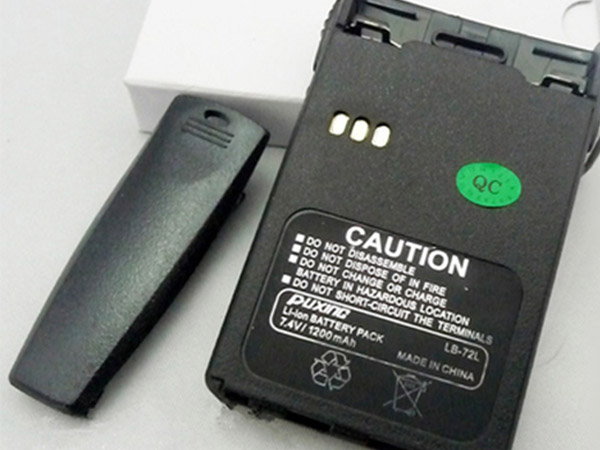
    PUXING PB-72L battery


    (product code: PB-72L) 

    (Usually ships the same business day!)

      Product details:

    • Brand: PUXING PB-72L Economic batteries

    • Type: Li-ion battery

    • Voltage: 7.4V

    • Capacity: 1800MAH

    • SKU: ECN10616_Ca_Oth

    Replace the following batteries:

    PB-72L

    Compatible with the following models:

    For PUXING PX-777 PX-888 3288s PX-UV9R XJ-928 VEV-3288S

    We ship to the Economic battery around Globe [USA, Canada, UK, NZ and Ireland, Australia]. View more Economic battery. Contact with us if any problem on selecting power Economic battery.

    PUXING PB-72L Features:
    All our high quality PUXING PB-72L replacement Economic battery have been tested and proven to match and / or match the performance of the original PUXING Economic battery and are 100% compatible with the original manufacturer's specifications. This PUXING PB-72L Economic battery comes with a 1-year limited warranty.
    Thank you for purchasing this high quality PUXING PB-72L replacement Economic battery. We have a rigorous testing process to ensure that your ordered products (like this Economic battery for PUXING PB-72L) are functionally correct before being packaged and sent to you. And before placing an order, make sure that your old original part number of the PUXING PB-72L Economic battery is listed below and that the shape is identical to the images in our Economic battery.

    Wholesale and retail Economic battery in NZ. Replacement for Acer,Apple, Compaq,Dell, FUJITSU, IBM,Lenovo,Sony and so on.

    Extend Economic battery PUXING PB-72L Service life

    1. Charge the battery! Consider keeping it plugged in for 12 hours before you unplug.
    2. Switch on the optimized battery or power feature. You'll find this option — sometimes referred to as max battery mode — in your laptop system's built-in power management control panel. You can select the option to reduce the amount of time your inactive laptop stays on before powering itself down and going to sleep.
    3. Remove the battery and clean the metal contacts. Wipe them with alcohol, ideally every two months, to ensure that the power transfer between the laptop and its battery is as efficient as possible. Allow the battery to dry thoroughly before replacing it! 
    4. Unplug any laptop accessories you aren't using. Even if they're not in use, accessories drain power from the battery.

    ABOUT US

    www.notebookbattery.co.nz was established to serve the needs of laptop users, and today we are one of the top e-retailers. Get a great deal on electronics when you shop on www.notebookbattery.co.nz. Choose an iPad, TV or laptop, headphones, PS4, Xbox One and more. Offers on mobile phones and cameras.

    Warm reminder!

    Before using the PUXING PB-72L battery, be sure to read the instructions to avoid danger during use. Here, we provide you with some tips for using this product.

      Top tips for extending the DELL T2JX4 battery life of your laptop:

    • 1. Dim your screen

    • 2. Change power settings

    • 3. Switch off Wi-Fi

    • 4. Turn off peripherals

    • 5. Eject your disc drives

    • 6. Invest in some hardware

    • 7. Disable features

    • 8. Battery care

    http://www.notebookbattery.co.nz/laptop-batteies-puxing/replace-battery-pb-72l-b179864.htm 

    These may be you want to look for :

    HB386280ECW battery replace for HuaWei P10 VTR-AL00

    L13D1P32 battery replace for Lenovo Ideapad A8-50 A5500

    63FK6 battery replace for Dell XPS 18 1810 1820

    BL-T24 battery replace for LG X Power K220 LS755 BL-T24

    DV9NT battery replace for Dell LATITUDE 15 3520 E5480 5480 5580 3520 notebook

  • Long Lasting Marantz FNB-110Li Replacement Economic battery

    Jingle Bells! Jingle Bells!Merry Christmas!Marantz FNB-110Li batteries 1140MAH/8.5WH 7.4V Li-ion-battery.

    Strict quality control, safe and stable!↘

    Low price, affordable and reliable! 100% compatible with the original battery and perfectly used for the original power adapter. 1-year warranty and 30 days money back guarantee!

    MARANTZ FNB-110Li Economic battery

    Marantz FNB-110Li battery


    (product code: FNB-110Li) 

    (Usually ships the same business day!)

      Product details:

    • Brand: Marantz FNB-110Li Economic batteries

    • Type: Li-ion battery

    • Voltage: 7.4V

    • Capacity: 1140MAH/8.5WH

    • SKU: ECN10617_Ca_Oth

    Replace the following batteries:

    FNB-110Li

    Compatible with the following models:

    For Marantz STANDARD HORIZON HX290 HX290S

    We ship to the Economic battery around Globe [USA, Canada, UK, NZ and Ireland, Australia]. View more Economic battery. Contact with us if any problem on selecting power Economic battery.

    Marantz FNB-110Li Features:
    All our high quality Marantz FNB-110Li replacement Economic battery have been tested and proven to match and / or match the performance of the original Marantz Economic battery and are 100% compatible with the original manufacturer's specifications. This Marantz FNB-110Li Economic battery comes with a 1-year limited warranty.
    Thank you for purchasing this high quality Marantz FNB-110Li replacement Economic battery. We have a rigorous testing process to ensure that your ordered products (like this Economic battery for Marantz FNB-110Li) are functionally correct before being packaged and sent to you. And before placing an order, make sure that your old original part number of the Marantz FNB-110Li Economic battery is listed below and that the shape is identical to the images in our Economic battery.

    Wholesale and retail Economic battery in NZ. Replacement for Acer,Apple, Compaq,Dell, FUJITSU, IBM,Lenovo,Sony and so on.

    Extend Economic battery Marantz FNB-110Li Service life

    1. Charge the battery! Consider keeping it plugged in for 12 hours before you unplug.
    2. Switch on the optimized battery or power feature. You'll find this option — sometimes referred to as max battery mode — in your laptop system's built-in power management control panel. You can select the option to reduce the amount of time your inactive laptop stays on before powering itself down and going to sleep.
    3. Remove the battery and clean the metal contacts. Wipe them with alcohol, ideally every two months, to ensure that the power transfer between the laptop and its battery is as efficient as possible. Allow the battery to dry thoroughly before replacing it! 
    4. Unplug any laptop accessories you aren't using. Even if they're not in use, accessories drain power from the battery.

    ABOUT US

    www.notebookbattery.co.nz was established to serve the needs of laptop users, and today we are one of the top e-retailers. Get a great deal on electronics when you shop on www.notebookbattery.co.nz. Choose an iPad, TV or laptop, headphones, PS4, Xbox One and more. Offers on mobile phones and cameras.

    Warm reminder!

    Before using the Marantz FNB-110Li battery, be sure to read the instructions to avoid danger during use. Here, we provide you with some tips for using this product.

      Top tips for extending the DELL T2JX4 battery life of your laptop:

    • 1. Dim your screen

    • 2. Change power settings

    • 3. Switch off Wi-Fi

    • 4. Turn off peripherals

    • 5. Eject your disc drives

    • 6. Invest in some hardware

    • 7. Disable features

    • 8. Battery care

    http://www.notebookbattery.co.nz/laptop-batteies-marantz/replace-battery-fnb-110li-b179865.htm 

    These may be you want to look for :

    A1389 battery replace for iPad3 ipad4 iPad 3 3rd ipad 4 11560mAh

    VGP-BPS37 battery replace for Sony Vaio Pro11 Ultrabook 11.6 (Svp11216cw/s)

    AC14B8K battery replace for Acer Aspire V3-371 V3-111 ES1-511 E5-771G P276 B115-M

    PA5209U-1BRS battery replace for Toshiba Radius 11.6 L15W-B1302

    088796 battery replace for Bose Soundlink Mini 2 Pack

  • Store battery power

    You can manually change the power consumption of your computer and save battery power.

    Reduce the number of open applications. Even if the application window is minimized, each open software application uses memory and power. Turn off the software application to conserve battery power.

    Reduce the screen brightness to the minimum required for reading. Use the function keys or the Windows screen settings to adjust the brightness.

    When not in use, disconnect the peripheral device. External hard drives and other peripherals consume battery even when not in use. Disconnect them after use.

    Reduce processor speed. The faster a computer works, the faster it consumes the battery. You can extend battery life by reducing processor speed.

    Turn off the wireless feature. The wireless connection consumes the battery. Turn off wireless when not needed. Press the wireless switch button to turn off the wireless function and its indicator.

    Change the power saving settings. Select Power Management recommendations to save battery power.

  • Laptop battery capacity and performance

    The performance and capacity of laptop batteries have decreased over time. In addition, the way the battery is used daily may interfere with these attributes.

    Many factors can promote battery performance:

    The battery unit experiences a gradual and irreversible capacity loss in each charge-discharge cycle.

    Temperature and discharge can affect battery performance and capacity.

    The battery capacity may be reduced even if the computer has been unplugged from the power source and is not being used.

    If not used for a long time, the battery will drop below the recommended low voltage level. Discharging the battery below the recommended low voltage level can cause physical damage to the battery and render it unusable.

    Note: If the battery cannot be recovered after 30-60 minutes of charging, it is likely to cause physical damage and must be replaced.

    Keeping the battery high for a long time in a high-temperature environment will accelerate the loss of capacity and performance. The computer generates heat due to high load or poor ventilation. This temporarily impairs the speed of charging and battery consumption. When the battery is cooled to an acceptable operating temperature, the battery function resumes normal operation.

    In order to maintain battery capacity, laptop batteries are designed to discharge a small amount after being fully charged. For most laptop batteries, this behavior is normal. Once the charge level is below 95%, the battery will start charging.

    Use high-definition graphics or video processing software to accelerate the loss of capacity and performance. For example, using a 3D game will reduce capacity faster than a word processor.

    Laptop configuration and power saving settings can affect battery performance. These settings are:

    Screen brightness

    Backlit keyboard

    Screen Resolution

    Windows energy saving combination

    Processor speed

    Storage type, such as storage device

  • Battery storage recommendations (for business laptops only)

    After the computer has been active for several months, the battery may reach a critical charge level and cannot be charged. This is a battery safety feature.

    Most HP business notebooks use transfer mode to reduce battery consumption. The transfer mode allows the battery to remain active longer than the computer remains off. However, the transfer mode is excited when the computer is first turned on. If you are not going to use your computer for a long time, such as during school holidays or for commercial purposes, put your computer in transport mode and then set it aside.

    Note: Not all business notebooks support transfer mode. Please refer to the User Guide to determine if your computer supports this feature.

    Before activating the battery transfer mode, follow these steps:

    Update your computer’s BIOS to the latest version. For more information, see Updating the BIOS.

    Make sure the battery is charged to 80-90% capacity.

    Select the appropriate method listed below to enable battery transfer mode.

    Set the transfer mode by turning off the computer with a series of buttons

    Set the transfer mode in the BIOS (F10)

    Set the transfer mode using the BIOS Configuration Utility (BCU)

    To exit the normal use transfer mode, connect your computer to the power source and press the power button to start the computer.

    Note: If you do not use your computer for an extended period of time, HP recommends that you check your computer every 3 months to check the battery level. If the battery charge is less than 50%, recharge it to 80-90% and repeat the above steps to re-enter the computer into transport mode.

  • Change power plan to meet performance needs

    A power plan is a combination of hardware and system settings that manage how your computer uses power. Choose from a preset power plan that can consume less energy, maximize performance, or balance. You can even create custom plans based on specific performance needs.

    In Windows, search for and open the Control Panel.

    Find the power supply and click Power Options.

    Turn on the power option in Windows

    Select an option in Select or Customize Power Plan.

    Choose energy-saving combination

    To customize the selected schedule, click Change Plan Settings and select Show and Pause settings when using the battery and connecting the power.

    Note: To set up a custom schedule, click Create Power Scheme in the list on the left side of the Power Options window and follow the instructions on the screen. This combination is displayed in the list of available energy savings combinations.

    To change other energy settings, click Change Advanced Power Settings.

     Change advanced power settings for more options

    Click the plus sign next to a component or feature to change the available settings, click Apply, and then click OK.

    Change advanced settings

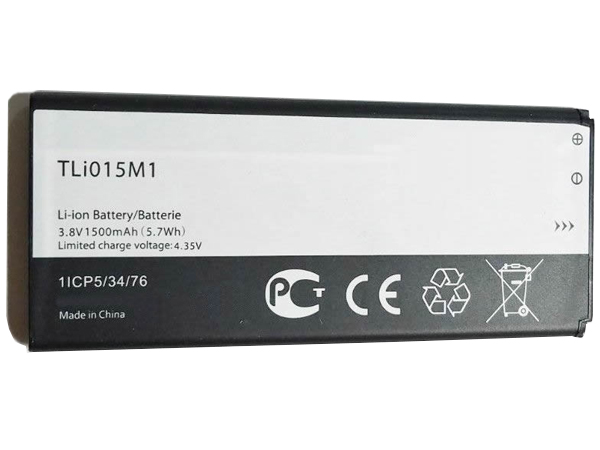
  • Alcatel TLi015M1 compatible with Alcatel One Touch Pixi 4 4034A Christmas Special!

    Jingle Bells! Jingle Bells!Merry Christmas!Alcatel TLi015M1 cell-phone battery 1500MAH/5.7Wh 3.8V Li-ion-battery.

    Strict quality control, safe and stable!↘

    Low price, affordable and reliable! 100% compatible with the original battery and perfectly used for the original power adapter. 1-year warranty and 30 days money back guarantee!

    ALCATEL TLi015M1 cell phone battery

    Alcatel TLi015M1 battery


    (product code: TLi015M1) 

    (Usually ships the same business day!)

      Product details:

    • Brand: Alcatel TLi015M1 Cell phone batteries

    • Type: Li-ion battery

    • Voltage: 3.8V

    • Capacity: 1500MAH/5.7Wh

    • SKU: ECN10367_Te

    Replace the following batteries:

    TLi015M1

    Compatible with the following models:

    Charge limit voltage: 4.35V
    Alcatel One Touch Pixi 4 4034A

    We ship to the cell phone battery around Globe [USA, Canada, UK, NZ and Ireland, Australia]. View more cell phone battery. Contact with us if any problem on selecting power cell phone battery.

    Alcatel TLi015M1 Features:
    All our high quality Alcatel TLi015M1 replacement cell phone battery have been tested and proven to match and / or match the performance of the original Alcatel cell phone battery and are 100% compatible with the original manufacturer's specifications. This Alcatel TLi015M1 cell phone battery comes with a 1-year limited warranty.
    Thank you for purchasing this high quality Alcatel TLi015M1 replacement cell phone battery. We have a rigorous testing process to ensure that your ordered products (like this cell phone battery for Alcatel TLi015M1) are functionally correct before being packaged and sent to you. And before placing an order, make sure that your old original part number of the Alcatel TLi015M1 cell phone battery is listed below and that the shape is identical to the images in our cell phone battery.

    Wholesale and retail cell phone battery in NZ. Replacement for Acer,Apple, Compaq,Dell, FUJITSU, IBM,Lenovo,Sony and so on.

    Extend cell phone battery Alcatel TLi015M1 Service life

    1. Charge the battery! Consider keeping it plugged in for 12 hours before you unplug.
    2. Switch on the optimized battery or power feature. You'll find this option — sometimes referred to as max battery mode — in your laptop system's built-in power management control panel. You can select the option to reduce the amount of time your inactive laptop stays on before powering itself down and going to sleep.
    3. Remove the battery and clean the metal contacts. Wipe them with alcohol, ideally every two months, to ensure that the power transfer between the laptop and its battery is as efficient as possible. Allow the battery to dry thoroughly before replacing it! 
    4. Unplug any laptop accessories you aren't using. Even if they're not in use, accessories drain power from the battery.

    ABOUT US

    www.notebookbattery.co.nz was established to serve the needs of laptop users, and today we are one of the top e-retailers. Get a great deal on electronics when you shop on www.notebookbattery.co.nz. Choose an iPad, TV or laptop, headphones, PS4, Xbox One and more. Offers on mobile phones and cameras.

    Warm reminder!

    Before using the Alcatel TLi015M1 battery, be sure to read the instructions to avoid danger during use. Here, we provide you with some tips for using this product.

      Top tips for extending the DELL T2JX4 battery life of your laptop:

    • 1. Dim your screen

    • 2. Change power settings

    • 3. Switch off Wi-Fi

    • 4. Turn off peripherals

    • 5. Eject your disc drives

    • 6. Invest in some hardware

    • 7. Disable features

    • 8. Battery care

    http://www.notebookbattery.co.nz/laptop-batteies-alcatel/replace-battery-tli015m1-b179438.htm 

    These may be you want to look for :

    A41N1421 battery replace for ASUS P2520LJ PU551LA ZX50JX4200 ZX50JX4720

    ZN08XL battery replace for HP 907584-850 907428-2C1

    BP3S3P2900-2 battery replace for Getac BP3S3P2900-2 cIndustrial grade

    BP-3L battery replace for NOKIA BP3L LUMIA 710 T-MOBILE 900 ATT 303 ASHA 603

    C31N1339 battery replace for Asus ZenBook UX303L Q302L

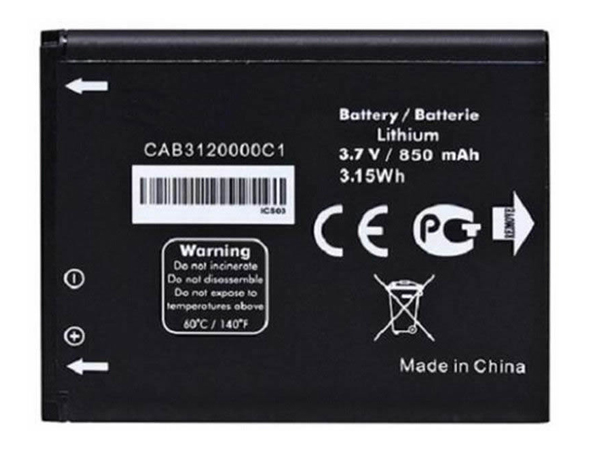
  • ALCATEL – Christmas Cheap Smartphone battery Replacement for CAB3120000C1

    Jingle Bells! Jingle Bells!Merry Christmas!ALCATEL CAB3120000C1 cell-phone battery 850mah/3.15Wh 3.7V Li-ion-battery.

    Strict quality control, safe and stable!↘

    Low price, affordable and reliable! 100% compatible with the original battery and perfectly used for the original power adapter. 1-year warranty and 30 days money back guarantee!

    ALCATEL CAB3120000C1 cell phone battery

    ALCATEL CAB3120000C1 battery


    (product code: CAB3120000C1) 

    (Usually ships the same business day!)

      Product details:

    • Brand: ALCATEL CAB3120000C1 Cell phone batteries

    • Type: Li-ion battery

    • Voltage: 3.7V

    • Capacity: 850mah/3.15Wh

    • SKU: ECN10368_Te

    Replace the following batteries:

    CAB3120000C1

    Compatible with the following models:

    ALCATEL 510A OT-800 OT-880a OT-710D 768T

    We ship to the cell phone battery around Globe [USA, Canada, UK, NZ and Ireland, Australia]. View more cell phone battery. Contact with us if any problem on selecting power cell phone battery.

    ALCATEL CAB3120000C1 Features:
    All our high quality ALCATEL CAB3120000C1 replacement cell phone battery have been tested and proven to match and / or match the performance of the original ALCATEL cell phone battery and are 100% compatible with the original manufacturer's specifications. This ALCATEL CAB3120000C1 cell phone battery comes with a 1-year limited warranty.
    Thank you for purchasing this high quality ALCATEL CAB3120000C1 replacement cell phone battery. We have a rigorous testing process to ensure that your ordered products (like this cell phone battery for ALCATEL CAB3120000C1) are functionally correct before being packaged and sent to you. And before placing an order, make sure that your old original part number of the ALCATEL CAB3120000C1 cell phone battery is listed below and that the shape is identical to the images in our cell phone battery.

    Wholesale and retail cell phone battery in NZ. Replacement for Acer,Apple, Compaq,Dell, FUJITSU, IBM,Lenovo,Sony and so on.

    Extend cell phone battery ALCATEL CAB3120000C1 Service life

    1. Charge the battery! Consider keeping it plugged in for 12 hours before you unplug.
    2. Switch on the optimized battery or power feature. You'll find this option — sometimes referred to as max battery mode — in your laptop system's built-in power management control panel. You can select the option to reduce the amount of time your inactive laptop stays on before powering itself down and going to sleep.
    3. Remove the battery and clean the metal contacts. Wipe them with alcohol, ideally every two months, to ensure that the power transfer between the laptop and its battery is as efficient as possible. Allow the battery to dry thoroughly before replacing it! 
    4. Unplug any laptop accessories you aren't using. Even if they're not in use, accessories drain power from the battery.

    ABOUT US

    www.notebookbattery.co.nz was established to serve the needs of laptop users, and today we are one of the top e-retailers. Get a great deal on electronics when you shop on www.notebookbattery.co.nz. Choose an iPad, TV or laptop, headphones, PS4, Xbox One and more. Offers on mobile phones and cameras.

    Warm reminder!

    Before using the ALCATEL CAB3120000C1 battery, be sure to read the instructions to avoid danger during use. Here, we provide you with some tips for using this product.

      Top tips for extending the DELL T2JX4 battery life of your laptop:

    • 1. Dim your screen

    • 2. Change power settings

    • 3. Switch off Wi-Fi

    • 4. Turn off peripherals

    • 5. Eject your disc drives

    • 6. Invest in some hardware

    • 7. Disable features

    • 8. Battery care

    http://www.notebookbattery.co.nz/laptop-batteies-alcatel/replace-battery-cab3120000c1-b179439.htm 

    These may be you want to look for :

    BP14-001180 battery replace for EIT 450-BTSC 143900055 Series

    0A36317 battery replace for Thinkpad X220 Tablet X220i Tablet X230 Tablet

    WX30 battery replace for Motorola Moto 360 1st Gen 2014 SNN5951A

    BL01100 battery replace for HTC A320 Desire C Golf One V a320e

    BR04XL battery replace for HP EliteBook 1020 G1

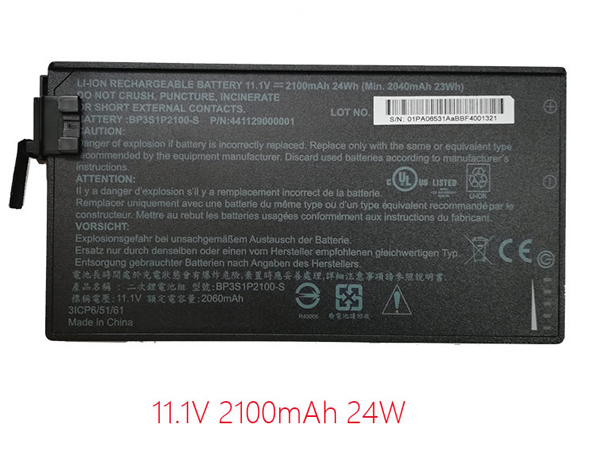
  • Discount Getac BP3S1P2100-S Notebook Battery [2100mAh/24Wh 11.1V ] Replacement

    Jingle Bells! Jingle Bells!Merry Christmas!Getac BP3S1P2100-S notebook batteries 2100mAh/24Wh 11.1V Li-ion-battery.

    Strict quality control, safe and stable!↘

    Low price, affordable and reliable! 100% compatible with the original battery and perfectly used for the original power adapter. 1-year warranty and 30 days money back guarantee!

    GETAC BP3S1P2100-S Notebook Battery

    Getac BP3S1P2100-S battery


    (product code: BP3S1P2100-S) 

    (Usually ships the same business day!)

      Product details:

    • Brand: Getac BP3S1P2100-S Notebook batteries

    • Type: Li-ion battery

    • Voltage: 11.1V

    • Capacity: 2100mAh/24Wh

    • SKU: GET3X006

    Replace the following batteries:

    BP3S1P2100-S BP3S1P2100 441129000001

    Compatible with the following models:

    Getac V110 Rugged Notebook

    We ship to the Notebook Battery around Globe [USA, Canada, UK, NZ and Ireland, Australia]. View more Notebook Battery. Contact with us if any problem on selecting power Notebook Battery.

    Getac BP3S1P2100-S Features:
    All our high quality Getac BP3S1P2100-S replacement Notebook Battery have been tested and proven to match and / or match the performance of the original Getac Notebook Battery and are 100% compatible with the original manufacturer's specifications. This Getac BP3S1P2100-S Notebook Battery comes with a 1-year limited warranty.
    Thank you for purchasing this high quality Getac BP3S1P2100-S replacement Notebook Battery. We have a rigorous testing process to ensure that your ordered products (like this Notebook Battery for Getac BP3S1P2100-S) are functionally correct before being packaged and sent to you. And before placing an order, make sure that your old original part number of the Getac BP3S1P2100-S Notebook Battery is listed below and that the shape is identical to the images in our Notebook Battery.

    Wholesale and retail Notebook Battery in NZ. Replacement for Acer,Apple, Compaq,Dell, FUJITSU, IBM,Lenovo,Sony and so on.

    Extend Notebook Battery Getac BP3S1P2100-S Service life

    1. Charge the battery! Consider keeping it plugged in for 12 hours before you unplug.
    2. Switch on the optimized battery or power feature. You'll find this option — sometimes referred to as max battery mode — in your laptop system's built-in power management control panel. You can select the option to reduce the amount of time your inactive laptop stays on before powering itself down and going to sleep.
    3. Remove the battery and clean the metal contacts. Wipe them with alcohol, ideally every two months, to ensure that the power transfer between the laptop and its battery is as efficient as possible. Allow the battery to dry thoroughly before replacing it! 
    4. Unplug any laptop accessories you aren't using. Even if they're not in use, accessories drain power from the battery.

    ABOUT US

    www.notebookbattery.co.nz was established to serve the needs of laptop users, and today we are one of the top e-retailers. Get a great deal on electronics when you shop on www.notebookbattery.co.nz. Choose an iPad, TV or laptop, headphones, PS4, Xbox One and more. Offers on mobile phones and cameras.

    Warm reminder!

    Before using the Getac BP3S1P2100-S battery, be sure to read the instructions to avoid danger during use. Here, we provide you with some tips for using this product.

      Top tips for extending the DELL T2JX4 battery life of your laptop:

    • 1. Dim your screen

    • 2. Change power settings

    • 3. Switch off Wi-Fi

    • 4. Turn off peripherals

    • 5. Eject your disc drives

    • 6. Invest in some hardware

    • 7. Disable features

    • 8. Battery care

    http://www.notebookbattery.co.nz/laptop-batteies-getac/replace-battery-bp3s1p2100-s-b179440.htm 

    These may be you want to look for :

    BTY-M47 battery replace for MSI GS40 GS43VR 6RE GS40 6QE

    BL-47TH battery replace for LG Optimus G Pro 2 LG-F350K F350S F350L D837

    HB442528EBC battery replace for Huawei Watch 1ICP5/25/28

    UM09A51 battery replace for Acer Aspire One ZA3 ZG8 751h AO751 531

    L12M4P21 battery replace for Lenovo Yoga 2 Pro 13 Y50-70AS-ISE 21CP5/57/128-2

  • The reason for laptop battery loss

    1, the battery itself is of poor quality

    2, use inferior charger

    3, long time operation in high temperature or low temperature environment

    4. The battery is connected to high-load peripherals, and the plugging and unplugging is not standardized.

    5, excessive charge and discharge (the battery used to the remaining power is less than 3%). The circuit is protected, but it happens occasionally.

    6, not fully charged and discharged (not used up and refill, but want to use it, want to charge it)

    7. Long-term use of batteries in strong electromagnetic radiation (which will interfere with the conductivity of the metal inside the battery)

    8. Use the battery under wet conditions for a long time (the wet battery will have lower performance)